Welcome to TiCon REST-API
0 Introduction
This document provides the information you need to get started with the TiCon REST-API.
The first chapters show how to read element data from TiCon and how to create and update supported elements. Later chapters explain the data model, query concepts, authorization, filtering, expansion, and additional endpoints in more detail.
The examples use placeholders such as {{ServerAddress}}, {{FOLDER_UID}}, and {{ELEMENT_UID}}. Replace these placeholders with values from your TiCon system.
1 Reading data from TiCon
1.1 Version information
This is the simplest call, that also does not require authorization, to get details about the TiCon REST-API version.
{{ServerAddress}}/ticon-web/services/management/version
Returns
Details about current TiCon REST-API version and used TiCon4 database version. If there is an error while connection to the database, the error message will appear here, a detailed message can be obtained from Azure insight or Windows Event viewer.
{
  "serverTime": "2023-11-27T08:59:45Z",
  "version": {
    "apiVersion": "4.08.09.1977 [.NETCoreApp,Version=v6.0]",
    "dbVersion": "TiCon408Praes [4.08.06.0007]"
  }
}
1.2 Configuration information
This is the simplest call, that also does not require authorization, to get details about the TiCon REST-API configuration.
{{ServerAddress}}/ticon-web/services/management/configuration
Returns
Details about current TiCon REST-API configuration.
{
  "serverTime": "2023-11-27T09:28:51Z",
  "configuration": {
    "sqlConnectionTimeout": "15",
    "sqlCommandTimeoutInSeconds": "30",
    "sqlConfiguration": [
      {
        "key": "DataSource",
        "value": "(LocalDB)\\MSSQLLocalDB"
      },
      {
        "key": "ApplicationName",
        "value": "TiCon4"
      },
      {
        "key": "InitialCatalog",
        "value": "TiCon407"
      },
      {
        "key": "AttachDBFilename",
        "value": "C:\\ProgramData\\MTM\\TiCon 4.07\\db\\TiCon4.mdf"
      }
    ]
  }
}
Remarks
You can configure the SQL command timeout, if it is necessary, e.g. if you get a SQL Client timeout exception. Beware this parameter is not the SQL connection timeout value! Edit the SqlCommandTimeoutInSeconds option in the appsettings.json file, don't forget to restart your service, after you change the value.
The REST implementation is selected globally with RestApi:Behavior in appsettings.json. native is the default and is also used when the setting is omitted. legacy is intended only as a temporary compatibility and diagnostic fallback. The behavior is server-wide; clients do not need to add or change a query parameter in their REST URLs. Restart the service after changing the setting.
Use the native implementation for normal operation:
{
  "RestApi": {
    "Behavior": "native"
  }
}
To temporarily compare a reported problem with the previous implementation, set the behavior to legacy and restart the service:
{
  "RestApi": {
    "Behavior": "legacy"
  }
}
Only native and legacy are valid values. The switch is intended for server-side compatibility and diagnostics; it is not a client-facing API option.
Remarks
RestApi:Behavior is a temporary compatibility setting and should not be considered part of the permanent configuration contract. We reserve the right to remove this setting in a future version without prior notice.
1.3 Languages
This call needs also no authorization, to get information about all languages.
{{ServerAddress}}/ticon-web/services/management/languages
Returns
A list of all installed languages in the TiCon4 database. If you use the parameter lang, you can use one displayed language to get all texts in this specific language.
{
  "serverTime": "2023-11-27T09:28:51Z",
  "languages": [
    {
      "languageCode": "de",
      "languageDescription": "Deutsch",
      "countryCode": "DE",
      "countryDescription": "Deutschland"
    },
    {
      "languageCode": "en",
      "languageDescription": "English",
      "countryCode": "US",
      "countryDescription": "United States"
    }
  ]
}
1.3.1 Language selection when saving texts (native REST API)
In native POST and PATCH operations, each LocaleText field controls its own source language.
An explicitly supplied language has priority over the request culture, even when other
fields of the same object use different languages:
{
  "description": { "language": "en-US", "text": "Machine starts" },
  "checkPoint": { "language": "de-DE", "text": "Maschine prüfen" }
}
If language is omitted (or is null/empty), the effective REST request culture applies,
selected through ?lang= or Accept-Language. The response language is selected
independently; isSource depends on the stored source language of each field.
Explicit language codes must correspond to an installed TiCon4 language. Unsupported codes,
including und, are rejected with HTTP 400 (InvalidLocaleTextLanguage). There is no
best-match fallback to another installed language.
The element configuration determines text storage: a language-neutral configuration stores
one row (LanguageId = 100) while each text property retains its actual
*SourceLanguageId. Non-neutral configurations use the installed language rows and
TiCon4's existing translation/update modes, including translator permissions.
Only the native saver uses these rules; legacy/AutoMapper saves are unchanged.
If an existing text collection is incomplete and lacks the row for an otherwise valid
installed language, saving returns HTTP 409 (MissingLocaleTextRow, with property
and languageId). Empty text collections are initialized using the TiCon4 language
configuration. The API does not silently add individual rows to a partially populated
collection, because doing so could invent incorrect source-language metadata.
For native SaveAs, source-language information is carried across using TiCon4's actual source/clone mapping, not by searching arbitrary loaded navigation graphs. Each registered text collection on an entity included in the clone mapping must have its corresponding cloned text rows; otherwise SaveAs fails before applying the new language plan. Registrations belonging to other batch entities or intentionally excluded children are not transferred. Neither behavior changes TiCon4 desktop saves.
1.4 Time elements
To retrieve basic data for Time Elements, also known as analyses, you can use the following call:
{{ServerAddress}}/ticon-web/services/data/time-elements?code={{code}}&lang=en-US&$expand=description,times,elementType($expand=description),elementStatus($expand=description),structure($expand=description,element($expand=times),criterion($expand=description)),defaultCriterion($expand=description)
The table below lists where to find the data numbered in the TiCon screenshot.
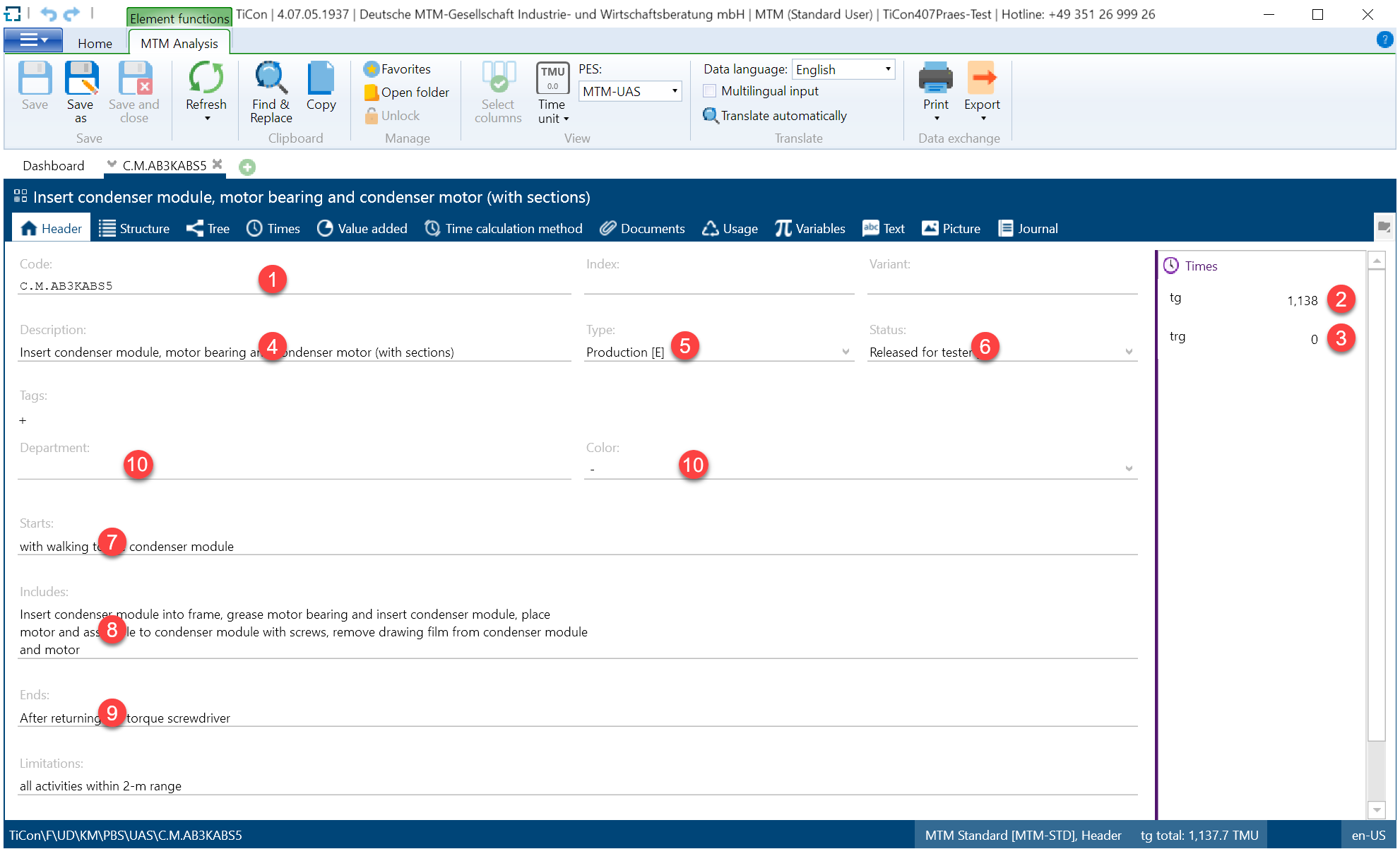
| No. | Content | Property Name and Remarks |
|---|---|---|
| 1 | Code of time element | entities[0].code |
| 2 | Basic time of element | entities[0].times.tg |
| 3 | Other times of element | entities[0].times.XXX |
| 4 | Description of element | entities[0].description.text |
| 5 | Type of element | Search for entities[0].elementTypeUid in expanded[] (expanded[x].uid = elementTypeUid), then read expanded[x].code and expanded[x].description.text |
| 6 | Status of element | Search for entities[0].elementStatusUid search in expanded[] (expanded[x].uid = elementStatusUid), then expanded[x].code and expanded[x].description.text |
| 7 | Starts | entities[0].begin.text |
| 8 | Includes | entities[0].content.text |
| 9 | Ends | entities[0].end.text |
| 10 | Criterions of element | entities[0].criteria[].row.elementCriterionUid element criteria structure row (expanded[x].elementCriterionCode and expanded[x].(textValue or numberValue)) |
Remarks
A Time element can have a short code, entities[0].shortcode, depending on the chosen analysis method.
All displayed times in TiCon REST-API will be shown in TMU.
The URL above explicitly requests times, structure data and referenced entities. A bare Time Element GET does not return those calculated/expanded values. For a curated non-calculated profile, use $expand=defaultDetails; calculated time vectors still have to be requested explicitly.
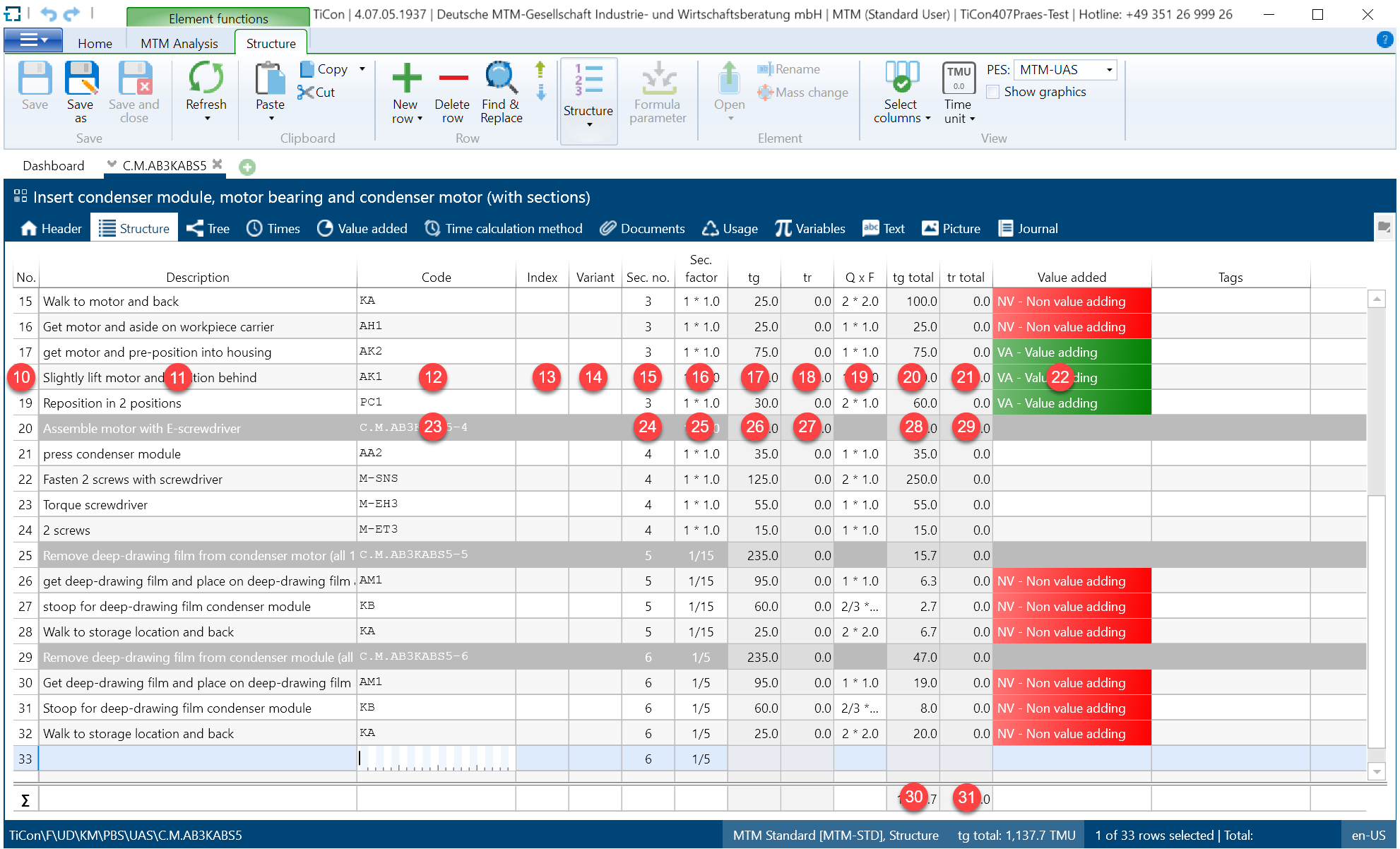
| No. | Content | Property Name and Remarks |
|---|---|---|
| 10 | Order number of structure row | entities[0].structure[].row.orderNumber |
| 11 | Description of usage | entities[0].structure[].row.description.text |
| 12 | Code of used element | Search for entities[0].structure[].row.elementUid in expanded[] (expanded[x].uid = structure[].row.elementUid), then read expanded[x].code |
| 13 | Index of used element | analogous to 12, then read expanded[x].index |
| 14 | Variant of used element | analogous to 12, then read expanded[x].variant |
| 15 | Section number | entities[0].structure[].row.sectionNumber |
| 16 | Section factor string | entities[0].structure[].row.sectionFactor |
| 17 | Basic time of used element | entities[0].structure[].row.times.tg |
| 18 | Setup time of used element | entities[0].structure[].row.times.tr |
| 19 | Factorstring of usage | use entities[0].structure[].row.factor for display (can be a formula) and entities[0].structure[].row.factorValue (is always a calculated number including the section factor and other factors) for calculations |
| 20 | Total basic time of used element | entities[0].structure[].row.totaltimes.tg |
| 21 | Total setup time of used element | entities[0}.structure[].row.totaltimes.tr |
| 22 | Indictors | Search for entities[0].structure[].row.criterionUids[0] in expanded (expanded[x].uid = structure[].row.criterionUids[0]), then read expanded[x].color for the color and expanded[x].code for the code |
| 23 | Code of sections | entities[0].code + "-" + entities[0].structure[].row.sectionNumber in expanded[] (expanded[x].uid = structure[].row.elementUid), then read expanded[x].code |
| 24 | Section number | entities[0].structure[].row.sectionNumber |
| 25 | Section factor string | entities[0].structure[].row.sectionFactor |
| 26 | Basic time of used elements in section | analogous to 17 |
| 27 | Setup time of used elements in section | analogous to 18 |
| 28 | Total basic time of section | analogous to 20 |
| 29 | Total setup time of section | analogous to 21 |
| 30 | Total basic time of whole structure | sum of all structure basic times |
| 31 | Total setup time of whole structure | sum of all structure setup times |
You will find three different types of lines: Section lines, Element lines and lines containing just a comment. These lines can be identified as follows:
- Element lines
structure[].row.rowType = "REFERENCE" and structure[].row.typeEnum = "Element" - Comment lines
structure[].row.rowType = "REFERENCE" and structure[].row.typeEnum = "Text" - Section lines
structure[].row.rowType = "SECTION_HEADER"
1.5 Detailed documentation
A detailed TiCon REST-API documentation with description of data schema and possible query parameters can be found here.
1.6 Filtering
The TiCon REST-API offers different ways to filter TiCon4 elements. The most common use case is searching by code, index and variant:
{{ServerAddress}}/ticon-web/services/data/time-elements?code={{code}}&index={{index}}&variant={{variant}}&lang=en-US&$expand=description
It is also possible to search TiCon4 elements by folder properties, like ID or path:
{{ServerAddress}}/ticon-web/services/data/time-elements?folderUids={{uid,uid}}&$expand=description,folder($expand=description)
{{ServerAddress}}/ticon-web/services/data/time-elements?folderpath={{path}}&$expand=description,folder($expand=description)
If you want to search recursive thru the folder path, add foldersrecursive=true to your parameters:
{{ServerAddress}}/ticon-web/services/data/time-elements?folderpath={{path}}&$expand=description,folder($expand=description)&foldersrecursive=true
It is not recommended to use folderUids and folderPath at the same time!
A most important use case is to search elements by their status. You can filter TiCon4 elements lower than a certain status lt, or by status greater than or equal, gte:
{{ServerAddress}}/ticon-web/services/data/time-elements?$expand=elementStatus&statuslt={{elementStatus}}
{{ServerAddress}}/ticon-web/services/data/time-elements?$expand=elementStatus&statusgte={{elementStatus}}
Elements can also be searched by their type. You can filter TiCon4 elements lower than a certain type lt, or by status greater than or equal, gte: Common types are E (execute = production), P (planning), C (calculation) and S (simulation) which are ordered by this given list. Both filters can be combined to find elements of a specific type. Eg. typeGte=E&typeLt=P will find only elements of type E.
{{ServerAddress}}/ticon-web/services/data/time-elements?$expand=elementStatus&typelt=P
{{ServerAddress}}/ticon-web/services/data/time-elements?$expand=elementStatus&typegte=P
The next section shows more examples of how you can filter in the TiCon REST-API.
{{ServerAddress}}/ticon-web/services/data/time-elements?$expand=description,elementConfiguration&ownercodes={{code}},{{code}}
{{ServerAddress}}/ticon-web/services/data/time-elements?$expand=description,elementConfiguration&owneruids={{uid}},{{uid}}
{{ServerAddress}}/ticon-web/services/data/time-elements?$expand=description,elementConfiguration&eccCodes={{code}},{{code}}
{{ServerAddress}}/ticon-web/services/data/time-elements?$expand=description,elementConfiguration&elementconfiguids={{uid}},{{uid}}
1.6.1 Joker characters
It is possible to use joker characters in filtering, e.g. as many or replace by one any character. Possible placeholders are
%,*Placeholders for many any characters_,?Placeholders for one any character
Joker characters only working, when *Wildcards parameter is set to true. At next some examples.
{{ServerAddress}}/ticon-web/services/data/time-elements?codeWildcards=true&code=3000K_.....5
{{ServerAddress}}/ticon-web/services/data/time-elements?codeWildcards=true&code=3000K*
{{ServerAddress}}/ticon-web/services/data/time-elements?codeWildcards=true&code=3000??.....5
1.7 Advanced search in TiCon REST-API
The TiCon REST-API offers an advanced search mechanism. To call the advanced searching, you have to use the following URL, it is necessary to create a search filter item as JSON in the request body and send it as POST to the server:
{{ServerAddress}}/ticon-web/services/data/search
{{ServerAddress}}/ticon-web/services/data/search?$expand=times&sortby=index,description desc
The default order behaviour of advanced search is Code, Index, Variant, but you can change this by set sortby keyword. If you want sort your results by ModifyUser.Code, you have to set the query parameter dueDate, see example.
{{ServerAddress}}/ticon-web/services/data/search?$expand=times&sortby=modifyuser.code,description desc&dueDate=2023-5-15
Caution: very complex filter configurations can cause connection timeouts!
Remarks
If the search JSON is not valid, the TiCon REST-API throws an exception.
Each new row is a or nexus.
If you want to show standard times or the descriptions, use the expand parameter, see chapter _6.5
1.7.1 Different filter types
The TiCon REST-API advanced search supports different filter types:
- MasterFilter
- TimeFilter
- TagFilter
- FolderFilter
- ElementCriteriaFilter
- CodeIndexVariantFilter
- IndicatorFilter
- EawsEvaluationFilter
- JournalFilter
- DescriptionFilter
- ElementTextsFilter
- ElementClassConfigurationFilter
- ElementTypeStatusFilter
- ShortCodeFilter
- DeletedFilter
- ReferenceFilter
- ValidityKeyFilter
- TextTabFilter
Every filter type has his own configuration framework. At first you have to set the filterType property, afterward defining the rows property, which can be very complex.
The filter types ElementTypStatusFilter, ShortCodeFilter and JournalFilter needs a special row, the searchpair row. This row is necessary for search pairs that are needed in the advanced search in TiCon4.
In the extended search you can use different value types, it depends on the filter type. The next table shows you what possibilities you have.
| String | Number | List | Date | Bool |
|---|---|---|---|---|
| Equals | Equals | Equals | Equals | Equals |
| Like | NotEquals | NotEquals | LessThan | NotEquals |
| NotLike | LessThan | GreaterThan | ||
| Contains | LessOrEquals | |||
| NotContains | GreaterOrEquals |
Remarks
When you use the DeletedFilter no other filter type is possible, otherwise the TiCon REST-API throws an exception.
1.7.1.1 MasterFilter
The behavior of the master filter is different from the other filter types. Only the stringValue and the language are allowed. In addition, there is a Property searchedField, which may have the following properties:
- MasterData - the string is searched in Code, Index, Variant and Description
- TimeData - the string is searched in Begin, Content, End and Limit of TimeElements and HWD-Elements
- All - is a combination of MasterData and TimeData
The compare operator is always contains, no other operators are valid. Wildcards are not allowed in this filter type and only one row is approved. The master filter can combined with the other filter types, please keep in mind, the logical operator between the other filter types and the master filter is always AND - (Code OR Index Or Variant OR Description) AND other filter type.
Examples:
[
  {
    "filterType": "masterfilter",
    "rows": [
      {
        "stringValue": "aufnehmen",
        "language": "de-DE",
        "searchedFields": "MasterData"
      }
    ]
  }
]
or
[
  {
    "filterType": "masterfilter",
    "rows": [
      {
        "stringValue": "leicht",
        "language": "de-DE",
        "searchedFields": "All"
      }
    ]
  },
  {
    "filterType": "codeindexvariantfilter",
    "rows": [
      {
        "code": "3000AA",
        "compareOperator": "contains"
      }
    ]
  }
]
The second example searches in Code OR Index OR Variant OR Description that contains the word leicht AND the Code contains 3000AA.
1.7.1.2 TimeFilter
In the TimeFilter the timeType and the numberValue are mandatory properties you have to set for filter to work. The timeType can have this options:
- TG
- TE
- TRG
- TR
Here a very simple example:
[
  {
    "filterType": "timefilter",
    "rows": [
      {
        "timetype": "tg",
        "compareoperator": "notequals",
        "numbervalue": 83.333333
      }
    ]
  }
]
1.7.1.3 TagFilter
The TagFilter expect no compare operator, it is always Equals. Code or Uid is mandatory, when both properties are given, the Uid is taken. Here is an simple example:
[
  {
    "filterType": "tagFilter",
    "rows": [
      {
        "code": "rd"
      },
      {
        "code": "gr"
      }
    ]
  }
]
1.7.1.4 FolderFilter
The FolderFilter expect no compare operator, it is always Equals.
Uid or Path is mandatory, when both properties are given, the Uid is taken. Keep in mind, when you add Code, you will get an exception. If you use the path property, the string is handle as SQL like, e.g. 'UD\HG' becomes 'UD\HG%'.
Optional you can set IncludeSubFolders property, to search also in the subfolders. Here is an simple example:
[
  {
    "filterType": "folderFilter",
    "rows": [
      {
        "path": "UD\\EAWS"
      }
    ]
  }
]
1.7.1.5 ElementCriteriaFilter
In the ElementCriteriaFilter the compare operator you can use, depends on the elementCriteriaType property, here the options you have for this property:
- String (
stringValueis mandatory) - List
- Date (
stringValueis mandatory, a valid date as string spelling) - Bool (
numberValueis optional, the value 0 or 1 is allowed) - Number (
numberValueis mandatory)
Code or Uid is mandatory, when both properties are given, the Uid is taken. If you use List as elementCriteriaType the property fixedCriterionValue is mandatory. Code or Uid is mandatory for this property. Here are some examples:
[
  {
    "filterType": "elementCriteriaFilter",
    "rows": [
      {
        "code": "bool.crit",
        "compareOperator": "equals",
        "elementCriteriaType": "bool",
        "numberValue": 0
      }
    ]
  }
]

[
  {
    "filterType": "elementCriteriaFilter",
    "rows": [
      {
        "code": "date",
        "compareOperator": "lessthan",
        "elementCriteriaType": "date",
        "stringValue": "2024-05-08"
      }
    ]
  }
]

[
  {
    "filterType": "elementCriteriaFilter",
    "rows": [
      {
        "code": "color",
        "compareOperator": "notequals",
        "elementCriteriaType": "list",
        "fixedcriterionvalue": {
          "code": "r"
        }
      }
    ]
  }
]
1.7.1.6 CodeIndexVariantFilter
The CodeIndexVariantFilter is a string value filter. Code or Index or Variant have to set or all properties together. Here a very simple example:
[
  {
    "filterType": "codeindexvariantfilter",
    "rows": [
      {
        "code": "3000AA1....5",
        "compareOperator": "equals"
      }
    ]
  }
]
1.7.1.7 IndicatorFilter
In the IndicatorFilter the properties IndicatorCriterion and Indicator are mandatory, Code or Uid is not optional, when both properties are given, the Uid is taken.
The IndicatorFilterType is deprecated and hence optional. If given, only the value Element is valid. To search for Indicators in the structure use the ReferenceFilter.
This filter finds all elements where the indicator is set in the element header. The IndicatorFilter is a List filter type, see table. Here is a example:
[
  {
    "filterType": "indicatorFilter",
    "rows": [
      {
        "compareOperator": "equals",
        "indicatorCriterion": {
          "code": "nv"
        },
        "indicator": {
          "code": "vaad"
        }
      }
    ]
  }
]
1.7.1.8 EawsEvaluationFilter
The EawsEvaluation is a number value filter, see table. The properties eawsEvaluationFilterType is mandatory. The eawsEvaluationFilterType can take this values:
- EvaluationState
- TotalScore
- WholeBodyScore
- PostureScore
- ForceScore
- LoadScore
- ExtraPointsScore
- UpperLimbsScore
- TotalFfg
- AwkwardPostureScore
- TotalFurtherFactorsScore
- TotalDurationScore
Here some very simple examples:
[
  {
    "filterType": "eawsEvaluationFilter",
    "rows": [
      {
        "eawsevaluationfiltertype": "totalscore",
        "compareoperator": "equals",
        "numbervalue": 2
      }
    ]
  }
]

[
  {
    "filterType": "eawsEvaluationFilter",
    "rows": [
      {
        "eawsevaluationfiltertype": "wholebodyscore",
        "compareoperator": "greaterthan",
        "numbervalue": 5
      },
      {
        "eawsevaluationfiltertype": "totalDurationScore",
        "compareoperator": "lessthan",
        "numbervalue": 10
      }
    ]
  }
]
The EvaluationState filter allows you to search for valid, invalid and non-calculated EAWS evaluations.
For valid evaluations use this filter
[
  {
    "filterType": "eawsEvaluationFilter",
    "rows": [
      {
        "eawsevaluationfiltertype": "evaluationState",
        "eawsevaluationstate": "valid"
      }
    ]
  }
]
For invalid evaluations use this filter
[
  {
    "filterType": "eawsEvaluationFilter",
    "rows": [
      {
        "eawsevaluationfiltertype": "evaluationState",
        "eawsevaluationstate": "invalid"
      }
    ]
  }
]
For non-calculated evaluations use this filter
[
  {
    "filterType": "eawsEvaluationFilter",
    "rows": [
      {
        "eawsevaluationfiltertype": "evaluationState",
        "eawsevaluationstate": "notCalculated"
      }
    ]
  }
]
In combination with the other EAWS evaluation filter types, you can search for valid or invalid evaluations with specific scores.
[
  {
    "filterType": "eawsEvaluationFilter",
    "rows": [
      {
        "eawsevaluationfiltertype": "evaluationState",
        "eawsevaluationstate": "notcalculated"
      }
    ]
  },
  {
    "filterType": "eawsEvaluationFilter",
    "rows": [
      {
        "eawsevaluationfiltertype": "totalFfg",
        "numbervalue": 200,
        "compareOperator": "lessthan"
      }
    ]
  }
]

[
  {
    "filterType": "eawsEvaluationFilter",
    "rows": [
      {
        "eawsevaluationfiltertype": "evaluationState",
        "eawsevaluationstate": "notcalculated"
      },
      {
        "eawsevaluationfiltertype": "evaluationState",
        "eawsevaluationstate": "valid"
      }
    ]
  }
]
1.7.1.9 JournalFilter
The JournalFilter needs a searchpair row, because it needs two information to get the filter work, journalEntry and journalDate. When both properties are not set, the filter will be ignored.
The compare operators of journalEntry depends on the configured journalFilterType. The journalFilterType can take this values:
- None
- Owner
- Creator
- Changer
- ChangeCode
- ChangeReason
- ChangeType
If you use Owner, Creator or Changer the compare operators Equals or NotEquals are possible. Code or Uid is mandatory, when both properties are given, the Uid is taken. If you use ChangeCode or ChangeReason all compare operators of string are possible, see table. StringValue is mandatory. If you use ChangeType you have to use JournalChangeType property, that can take this values:
- None
- IsCodeChanged
- IsDescriptionChanged
- IsStructureChanged
- IsTimeChanged
- IsTimeIndirectChanged
- IsDocumentChanged
- IsElementStatusChanged
- IsAssignmentStructureChanged
- IsValidityChanged
- IsEvaluationChanged
- IsBasicChanged
If you use None all given values are ignored!
Instead of supplying JournalChangeType you can use JournalChangeReason property, that can take this values:
- None
- Update
- Calculate
- CalculateErgonomics
- Duplicate
- Rename
- ElementClassConfigurationChange
- ValidationSet
- ValidationChange
- SaveAs
- Generate
- Delete
- OperationChange
- KvpSimulation
- KvpExecute
- ExchangeCode
- Overwrite
- Move
- Import
- CreatedFromStructure
- IndexAuto
- VariantAuto
- IndexVariantAuto
- Sync
- Copy
If you use None JournalChangeType will be used!
The journalDate is of type date, see table. This values are valid:
- None
- CreationDate
- ChangeDate
Here some very simple examples:
[
 {
   "filterType": "journalfilter",
   "rows": [
     {
       "searchpair": {
         "journalentry": {
           "journalfiltertype": "creator",
           "compareoperator": "equals",
           "code": "mtm"
         },
         "journaldate": {
           "journalfiltertype": "none"
         }
       }
     }
   ]
 }
]

[
 {
   "filterType": "journalfilter",
   "rows": [
     {
       "searchpair": {
         "journalentry": {
           "journalfiltertype": "owner",
           "compareoperator": "equals",
           "code": "mtm"
         },
         "journaldate": {
           "journalfiltertype": "changedate",
           "stringvalue": "2021-01-01",
           "compareoperator": "lessthan"
         }
       }
     }
   ]
 }
]

[
 {
   "filterType": "journalfilter",
   "rows": [
     {
       "searchpair": {
         "journalentry": {
           "journalfiltertype": "changetype",
           "compareoperator": "equals",
           "journalchangereason": "saveas"
         },
         "journaldate": {
           "journalfiltertype": "none"
         }
       }
     }
   ]
 }
]
1.7.1.10 DescriptionFilter
The DescriptionFilter is of type string, see table. StringValue is mandatory, the property Language is optional, when not set, it filters the description by the current language of the REST-API server. Here a very simple example:
[
  {
    "filterType": "descriptionfilter",
    "rows": [
      {
        "description": {
          "stringvalue": "aufnehmen",
          "language": "de-DE",
          "compareOperator": "notcontains"
        }
      }
    ]
  }
]
1.7.1.11 ElementTextsFilter
The ElementTextsFilter is of type string, see table. You can set the following values
- begin
- end
- limit
- content
Each block consists of the properties StringValue, is always mandatory, and Language, is optional. Here a simple example:
[
  {
    "filterType": "elementtextsfilter",
    "rows": [
      {
        "compareOperator": "contains",
        "begin": {
          "stringvalue": "schaufel ansetzen",
          "language": "de-DE"
        },
        "end": {
          "stringvalue": "teile ausgeschüttet",
          "language": "de-DE"
        }
      }
    ]
  }
]
1.7.1.12 ElementClassConfigurationFilter
The ElementClassConfigurationFilter expects only Code or Uid, when both properties are given, Uid is taken. The compare operator is optional and always Equals. Here a simple example:
[
  {
    "filterType": "elementClassConfigurationFilter",
    "rows": [
      {
        "code": "T.ST2"
      }
    ]
  }
]
1.7.1.13 ElementTypeStatusFilter
The ElementTypeStatusFilter needs a searchpair row, because it has two information for the filter, elementtype and elementstatus. When both properties are not set, the filter will be ignored.
If only one of elementtype or elementstatus is present the filter will only apply to type or status.
The compareOperator is mandatory. Either Code or Uid has to be supplied for elementtype and elementstatus.
Here some very simple examples:
[
  {
    "filterType": "elementtypestatusfilter",
    "rows": [
      {
        "searchpair": {
          "elementtype": {
            "code": "p",
            "compareOperator": "equals"
          },
          "elementstatus": {
            "code": "3",
            "compareOperator": "equals"
          }
        }
      }
    ]
  }
]

[
  {
    "filterType": "elementtypestatusfilter",
    "rows": [
      {
        "searchpair": {
          "elementstatus": {
            "code": "3",
            "compareOperator": "equals"
          }
        }
      }
    ]
  }
]

[
  {
    "filterType": "elementtypestatusfilter",
    "rows": [
      {
        "searchpair": {
          "elementtype": {
            "code": "p",
            "compareOperator": "equals"
          },
          "elementstatus": {
            "code": "3",
            "compareOperator": "equals"
          }
        }
      },
      {
        "searchpair": {
          "elementtype": {
            "code": "e",
            "compareOperator": "equals"
          },
          "elementstatus": {
            "code": "7",
            "compareOperator": "equals"
          }
        }
      }
    ]
  }
]
1.7.1.14 ShortCodeFilter
The ShortCodeFilter needs a searchpair row, because it needs two information to get the filter work, shortcode and analyzemethod. When both properties are not set, the filter will be ignored.
Shortcode is mandatory and of type string, see table. You must also set the Analyzemethod property. In this block Code or Uid is mandatory, when both properties are given, the Uid is taken. Analyzemethod is of type list, see table. Here is a simple example:
[
  {
    "filterType": "shortcodefilter",
    "rows": [
      {
        "searchPair": {
          "shortcode": "AHG02",
          "compareOperator": "like",
          "analyzeMethod": {
            "compareOperator": "notequals",
            "code": "mtm-1"
          }
        }
      }
    ]
  }
]
1.7.1.15 DeletedFilter
The DeleteFilter must set a deletedelement block. At first you have to set DeletedElementType property, this values are valid:
- Code (the compare operator is of type string)
- Index (the compare operator is of type string)
- Variant (the compare operator is of type string)
- FolderLabel (the compare operator is of type string)
- ElementClassConfigCode (the compare operator is of type string)
- AccountCode (the compare operator is of type string)
- DeletedAccountCode (the compare operator is of type string)
- ElementType (the compare operator is of type list)
- ElementStatus (the compare operator is of type list)
- Tg (the compare operator is of type number)
- Trg (the compare operator is of type number)
- Date (the compare operator is of type date)
If you want to search by Code, Index, Variant, FolderLabel, ElementClassConfigCode, AccountCode, DeletedAccountCode or Date the StringValue is mandatory. If you want to search by Tg or Trg the NumberValue is mandatory. You can only add one property per row!
Here some very simple examples:
[
  {
    "filterType": "deletedfilter",
    "rows": [
      {
        "deletedelement": {
          "deletedelementtype": "accountcode",
          "compareoperator": "equals",
          "stringvalue": "mtm"
        }
      }
    ]
  }
]

[
  {
    "filterType": "deletedfilter",
    "rows": [
      {
        "deletedelement": {
          "deletedelementtype": "code",
          "compareoperator": "notcontains",
          "stringvalue": "k"
        }
      }
    ]
  }
]
1.7.1.16 ReferenceFilter
The ReferenceFilter allows to search for properties of a structure row (row in short) of an element. The properties ReferenceType and ReferenceOperatorType must be set in any case. Depending on the value of ReferenceType there are more things to be aware of:
| ReferenceType | Operator | Value propert(ies) | Remarks |
|---|---|---|---|
| Count | Number | NumberValue | Total count of rows in the element. ReferenceOperatorType is not mandatory. |
| Description | String | StringValue, Language | Description of the row |
| Key | String | Code, Index, Variant | Code, Index, Variant of the row |
| Factor | String | StringValue | Factor of the row |
| Indicator | List | Indicator, IndicatorCriterion | Indicator of the row. See IndicatorFilter on how to fill the value properties. |
| Tag | List | Tag | Tag of the row. See TagFilter on how to fill the value property. |
For ReferenceOperatorType the following values are valid:
- AnyRow: An element is a hit if at least one structure row meets the filter criteria
- AllRows: An element is only a hit if all structure rows meet the filter criteria
- SameRow: Only valid from the second filter row onwards. Combines the filter of the row before with the current filter.
Here some examples:
[
  {
    "filterType": "referencefilter",
    "rows": [
      {
        "referenceType": "count",
        "numberValue": 10,
        "compareoperator": "greaterThan"
      }
    ]
  }
]

[
  {
    "filterType": "referencefilter",
    "rows": [
      {
        "referenceType": "description",
        "stringValue": "leicht",
        "language": "de-DE",
        "compareoperator": "contains"
      }
    ]
  }
]

[
  {
    "filterType": "referencefilter",
    "rows": [
      {
        "referenceType": "key",
        "code": "3000",
        "compareoperator": "contains"
      }
    ]
  }
]

[
  {
    "filterType": "referencefilter",
    "rows": [
      {
        "referenceType": "factor",
        "stringValue": "1 * 2",
        "compareoperator": "contains"
      }
    ]
  }
]

[
  {
    "filterType": "referencefilter",
    "rows": [
      {
        "referenceType": "indicator",
        "referenceOperatorType": "allRows",
        "compareOperator": "equals",
        "indicatorCriterion": {
          "code": "nv"
        },
        "indicator": {
          "code": "vaad"
        }
      }
    ]
  }
]

[
  {
    "filterType": "referencefilter",
    "rows": [
      {
        "referenceType": "tag",
        "compareOperator": "notEquals",
        "code": "GR"
      }
    ]
  }
]

[
  {
    "filterType": "referencefilter",
    "rows": [
      {
        "referenceType": "description",
        "referenceOperatorType": "anyRow",
        "stringValue": "leicht",
        "language": "de-DE",
        "compareoperator": "contains"
      },
      {
        "referenceOperatorType": "sameRow",
        "referenceType": "tag",
        "compareOperator": "equals",
        "code": "RD"
      }
    ]
  }
]
1.7.1.17 ValidityKeyFilter
The ValidityKeyFilter is of type string, see table. StringValue is mandatory. Here a very simple example:
[
  {
    "filterType": "validitykeyfilter",
    "rows": [
      {
        "stringvalue": "ABC",
        "compareOperator": "contains"
      }
    ]
  }
]
1.7.1.18 TextTabFilter
The TextTabFilter is of type string, see table. StringValue and TextTab are mandatory, the property Language is optional, when not set, it filters the description by the current language of the REST-API server. Here a very simple example:
[
  {
    "filterType": "texttabfilter",
    "rows": [
      {
        "text": {
          "stringvalue": "aufnehmen",
          "language": "de-DE",
          "texttab": 1,
          "compareOperator": "contains"
        }
      }
    ]
  }
]
1.7.2 Examples
1.7.2.1 Search by code, index, variant
To search by code, index and variant with wildcards, your mask in TiCon4 looks like the screenshot shows.
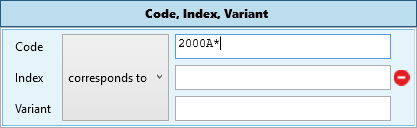
The corresponding JSON for the TiCon REST-API is very easy.
[
  {
    "filterType": "codeIndexVariantFilter",
    "rows": [
      {
        "code": "2000A*",
        "compareOperator": "Like"
      }
    ]
  }
]
When you add another row, your JSON looks as following:
[
  {
    "filterType": "codeIndexVariantFilter",
    "rows": [
      {
        "code": "2000A*",
        "compareOperator": "Like"
      },
      {
        "code": "AN",
        "index": "2",
        "compareOperator": "Equals"
      }
    ]
  }
]
Every new row in the filter definition is an OR nexus. When you add a new filterType with rows, it is an AND nexus.
1.7.2.2 Search by code or index or variant and description
If you want a filter to search by code 2000A* OR index OR variant AND a description contains "walk", the TiCon4 search mask looks as follows:
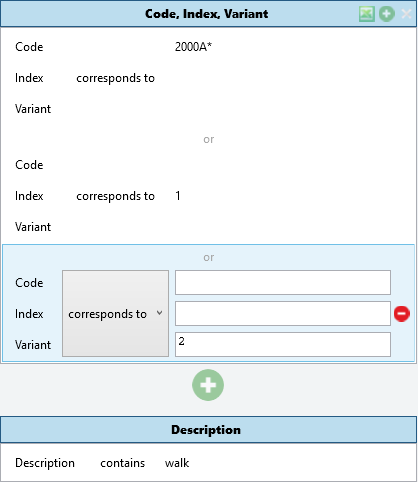
The TiCon REST-API JSON is the following:
[
  {
    "filterType": "codeIndexVariantFilter",
    "rows": [
      {
        "code": "2000A*",
        "compareOperator": "Like"
      },
      {
        "index": "1",
        "compareOperator": "Like"
      },
      {
        "variant": "2",
        "compareOperator": "Like"
      }
    ]
  },
  {
    "filterType": "descriptionFilter",
    "rows": [
      {
        "description": {
          "stringValue": "walk",
          "language": "en-US",
          "compareOperator": "Contains"
        }
      }
    ]
  }
]
1.7.2.3 Search by code or index or variant OR description
You can change the AND behavior in the upper example, by setting the andCompare property to false. To do that, add this keyword to the URL:
{{ServerAddress}}/ticon-web/services/data/search?$expand=times&sortby=modifyuser.code,description desc&dueDate=2023-5-15&andCompare=false
1.7.2.4 Search element type 'XY' in folder 'XX'
The next example looks like the screenshot below, it is a search by element type and folder.
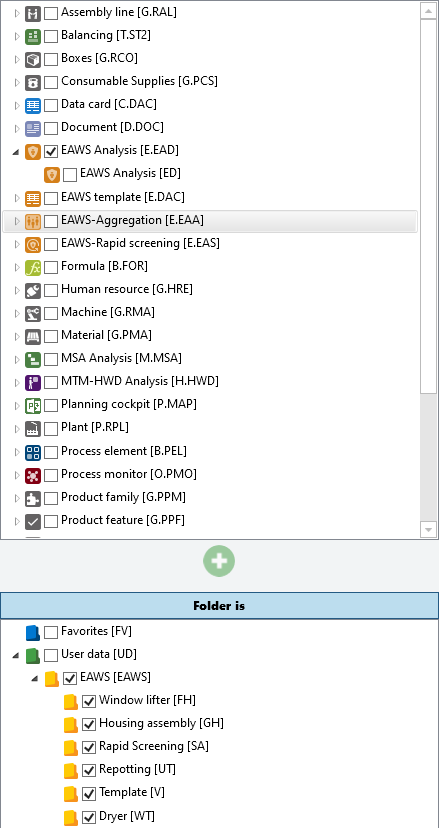
The user wants to search by an Element type of "E.EAD" in folders "EAWS", "FH", "GH", "SA", "UT", "V" and "WT". The following JSON definition is valid in this case.
[
  {
    "filterType": "elementClassConfigurationFilter",
    "rows": [
      {
        "code": "e.ead"
      }
    ]
  },
  {
    "filterType": "folderFilter",
    "rows": [
      {
        "uid": "Folder-25"
      },
      {
        "uid": "Folder-26"
      },
      {
        "path": "UD\\EAWS\\GH"
      },
      {
        "uid": "Folder-30"
      }
    ]
  }
]
1.7.2.5 Search element type 'XY' in folder 'XX' and change date 'xxxx-xx-xx'
You create the following search mask in TiCon4, the search parts are element type, folder and change information.
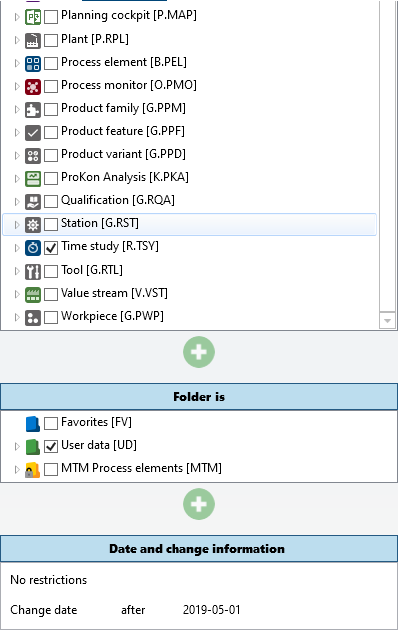
The JSON body for the TiCon REST-API is a bit complex, let's take a look.
[
  {
    "filterType": "ElementClassConfigurationFilter",
    "rows": [
      {
        "code": "R.TSY"
      }
    ]
  },
  {
    "filterType": "folderFilter",
    "rows": [
      {
        "code": "UD"
      }
    ]
  },
  {
    "filterType": "journalFilter",
    "rows": [
      {
        "searchPair": {
          "journalEntry": {
            "journalFilterType": "None"
          },
          "journalDate": {
            "stringValue": "2019-4-22",
            "compareOperator": "greaterThan",
            "journalFilterType": "changeDate"
          }
        }
      }
    ]
  }
]
Remarks
The search filter journalFilter needs a row pair, called searchPair. Inside this clause you have to define a journalEntry and a journalDate property. As you can see, you have to set the journalFilterType, here is a list of all possibilities.
- None
- Owner
- Creator
- Changer
- CreationDate
- ChangeDate
- ChangeCode
- ChangeReason
1.7.2.6 Search for elements in folder 'XY' with element criterion 'X'
In TiCon4 you have to create the following search mask, take a look at the screenshot.
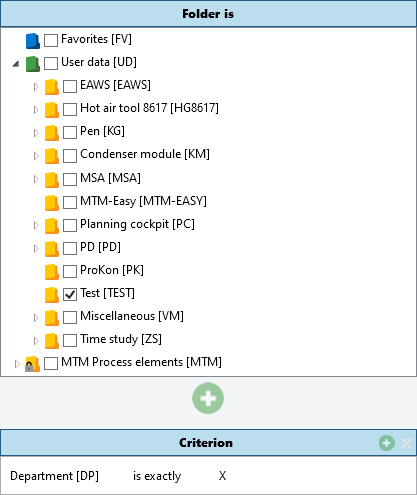
We will search for elements in folder "TEST" where the criterion Department is exactly "X". The TiCon REST-API JSON is as following:
[
  {
    "filterType": "folderFilter",
    "rows": [
      {
        "path": "UD\\TEST"
      }
    ]
  },
  {
    "filterType": "elementCriteriaFilter",
    "rows": [
      {
        "code": "dp",
        "compareOperator": "Equals",
        "elementCriteriaType": "String",
        "stringValue": "X"
      }
    ]
  }
]
Remarks
The elementCriteriaFilter needs an elementCriteriaType, because in the critias some different types exist.
- String
- Number
- Date
- List
- Bool
When the elementCriteriaType is a list value, the JSON looks like this.
{
  "filterType": "elementCriteriaFilter",
  "rows": [
    {
      "code": "GD",
      "compareOperator": "NotEquals",
      "elementCriteriaType": "List",
      "fixedCriterionValue": {
        "code": "m"
      }
    }
  ]
}
When you set a DateTime value, be careful, that it is in a valid writing form. The schema is always year-month-day hour:minute:second (yyyy-MM-dd hh:mm:ss), independently from locale language settings. All times are in GMT. Take a look:
{
  "filterType": "elementCriteriaFilter",
  "rows": [
    {
      "code": "DATE",
      "compareOperator": "LessThan",
      "elementCriteriaType": "Date",
      "stringValue": "2023-4-9"
    }
  ]
}
2 Writing data to TiCon
TiCon supports multilingual data. When writing text properties, always specify the intended language. You can set the leading/login language with the lang query parameter, for example:
{{ServerAddress}}/ticon-web/services/data/time-elements?lang=en-US
Alternatively, the first value in the Accept-Language header is used. If neither is supplied, the server operating system culture becomes the leading language. This can cause errors when that culture is not installed in TiCon.
The following endpoints have a native POST/PATCH save contract. An endpoint not listed here should not be assumed to support POST or PATCH; see its chapter for DELETE, duplicate, upload, or other operations.
| Endpoint | POST | PATCH | Remarks |
|---|---|---|---|
time-elements |
yes | yes | Full element contract including structure, texts, criteria, variables, formula values and documents |
time-study-elements |
yes | yes | Sections/cycles and multipart document upload are supported |
formula-elements |
yes | yes | Formula structure and formula values are supported |
eaws-detailed-elements |
yes | yes | EAWS structure is writable; calculated results are read-only |
document-elements |
yes | yes | Metadata and multipart binary upload are supported |
folders |
yes | yes | Folder type is create-time only; parent/path rules are validated by TiCon |
resource-station-elements |
yes | yes | Includes station assignment collections |
resource-operator-elements |
yes | yes | Includes qualifications |
resource-machine-elements |
yes | yes | Includes qualifications and tools |
resource-carrier-elements |
yes | yes | Common Resource contract |
resource-qualification-elements |
yes | yes | Common Resource contract |
resource-tool-elements |
yes | yes | Common Resource contract |
product-material-elements |
yes | yes | Common ProductItem contract |
product-consumable-supplies-elements |
yes | yes | Common ProductItem contract |
product-variant-elements |
yes | yes | Product family, generated definition updates and BOM assignments |
product-work-piece-elements |
yes | yes | BOM assignments through bomUnitList |
stream-elements |
no | yes | PATCH is limited to the documented basic/header properties |
account |
yes | yes | Local and Open ID account rules differ |
extraPoint-categories |
yes | yes | Definitions are written through the category structure |
2.1 General rules for POST and PATCH
Use POST to create new elements.
Use PATCH to update existing elements. A PATCH request must contain the uid of the element to update.
The request body is always a JSON array, so multiple elements can be processed in one request.
POST example
[
  {
    "code": "REST.EXAMPLE.1"
  },
  {
    "code": "REST.EXAMPLE.2"
  }
]
PATCH example
[
  {
    "uid": "Element-123456",
    "description": {
      "language": "en-US",
      "text": "Changed description"
    }
  }
]
For simple properties, PATCH uses partial-update semantics:
- Property omitted -> existing value remains unchanged
- Property supplied -> value is updated
- Nullable property supplied with
null-> value is cleared, where supported
For synchronized collections, the semantics are different:
As soon as a collection is present in a PATCH request, it represents the complete desired target state of that collection.
This applies, for example, to:
structuresectionsqualificationsbomUnitListdocumentsformulaValuesvariableValues- nested
additionalObjects - nested cycle collections
If the collection property is omitted, the collection remains unchanged.
If the collection is supplied as an empty array, all entries of that collection are removed.
{
  "structure": []
}
2.2 Collection identifiers
Many TiCon REST-API collections use objects with row and identifier.
{
  "identifier": "12345",
  "row": {
    "description": {
      "language": "en-US",
      "text": "Example"
    }
  }
}
The identifier is the persistent identifier of the collection entry. It is not the UID of the referenced TiCon element.
2.2.1 Keep an existing entry unchanged
{
  "identifier": "12345"
}
This keeps the existing entry in the collection without changing its row data.
2.2.2 Update an existing entry
{
  "identifier": "12345",
  "row": {
    "factor": "2"
  }
}
Only the supplied row properties are changed.
2.2.3 Create a new entry
A new collection entry does not require an identifier:
{
  "row": {
    "elementUid": "Element-100",
    "factor": "1"
  }
}
A temporary identifier can optionally be supplied:
{
  "identifier": "new-row-1",
  "row": {
    "elementUid": "Element-100",
    "factor": "1"
  }
}
Temporary identifiers are useful when a newly created entry must be referenced by another entry within the same request.
2.2.4 Identifier behavior summary
no identifier + row
    -> create

temporary identifier + row
    -> create

existing persistent positive identifier
    -> keep or update

unknown persistent positive identifier
    -> error

new/temporary identifier without row
    -> error
After saving, use the persistent identifiers returned by the server for subsequent PATCH requests.
2.3 Time elements
Endpoint:
{{ServerAddress}}/ticon-web/services/data/time-elements
2.3.1 Simple Time element POST
[
  {
    "code": "{{TIME_ELEMENT_CODE}}",
    "folderUid": "{{FOLDER_UID}}",
    "elementConfigurationUid": "{{TIME_ELEMENT_CONFIGURATION_UID}}",
    "elementStatusUid": "{{ELEMENT_STATUS_UID}}",
    "elementTypeUid": "{{ELEMENT_TYPE_UID}}",
    "description": {
      "language": "en-US",
      "text": "My time element"
    }
  }
]
Typical placeholders:
{{TIME_ELEMENT_CODE}}               -> REST.TIME.001
{{FOLDER_UID}}                      -> Folder-130
{{TIME_ELEMENT_CONFIGURATION_UID}}  -> ElementClassConfiguration-100013
{{ELEMENT_STATUS_UID}}              -> ElementStatus-3
{{ELEMENT_TYPE_UID}}                -> ElementType-1
2.3.2 Time element with text fields
[
  {
    "code": "{{TIME_ELEMENT_CODE}}",
    "folderUid": "{{FOLDER_UID}}",
    "elementConfigurationUid": "{{TIME_ELEMENT_CONFIGURATION_UID}}",
    "description": {
      "language": "en-US",
      "text": "Insert condenser module"
    },
    "begin": {
      "language": "en-US",
      "text": "Start with walking to the condenser module"
    },
    "content": {
      "language": "en-US",
      "text": "Insert condenser module into frame"
    },
    "end": {
      "language": "en-US",
      "text": "After returning the torque screwdriver"
    },
    "limit": {
      "language": "en-US",
      "text": "All activities within the defined work area"
    }
  }
]
2.3.3 Simple Time element PATCH
[
  {
    "uid": "{{TIME_ELEMENT_UID}}",
    "description": {
      "language": "en-US",
      "text": "Changed description"
    },
    "begin": {
      "language": "en-US",
      "text": "Changed start"
    },
    "content": {
      "language": "en-US",
      "text": "Changed work content"
    }
  }
]
Properties not included in the request remain unchanged.
2.3.4 Analyze method
Set an analyze method with analyzeMethodUid:
[
  {
    "uid": "{{TIME_ELEMENT_UID}}",
    "analyzeMethodUid": "{{ANALYZE_METHOD_UID}}"
  }
]
Remove the analyze method:
[
  {
    "uid": "{{TIME_ELEMENT_UID}}",
    "analyzeMethodUid": null
  }
]
The referenced analyze method must exist in the TiCon system.
2.3.5 Time element with structure
[
  {
    "code": "{{TIME_ELEMENT_CODE}}",
    "folderUid": "{{FOLDER_UID}}",
    "elementConfigurationUid": "{{TIME_ELEMENT_CONFIGURATION_UID}}",
    "elementStatusUid": "{{ELEMENT_STATUS_UID}}",
    "elementTypeUid": "{{ELEMENT_TYPE_UID}}",
    "description": {
      "language": "en-US",
      "text": "Time element with structure"
    },
    "structure": [
      {
        "row": {
          "elementUid": "{{CHILD_TIME_ELEMENT_UID}}",
          "factor": "1",
          "typeEnum": "Element",
          "description": {
            "language": "en-US",
            "text": "Used time element"
          },
          "rowType": "REFERENCE"
        }
      },
      {
        "row": {
          "factor": "1",
          "typeEnum": "Text",
          "description": {
            "language": "en-US",
            "text": "Comment"
          },
          "rowType": "COMMENT"
        }
      }
    ]
  }
]
New structure rows do not require an identifier.
2.3.6 Patch a structure
Assume the current structure contains the persistent identifiers 100, 101, and 102.
The following PATCH changes row 100, keeps 102, removes 101, and adds one new row:
[
  {
    "uid": "{{TIME_ELEMENT_UID}}",
    "structure": [
      {
        "identifier": "100",
        "row": {
          "factor": "2"
        }
      },
      {
        "identifier": "102"
      },
      {
        "row": {
          "elementUid": "{{NEW_CHILD_TIME_ELEMENT_UID}}",
          "factor": "1",
          "typeEnum": "Element",
          "rowType": "REFERENCE"
        }
      }
    ]
  }
]
2.3.7 Qualifications
A local qualification does not require elementUid:
{
  "identifier": "qualification-local",
  "row": {
    "description": {
      "language": "en-US",
      "text": "Local qualification"
    },
    "typeEnum": "ResourceQualification",
    "rowType": "ASSIGNMENTREFERENCE"
  }
}
A qualification based on an existing qualification element uses elementUid:
{
  "identifier": "qualification-global",
  "row": {
    "elementUid": "{{QUALIFICATION_ELEMENT_UID}}",
    "description": {
      "language": "en-US",
      "text": "Qualification"
    },
    "typeEnum": "ResourceQualification",
    "rowType": "ASSIGNMENTREFERENCE"
  }
}
The referenced element must be valid for use as a ResourceQualification.
2.3.8 Complex Time element with qualifications and additional objects
The following example creates two qualifications and immediately references them from structure rows in the same request.
[
  {
    "code": "{{TIME_ELEMENT_CODE}}",
    "folderUid": "{{FOLDER_UID}}",
    "elementConfigurationUid": "{{TIME_ELEMENT_CONFIGURATION_UID}}",
    "elementStatusUid": "{{ELEMENT_STATUS_UID}}",
    "elementTypeUid": "{{ELEMENT_TYPE_UID}}",
    "description": {
      "language": "en-US",
      "text": "Complex time element"
    },
    "qualifications": [
      {
        "identifier": "qualification-local",
        "row": {
          "description": {
            "language": "en-US",
            "text": "Local qualification"
          },
          "typeEnum": "ResourceQualification",
          "rowType": "ASSIGNMENTREFERENCE"
        }
      },
      {
        "identifier": "qualification-global",
        "row": {
          "elementUid": "{{QUALIFICATION_ELEMENT_UID}}",
          "description": {
            "language": "en-US",
            "text": "Global qualification"
          },
          "typeEnum": "ResourceQualification",
          "rowType": "ASSIGNMENTREFERENCE"
        }
      }
    ],
    "structure": [
      {
        "row": {
          "elementUid": "{{CHILD_TIME_ELEMENT_UID}}",
          "factor": "1",
          "typeEnum": "Element",
          "rowType": "REFERENCE",
          "description": {
            "language": "en-US",
            "text": "Work step 1"
          },
          "additionalObjects": [
            {
              "row": {
                "quantity": 1.0,
                "assignmentReferenceId": "qualification-local"
              }
            },
            {
              "row": {
                "quantity": 2.0,
                "assignmentReferenceId": "qualification-global"
              }
            }
          ]
        }
      },
      {
        "row": {
          "elementUid": "{{SECOND_CHILD_TIME_ELEMENT_UID}}",
          "factor": "1",
          "typeEnum": "Element",
          "rowType": "REFERENCE",
          "description": {
            "language": "en-US",
            "text": "Work step 2"
          }
        }
      }
    ]
  }
]
The strings qualification-local and qualification-global are temporary identifiers used only inside this request.
2.3.9 Formula values in Time element structure
If a structure row references a Formula element, formula parameter values can be supplied with formulaValues.
{
  "row": {
    "elementUid": "{{FORMULA_ELEMENT_UID}}",
    "factor": "1",
    "typeEnum": "FormulaElement",
    "rowType": "REFERENCE",
    "formulaValues": [
      {
        "row": {
          "orderNumber": 1,
          "calculation": "45"
        }
      }
    ]
  }
}
Patch an existing Formula structure row:
[
  {
    "uid": "{{TIME_ELEMENT_UID}}",
    "structure": [
      {
        "identifier": "{{FORMULA_STRUCTURE_IDENTIFIER}}",
        "row": {
          "formulaValues": [
            {
              "row": {
                "orderNumber": 1,
                "calculation": "60"
              }
            }
          ]
        }
      },
      {
        "identifier": "{{OTHER_STRUCTURE_IDENTIFIER}}"
      }
    ]
  }
]
The elementUid does not need to be sent again if the referenced Formula element is not changed.
Clear the formula values:
"formulaValues": []
2.3.10 Variables and formula values in the same PATCH
[
  {
    "uid": "{{TIME_ELEMENT_UID}}",
    "variables": [
      {
        "identifier": "variable-a",
        "row": {
          "code": "A",
          "value": 75
        }
      }
    ],
    "structure": [
      {
        "identifier": "{{FORMULA_STRUCTURE_IDENTIFIER}}",
        "row": {
          "formulaValues": [
            {
              "row": {
                "orderNumber": 1,
                "calculation": "A"
              }
            }
          ]
        }
      },
      {
        "identifier": "{{OTHER_STRUCTURE_IDENTIFIER}}"
      }
    ]
  }
]
2.3.11 Documents
URL documents can be attached to Time elements, Time study elements, Formula elements, and EAWS Detailed elements.
Example for a Time element:
[
  {
    "uid": "{{TIME_ELEMENT_UID}}",
    "documents": [
      {
        "identifier": "document-url",
        "row": {
          "description": {
            "language": "en-US",
            "text": "Work instruction"
          },
          "documentElement": {
            "code": "{{DOCUMENT_CODE}}",
            "sourceType": "Url",
            "path": "https://example.com/document",
            "language": "en-US"
          }
        }
      }
    ]
  }
]
Patch an existing document:
[
  {
    "uid": "{{TIME_ELEMENT_UID}}",
    "documents": [
      {
        "identifier": "{{DOCUMENT_REFERENCE_IDENTIFIER}}",
        "row": {
          "documentElement": {
            "path": "https://example.com/document-v2"
          }
        }
      }
    ]
  }
]
Remove all documents:
[
  {
    "uid": "{{TIME_ELEMENT_UID}}",
    "documents": []
  }
]
2.4 Time study elements
Endpoint:
{{ServerAddress}}/ticon-web/services/data/time-study-elements
GET examples
{{ServerAddress}}/ticon-web/services/data/time-study-elements?code={{TIME_STUDY_CODE}}
{{ServerAddress}}/ticon-web/services/data/time-study-elements?code={{TIME_STUDY_CODE}}&$expand=defaultDetails
{{ServerAddress}}/ticon-web/services/data/time-study-elements?uids={{TIME_STUDY_UID}}&$expand=description,sections($expand=description,checkPoint,cycleInformations($expand=description,additionalSections($expand=description)))
defaultDetails includes the shared BaseElement details, the Time study texts (begin, content, end, limit), Work Organization details (timeDeterminationMethod, workOrganization, workOrganizationBreakStructure, defaultCriterion, extraPoints) and sections with their inexpensive row details such as description, checkpoint, influence quantities, criteria and time type. Calculated root times / timeTgByCriterionUid, section times / totalTimes, section document references, cycleInformations and other public nodes that are not marked as details remain explicit expansions.
2.4.1 Simple Time study element POST
[
  {
    "code": "{{TIME_STUDY_CODE}}",
    "folderUid": "{{FOLDER_UID}}",
    "elementConfigurationUid": "{{TIME_STUDY_CONFIGURATION_UID}}",
    "elementStatusUid": "{{ELEMENT_STATUS_UID}}",
    "elementTypeUid": "{{ELEMENT_TYPE_UID}}",
    "description": {
      "language": "en-US",
      "text": "My time study"
    },
    "targetConfidenceInterval": 95.0
  }
]
2.4.2 Simple Time study element PATCH
[
  {
    "uid": "{{TIME_STUDY_UID}}",
    "description": {
      "language": "en-US",
      "text": "Changed time study"
    },
    "targetConfidenceInterval": 90.0,
    "content": {
      "language": "en-US",
      "text": "Changed work content"
    }
  }
]
2.4.3 Time study sections
New sections do not require an identifier.
"sections": [
  {
    "row": {
      "description": {
        "language": "en-US",
        "text": "Section 1"
      },
      "checkPoint": {
        "language": "en-US",
        "text": "Check point"
      },
      "factor": "1",
      "cycleSelectionType": "All"
    }
  }
]
2.4.4 Complex Time study element with sections and cycles
[
  {
    "code": "{{TIME_STUDY_CODE}}",
    "folderUid": "{{FOLDER_UID}}",
    "elementConfigurationUid": "{{TIME_STUDY_CONFIGURATION_UID}}",
    "elementStatusUid": "{{ELEMENT_STATUS_UID}}",
    "elementTypeUid": "{{ELEMENT_TYPE_UID}}",
    "description": {
      "language": "en-US",
      "text": "Time study with sections and cycles"
    },
    "targetConfidenceInterval": 95.0,
    "begin": {
      "language": "en-US",
      "text": "Start of observation"
    },
    "content": {
      "language": "en-US",
      "text": "Observe the work sequence"
    },
    "end": {
      "language": "en-US",
      "text": "End of observation"
    },
    "sections": [
      {
        "identifier": "section-1",
        "row": {
          "description": {
            "language": "en-US",
            "text": "Pick up material"
          },
          "checkPoint": {
            "language": "en-US",
            "text": "Material picked up"
          },
          "factor": "1",
          "cycleSelectionType": "All",
          "cycleInformations": [
            {
              "identifier": "cycle-1",
              "row": {
                "orderNumber": 1,
                "progressTime": 120.0,
                "performanceLevel": 100,
                "isActive": true,
                "isTimeDiscarded": false,
                "description": {
                  "language": "en-US",
                  "text": "Cycle 1"
                }
              }
            },
            {
              "identifier": "cycle-2",
              "row": {
                "orderNumber": 2,
                "progressTime": 245.0,
                "performanceLevel": 105,
                "isActive": true,
                "isTimeDiscarded": false,
                "description": {
                  "language": "en-US",
                  "text": "Cycle 2"
                }
              }
            }
          ]
        }
      },
      {
        "identifier": "section-2",
        "row": {
          "description": {
            "language": "en-US",
            "text": "Assemble component"
          },
          "checkPoint": {
            "language": "en-US",
            "text": "Component assembled"
          },
          "factor": "1",
          "cycleSelectionType": "All",
          "cycleInformations": [
            {
              "identifier": "cycle-1-section-2",
              "row": {
                "orderNumber": 1,
                "progressTime": 300.0,
                "performanceLevel": 100,
                "isActive": true,
                "isTimeDiscarded": false
              }
            },
            {
              "identifier": "cycle-2-section-2",
              "row": {
                "orderNumber": 2,
                "progressTime": 610.0,
                "performanceLevel": 100,
                "isActive": true,
                "isTimeDiscarded": false
              }
            }
          ]
        }
      }
    ]
  }
]
A cycle can also contain additional sections:
{
  "row": {
    "orderNumber": 1,
    "progressTime": 120.0,
    "performanceLevel": 100,
    "isActive": true,
    "additionalSections": [
      {
        "row": {
          "beginTime": 20.0,
          "endTime": 40.0,
          "description": {
            "language": "en-US",
            "text": "Interruption"
          }
        }
      }
    ]
  }
}
2.4.5 Complex Time study PATCH
Assume the server returned these persistent identifiers:
Section 1 -> 5001
Section 2 -> 5002
Cycle 1 in Section 1 -> 6001
Cycle 2 in Section 1 -> 6002
The following request updates Section 1 and Cycle 1, removes Cycle 2, and keeps Section 2 unchanged:
[
  {
    "uid": "{{TIME_STUDY_UID}}",
    "sections": [
      {
        "identifier": "5001",
        "row": {
          "description": {
            "language": "en-US",
            "text": "Pick up material - changed"
          },
          "cycleInformations": [
            {
              "identifier": "6001",
              "row": {
                "progressTime": 130.0,
                "performanceLevel": 105
              }
            }
          ]
        }
      },
      {
        "identifier": "5002"
      }
    ]
  }
]
Remove all sections:
[
  {
    "uid": "{{TIME_STUDY_UID}}",
    "sections": []
  }
]
2.5 Formula elements
Endpoint:
{{ServerAddress}}/ticon-web/services/data/formula-elements
Formula elements define a calculation and optional formula parameters. Formula parameters are stored in structure.
2.5.1 Reading Formula elements
Read Formula elements with the curated default profile:
{{ServerAddress}}/ticon-web/services/data/formula-elements?code={{FORMULA_CODE}}&$expand=defaultDetails
For Formula elements, defaultDetails includes the shared BaseElement details and content. The formula parameter structure is public but deliberately not part of defaultDetails; request it explicitly when parameter rows are needed.
Read Formula elements and their description only:
{{ServerAddress}}/ticon-web/services/data/formula-elements?$expand=description&code={{FORMULA_CODE}}
Read the formula together with its parameter structure:
{{ServerAddress}}/ticon-web/services/data/formula-elements?$expand=description,content,structure($expand=description)
Read formula indicators and parameter values:
{{ServerAddress}}/ticon-web/services/data/formula-elements?$expand=formulaCriterion($expand=description),description,structure($expand=description,variableValues($expand=description))
formulaCriterionUids is returned as a list of key/value pairs, for example:
"formulaCriterionUids": [
  {
    "key": "0",
    "value": "IndicatorCriterion-10000"
  },
  {
    "key": "1",
    "value": "IndicatorCriterion-10005"
  }
]
Calculated and read-only properties can be returned by GET but must not be sent as writable values in POST/PATCH requests.
2.5.2 Simple Formula element POST
[
  {
    "code": "{{FORMULA_CODE}}",
    "calculation": "PI * 3.043",
    "folderUid": "{{FOLDER_UID}}",
    "elementConfigurationUid": "{{FORMULA_CONFIGURATION_UID}}",
    "elementStatusUid": "{{ELEMENT_STATUS_UID}}",
    "elementTypeUid": "{{ELEMENT_TYPE_UID}}",
    "formulaType": "Time",
    "timeType": "Ttu",
    "courseOfTimeType": "Separate",
    "description": {
      "language": "en-US",
      "text": "My formula"
    }
  }
]
2.5.3 Formula parameters
Formula parameters are stored in structure.
A new parameter can be created with a temporary identifier:
{
  "identifier": "parameter-l",
  "row": {
    "variable": "L",
    "timeType": "Ttu",
    "parameterType": "Variable",
    "defaultInput": "2 * 1.0",
    "description": {
      "language": "en-US",
      "text": "Variable L"
    }
  }
}
If parameterType is omitted when a parameter is created, TiCon applies the default parameter type configured for the Formula element configuration. If parameterType is supplied, all type-dependent defaults are initialized for that effective type.
2.5.4 Complex Formula element POST
[
  {
    "code": "{{FORMULA_CODE}}",
    "calculation": "L * I",
    "folderUid": "{{FOLDER_UID}}",
    "elementConfigurationUid": "{{FORMULA_CONFIGURATION_UID}}",
    "elementStatusUid": "{{ELEMENT_STATUS_UID}}",
    "elementTypeUid": "{{ELEMENT_TYPE_UID}}",
    "formulaType": "Time",
    "timeType": "Ttu",
    "courseOfTimeType": "Separate",
    "description": {
      "language": "en-US",
      "text": "Formula with parameters"
    },
    "structure": [
      {
        "identifier": "parameter-l",
        "row": {
          "variable": "L",
          "timeType": "Ttu",
          "parameterType": "Variable",
          "defaultInput": "2 * 1.0",
          "description": {
            "language": "en-US",
            "text": "Variable L"
          }
        }
      },
      {
        "identifier": "parameter-i",
        "row": {
          "variable": "I",
          "timeType": "Ttu",
          "parameterType": "Variable",
          "min": 1,
          "max": 10,
          "description": {
            "language": "en-US",
            "text": "Variable I"
          }
        }
      }
    ]
  }
]
The formula must be valid after the complete request has been applied. For example, every variable used by calculation must still have a matching formula parameter.
2.5.5 Simple Formula element PATCH
Only supplied simple properties are changed. Omitted properties remain unchanged.
[
  {
    "uid": "{{FORMULA_ELEMENT_UID}}",
    "description": {
      "language": "en-US",
      "text": "Changed formula"
    },
    "calculation": "PI * 14"
  }
]
Writable text properties use the general PATCH text semantics. null, an empty string, or whitespace-only text removes the stored text.
2.5.6 Formula structure PATCH
When structure is present in a PATCH request, it represents the complete desired Formula parameter structure.
- omitted
structure-> structure remains unchanged structure: []-> remove all Formula parameters- existing persistent identifier -> keep/update that parameter
- omitted existing parameter -> delete it
- temporary identifier plus
row-> create a new parameter - request order determines
orderNumber
Example:
[
  {
    "uid": "{{FORMULA_ELEMENT_UID}}",
    "calculation": "L + I",
    "structure": [
      {
        "identifier": "{{PARAMETER_L_IDENTIFIER}}",
        "row": {
          "defaultInput": "4 * 1.5"
        }
      },
      {
        "identifier": "{{PARAMETER_I_IDENTIFIER}}",
        "row": {
          "min": 1,
          "max": 5
        }
      }
    ]
  }
]
Changing parameterType also updates or clears type-dependent properties that are no longer valid for the new parameter type. Explicit properties supplied in the same request take precedence over automatically applied defaults.
Example:
[
  {
    "uid": "{{FORMULA_ELEMENT_UID}}",
    "structure": [
      {
        "identifier": "{{PARAMETER_IDENTIFIER}}",
        "row": {
          "parameterType": "Text"
        }
      }
    ]
  }
]
Removing all parameters is allowed only if the resulting formula remains valid:
[
  {
    "uid": "{{FORMULA_ELEMENT_UID}}",
    "structure": []
  }
]
For example, if calculation still references variable A, removing the parameter A is rejected with a calculation/validation error.
If a Formula element is already in use, its parameter structure cannot be added to, deleted from, or reordered. Property updates on the existing parameter rows remain possible as long as the parameter identity and order do not change.
2.5.7 Formula indicator criteria
formulaCriterionUids uses the same key/value list representation as GET.
Set indicator slots:
[
  {
    "uid": "{{FORMULA_ELEMENT_UID}}",
    "formulaCriterionUids": [
      {
        "key": "0",
        "value": "IndicatorCriterion-10000"
      },
      {
        "key": "1",
        "value": "IndicatorCriterion-10005"
      }
    ]
  }
]
Set an indicator slot to NONE by supplying null as its value:
[
  {
    "uid": "{{FORMULA_ELEMENT_UID}}",
    "formulaCriterionUids": [
      {
        "key": "0",
        "value": "IndicatorCriterion-10000"
      },
      {
        "key": "1",
        "value": null
      }
    ]
  }
]
An unknown non-empty IndicatorCriterion UID is rejected.
2.5.8 Read-only and unsupported Formula properties
Some properties returned by GET are calculated or read-only and must not be written back unchanged.
In particular:
calculationPostFixis calculated fromcalculation.structure[].row.formulaValuesis read-only on the Formula element's own parameter structure.structure[].row.orderNumberis determined by request order.variableValues[].row.valueis calculated from its input.variableValues[].row.orderNumberis determined by request order.variableValues[].row.formulaParameterReferenceUidis not writable.- inherited structure fields that are not part of Formula parameter editing are rejected when supplied.
Therefore a complete GET response should not be echoed directly as a PATCH payload. Send only the properties that are writable and that you intend to change.
2.6 EAWS detailed elements
Endpoint:
{{ServerAddress}}/ticon-web/services/data/eaws-detailed-elements
GET examples
{{ServerAddress}}/ticon-web/services/data/eaws-detailed-elements?code={{EAWS_CODE}}
{{ServerAddress}}/ticon-web/services/data/eaws-detailed-elements?code={{EAWS_CODE}}&$expand=defaultDetails
{{ServerAddress}}/ticon-web/services/data/eaws-detailed-elements?uids={{EAWS_ELEMENT_UID}}&$expand=description,details,structure($expand=description,comment,timeReferenceAssociations),rtwResult
defaultDetails includes the shared BaseElement details, Work Organization details (timeDeterminationMethod, workOrganization, workOrganizationBreakStructure, defaultCriterion, extraPoints), the EAWS details text and structure with its inexpensive row details. Root times / timeTgByCriterionUid, rtwResult and ergonomics are calculated or potentially expensive data and remain explicit expansions; request them only when they are needed.
2.6.1 Simple EAWS detailed element POST
[
  {
    "code": "{{EAWS_CODE}}",
    "folderUid": "{{FOLDER_UID}}",
    "elementConfigurationUid": "{{EAWS_CONFIGURATION_UID}}",
    "description": {
      "language": "en-US",
      "text": "My EAWS detailed element"
    },
    "details": {
      "language": "en-US",
      "text": "EAWS details"
    }
  }
]
2.6.2 Complex EAWS detailed element POST
EAWS structure rows can be created together with the element.
[
  {
    "code": "{{EAWS_CODE}}",
    "folderUid": "{{FOLDER_UID}}",
    "elementConfigurationUid": "{{EAWS_CONFIGURATION_UID}}",
    "description": {
      "language": "en-US",
      "text": "EAWS detailed element with structure"
    },
    "details": {
      "language": "en-US",
      "text": "Detailed ergonomic evaluation"
    },
    "structure": [
      {
        "identifier": "new-row-1",
        "row": {
          "duration": 100.0,
          "percentage": "100.0%",
          "frequencyValue": 1.0,
          "numberValue": 1.0,
          "handType": "RightHand",
          "bodyPosture": "StandingUpright",
          "description": {
            "language": "en-US",
            "text": "First EAWS work step"
          }
        }
      }
    ]
  }
]
The EAWS result is calculated by TiCon when the element is saved. rtwResult is read-only and must not be supplied by the client.
2.6.3 EAWS detailed element PATCH
A PATCH only changes supplied simple properties. Omitted properties remain unchanged.
[
  {
    "uid": "{{EAWS_ELEMENT_UID}}",
    "description": {
      "language": "en-US",
      "text": "Changed EAWS description"
    },
    "details": {
      "language": "en-US",
      "text": "Changed EAWS details"
    }
  }
]
To update an existing structure row, send its persistent identifier. Because structure is a synchronized collection, all structure rows that shall remain must be included in the request.
[
  {
    "uid": "{{EAWS_ELEMENT_UID}}",
    "structure": [
      {
        "identifier": "{{EAWS_STRUCTURE_IDENTIFIER}}",
        "row": {
          "duration": 150.0,
          "farReach": 60
        }
      }
    ]
  }
]
The handType property can be omitted when patching a structure row. In this case the existing hand assignment remains unchanged.
Remove all EAWS structure rows:
[
  {
    "uid": "{{EAWS_ELEMENT_UID}}",
    "structure": []
  }
]
Writable text properties follow the general PATCH rules. Supplying null, an empty string, or whitespace-only text removes the stored text.
[
  {
    "uid": "{{EAWS_ELEMENT_UID}}",
    "description": null,
    "details": null
  }
]
2.7 Documents on supported elements
Time elements, Time study elements, Formula elements and EAWS Detailed elements expose the root collection documents. Each entry contains a document reference identifier and, when supplied, a row with a documentElement. The document can use sourceType Url, Filesystem or Database.
On supported structure rows, the properties documentElement1Uid, documentElement2Uid and documentElement3Uid point to DocumentElements from the root documents collection. The structure association is separate from creating or updating a document. TimeElement structure, TimeStudyElement sections and EAWS detailed structure have their own structure/section contracts. FormulaElement's formula structure does not support these three fields; only its root documents collection is writable. Do not infer write support from properties inherited by a DTO. Product/BOM, ProductVariant definition, DataCard and additionalObjects do not support structure document associations.
2.7.1 POST/PATCH: the multipart request
A database-backed document (sourceType = "Database") requires a physical file sent through multipart/form-data. Never embed the binary data or Base64 in the JSON. Use the upload endpoint of the element type:
POST  {{ServerAddress}}/ticon-web/services/data/time-elements/upload?lang=de-DE
PATCH {{ServerAddress}}/ticon-web/services/data/time-elements/upload?lang=de-DE
POST/PATCH {{ServerAddress}}/ticon-web/services/data/time-study-elements/upload
POST/PATCH {{ServerAddress}}/ticon-web/services/data/formula-elements/upload
POST/PATCH {{ServerAddress}}/ticon-web/services/data/eaws-detailed-elements/upload
POST/PATCH {{ServerAddress}}/ticon-web/services/data/document-elements/upload
Send a multipart/form-data request containing the following named parts. This format is supported by any HTTP client capable of sending multipart requests (for example, command-line tools, API testing applications and custom integrations):
| Part name | Content | Requirement |
|---|---|---|
entities |
Text form field containing the normal JSON array of elements (examples below) | Required |
files |
Binary file part containing the physical PDF, image or other file | Repeat the files part for each additional file |
The HTTP request must use Content-Type: multipart/form-data with the correct boundary parameter. HTTP clients normally generate the boundary automatically; when constructing the request manually, ensure the header and body use the same boundary. Do not override an automatically generated Content-Type header with a value that omits the boundary. Each uploaded filename (received as IFormFile.FileName) must match the associated documentElement.path (case-insensitive). For example, when path is work-instruction.pdf, send a file part whose filename is work-instruction.pdf. Use distinct filenames for distinct documents within the same request to avoid ambiguous matching. sourceType = "Database" is required for database binary storage.
For new database documents, changing a stored document to Database or changing its path, a matching file is required; otherwise the saver returns DocumentBinaryNotFound. A metadata-only PATCH of an existing database document does not require the binary again. When a matching file is supplied to a processed database document, the saver updates its binary content and size, even if the path remains unchanged.
Url and Filesystem documents can use ordinary JSON POST/PATCH requests. No physical file upload is required for those source types.
The language property of a new DocumentElement is optional, both in the root documents[].row.documentElement and when creating a DocumentElement through /document-elements. If omitted, the native saver uses the effective request language (from lang when specified, otherwise the request's configured language). An explicitly supplied document language takes precedence. When PATCHing an existing document, omitting language leaves its stored language unchanged; an explicit null or blank value is invalid. This document-level language is distinct from the individual description.language fields, which follow the LocaleText rules.
2.7.2 Multipart POST: new TimeElement with a database document in its structure
Use the TimeElement POST upload endpoint shown above, with entities set to:
[
  {
    "code": "REST-TIME-STRUCT-DOC-001",
    "folderUid": "{{FOLDER_UID}}",
    "elementConfigurationUid": "{{TIME_ELEMENT_CONFIGURATION_UID}}",
    "description": {
      "language": "de-DE",
      "text": "TimeElement with a database work instruction"
    },
    "documents": [
      {
        "identifier": "new-document-reference",
        "row": {
          "description": {
            "language": "de-DE",
            "text": "Work instruction"
          },
          "documentElement": {
            "uid": "new-work-instruction-1",
            "code": "REST-DOC-STRUCT-001",
            "sourceType": "Database",
            "path": "work-instruction.pdf"
          }
        }
      }
    ],
    "structure": [
      {
        "identifier": "new-structure-row",
        "row": {
          "typeEnum": "Text",
          "description": {
            "language": "de-DE",
            "text": "Follow the attached work instruction"
          },
          "documentElement1Uid": "new-work-instruction-1"
        }
      }
    ]
  }
]
Upload the physical file work-instruction.pdf as the files part. Replace the folder and element-configuration placeholders with existing UIDs. The document may use the default database DocumentElement configuration (normally 1501), or specify a valid elementConfigurationUid in its documentElement object.
There are two independent identifiers in this request:
new-document-referenceandnew-structure-roware new collection-rowidentifiervalues. New rows do not have persistent numeric reference identifiers yet; the response/GET supplies those after saving.new-work-instruction-1is a temporary correlation UID, not a persistent DocumentElement UID or a special reserved format. It must match exactly (case-sensitive) indocuments[].row.documentElement.uidandstructure[].row.documentElement1Uid. On save the structure references the newly persisted DocumentElement (whose real UID has the formElement-<id>).
The native saver processes root documents before TimeElement structure rows, so the new binary document can be associated with its structure row in the same POST. Other available positions are documentElement2Uid and documentElement3Uid; they follow the same mapping rules. For TimeStudyElement, the corresponding fields are on sections[].row rather than TimeElement structure[].row.
2.7.3 Multipart PATCH: replace an existing TimeElement database file
Use the TimeElement PATCH upload endpoint. First GET the existing TimeElement with its documents to obtain its uid, the numeric document reference identifier and the document's current path:
GET {{ServerAddress}}/ticon-web/services/data/time-elements?uids={{TIME_ELEMENT_UID}}&lang=de-DE&$expand=documents($expand=description,documentElement($expand=description)),structure($expand=description)
Suppose the element UID is Element-15710, the document reference identifier is 193340, and its path is work-instruction.pdf. To replace the physical binary without changing the path or structure, upload a new local file named work-instruction.pdf with this entities content:
[
  {
    "uid": "Element-15710",
    "documents": [
      {
        "identifier": "193340",
        "row": {
          "documentElement": {
            "path": "work-instruction.pdf"
          }
        }
      },
      {
        "identifier": "{{OTHER_DOCUMENT_REFERENCE_IDENTIFIER}}"
      }
    ]
  }
]
The second document-reference entry is illustrative: include it only if it actually exists. When the element has more document references, include every reference that should remain, each using only its persistent identifier if it is not being edited. A document-reference identifier such as 193340 is not the same thing as the DocumentElement UID (Element-...). The file upload must match path; sending the updated binary alone without a row.documentElement update does not process the binary.
structure is intentionally omitted in this PATCH: all structure rows and their document associations remain unchanged.
2.7.4 PATCH: update a document association inside a TimeElement structure row
To assign an existing DocumentElement already belonging to the element's root documents collection, send its persistent DocumentElement UID in the structure row. For example:
[
  {
    "uid": "{{TIME_ELEMENT_UID}}",
    "structure": [
      {
        "identifier": "{{STRUCTURE_REFERENCE_IDENTIFIER_1}}",
        "row": {
          "documentElement1Uid": "{{DOCUMENT_ELEMENT_UID}}"
        }
      },
      {
        "identifier": "{{STRUCTURE_REFERENCE_IDENTIFIER_2}}"
      }
    ]
  }
]
The second row preserves an unchanged structure reference. Include every structure reference that must remain. The documents collection is omitted and therefore remains unchanged. The actual DocumentElement must be available through the element's root document references; an arbitrary unrelated DocumentElement UID cannot be assigned by this mechanism. To clear one association explicitly, send "documentElement1Uid": null in that row. Omitted document UID fields remain unchanged.
2.7.5 Important PATCH collection semantics
These rules apply to both documents and structure/sections, and recursively to their nested synchronized collections:
| Input | Result |
|---|---|
| Collection omitted | Existing collection stays unchanged |
| Collection present | Describes the complete desired collection |
Existing identifier omitted from that collection |
That collection entry is removed |
Existing identifier without row |
Entry remains unchanged |
Existing identifier with row |
Only supplied row properties are updated |
Collection set to [] |
All entries in that collection are removed |
New row with a nonpersistent identifier and row |
Creates a new entry |
An unknown numeric reference identifier is an error. Do not omit other rows to create a partial PATCH: omission inside a supplied collection means deletion.
2.7.6 Verify the persisted metadata and binary
Check the TimeElement root documents and structure after saving:
GET {{ServerAddress}}/ticon-web/services/data/time-elements?uids={{TIME_ELEMENT_UID}}&lang=de-DE&$expand=documents($expand=description,documentElement($expand=description)),structure($expand=description)
Check the persisted database binary separately using the DocumentElement GET endpoint and its binary expansion:
GET {{ServerAddress}}/ticon-web/services/data/document-elements?uids={{DOCUMENT_ELEMENT_UID}}&$expand=description,binary
The Save response contains document metadata, not the binary bytes. A metadata-only GET proves the references were retained; only retrieving/comparing the binary content verifies that the physical file itself was updated.
2.8 Reading and writing criteria
Criteria store customer-specific data on TiCon elements. Criteria are configured in TiCon Admin and assigned to an element configuration.
The easiest way to determine the required JSON shape is to create or inspect an element in TiCon and retrieve its criteria.
Example GET:
GET {{ServerAddress}}/ticon-web/services/data/time-elements?code={{CODE}}&$expand=criterion
A response can contain criteria such as:
{
  "criteria": [
    {
      "row": {
        "elementCriterionUid": "ElementCriterion-1006",
        "textValue": "Test department",
        "elementCriterionCode": "DP"
      },
      "identifier": "19323"
    },
    {
      "row": {
        "elementCriterionUid": "ElementCriterion-1044",
        "numberValue": 42,
        "elementCriterionCode": "ONR"
      },
      "identifier": "30186"
    }
  ]
}
Criterion values are stored according to criterion type:
numberValuefor numeric and boolean criteriatextValuefor alphanumeric and date criteriafixedCriterionValueCodeandfixedCriterionValueUidfor list criteria- if none of these fields is present, the criterion value is
null
Example POST with criteria:
[
  {
    "code": "MY-DEMO-ELEMENT",
    "folderUid": "{{FOLDER_UID}}",
    "elementConfigurationUid": "{{ELEMENT_CONFIGURATION_UID}}",
    "criteria": [
      {
        "row": {
          "elementCriterionUid": "ElementCriterion-1006",
          "textValue": "Test department",
          "language": "en-US"
        }
      },
      {
        "row": {
          "elementCriterionUid": "ElementCriterion-1044",
          "numberValue": 42,
          "language": "en-US"
        }
      }
    ]
  }
]
Example PATCH:
[
  {
    "uid": "{{ELEMENT_UID}}",
    "criteria": [
      {
        "row": {
          "elementCriterionUid": "ElementCriterion-1006",
          "textValue": "Changed Department",
          "language": "en-US"
        }
      }
    ]
  }
]
3 Data structure in TiCon
In TiCon we distinguish between Administration Data and Element Data. Element Data refers to all elements stored within TiCon, that the TiCon user regularly works with. These elements can be Time Elements, also known as analyses or Balancing elements, and others. Time Elements are built by the composition of other Time Elements, like MTM basic time elements as the UAS elements KA, AA1 etc.
Each element has some basic data like a folder where a code, index, variant, and description are stored, and even more. Folder, code, index, and variant form a natural unique key. Furthermore, there is an artificial unique key to identify elements.
Each type of element - we call them element class - has additional unique properties. Besides the element class, which identifies the type of the element there is a so-called element configuration that controls what data is visible to the user and how the element can be composed from others, as well as, user rights that are given to the different configurations.
4 Concepts of the API
4.1 Design philosophy - General design decisions
4.1.1 Orthogonality
The CRUD operations with entities are orthogonal. That is: the REST endpoints are different, but the same parameters in the same format can be used for all these REST endpoints. Also, the JSON formats in request and response are the same, apart from the entity's different object type in each case.
The advantage of orthogonal APIs is that they are easier to use, because the parameter set and the request/response object only need to be understood once and can then be applied to all endpoints.
4.1.2 Idempotency
The CRUD operations GET and PATCH with entities are idempotent. That is, the same REST call with the same parameters produces the same state on the server and returns the same response.
Multiple identical GETs return the same response and do not change the state on the server, so the operation is idempotent. Multiple identical PATCHes change the state on the server, but in an identical way, and return the same response. The operation is therefore idempotent.
A POST creates multiple entities with different UIDs when called multiple times. The operation is therefore not idempotent.
A DELETE returns an error on the second call, since the resource with the specified UID is then no longer available. The operation is therefore also not idempotent.
4.1.3 GET-by-URL
Reading operation with the GET verb hold all the parameters entirely in the URL (except authorization data if any authorization is used).
That is: a GET call for entities can be reproduced by simply copying the URL. There is no "hidden" parameter part in the header.
4.1.4 OData-inspired query syntax
The TiCon REST-API is not a fully OData-compliant service. It deliberately keeps its TiCon-specific endpoints, filters, paging parameters, and response models.
For property expansion, however, the REST-API supports an OData-inspired $expand syntax. This provides a compact and readable way to request nested data without adopting the complete OData protocol. The supported expansion options are $expand and, for explicitly recursive properties, $levels. See chapter 6.5 for details.
4.1.5 Extensibility and backward compatibility
The API will be kept backward compatible in recent subsequent versions so that older clients can work with servers that use newer API versions.
This imposes the following constraints for API extensions:
- new endpoints with new parameters and new data models may always be introduced
- existing endpoints will be kept backward compatible, i.e:
- new parameters may be added, but they will be optional, because old clients do not use these parameters, and the default case (i.e., without specifying the parameter) will behave the same as the old version of the API
- existing parameters (and data models) may be extended by new properties, but these properties will also be optional, and the default case will again behave like in the old version of the API (see above)
- GET may provide more complex data models than in the old API, the old client should ignore the additional properties.
To obtain the current version number you may call {{ServerAddress}}/ticon-web/services/management/version (GET).
4.1.6 High-level API and dumb clients
The TiConWeb API is supposed to be a high-level API. This means fewer, but more large-scale server requests. An API operation combines more functionality in itself, so it has a higher level of abstraction.
Examples
- Create time elements with structure and time vector in one POST request instead of creating time vector and structure first by several single requests.
- Request rendered data card from server instead of requesting all needed information by 100 single requests, in order to render it on the client.
This has the following advantages
- Better performance, especially shorter response time for users.
- The server has to trust the client less, which is very important, especially in the cloud environment. The correct flow control is ensured on the server side. A client can also not maliciously cause damage if it takes over the flow control itself, e.g. through:
- Connection failures or browser crashes while the client is in the middle of a flow (e.g., creating or deleting a time block)
- Implementation errors in the client
- Easier usability of the API, better implementability of the client. Client needs less concrete knowledge about data models, flow control and business logic (Dumb Client). These are encapsulated as implementation details on the server side.
- Better flexibility / extensibility of the API. Due to fewer adjustments required to the client in case of changes to the API.
4.1.7 Data multilingualism and translations
The TiConWeb API supports data multilingualism. However, in the CRUD operations with entities, only one language is transmitted. This corresponds to the workflow of the functional modification of a text, which is done with the language of the current user.
For translation, there are dedicated endpoints that allow reading / writing of all translations for each property.
4.2 CRUD operations with entities
4.2.1 Entities versus Models
We distinguish two types of data in the API:
- Entities - objects than can live on their own with their own UId in the database. For each entity type there is a separate REST endpoint to perform CRUD operations with the corresponding entities.
- Models - objects that are also persisted in the database, but are used only as a substructure of exactly one entity.
Examples of models are the time vector and structure lines in time elements. Whereas an example of an entity is a time element, and indicator criteria as it is used not only within indicator categories, but also from time elements and structure lines.
Models differ from entities on the data side in the following ways:
- From a database perspective, a Model can be a standalone Entity - with its own Id or UId - but it does not have to be. This is an implementation detail of the backend, and from a REST perspective is abstracted away.
- Models (from REST point of view) don't have UIds either, because not every backend has UIds for models
- Models do not have their own REST endpoints either. Only entities have REST endpoints
4.2.2 IDs versus UIDs
From a REST perspective, entities always have a UId. UIds and Ids are not the same thing:
- UId - identifies the object globally, regardless of the object type.
- Id - identifies the object within a type or type hierarchy (source table). Only the tuple (Id, origin table) therefore identifies the object globally.
For example, in the TiCon4 database a folder can have Id 42 and a time element can have Id 42. However, two time elements can not share the same Id, as they are stored in the same table.
In the API the UId is always constructed by the object name and it's Id, e. g.: Folder-20.
5. Authorization
The TiCon REST-API supports
- Basic Auth
- OAuth 2.0
authorization scheme out of the box. If you want to use Entra ID you have to configure it in the TiCon4 Admin. For this you need a valid app registration ID, a directory ID and a valid Scope.
5.1 Basic Authentication
This API uses the Basic Authentication scheme. In context of an HTTP transaction, basic access authentication is a method for an HTTP user agent to provide a username and password when making a request. Every request contains a header field in the form of Authorization: Basic <credentials>, username and password splitted by a single colon.
The credentials are built by the TiCon username and the corresponding password. A REST endpoint will only provide the data the corresponding TiCon user would be able to see. Writing (creating, updating, and deleting) is handled in the same way.
5.2 OAuth 2.0
The TiCon REST-API supports OAuth 2.0 for authorization. OAuth 2.0 is the industry-standard protocol for authorization. It focuses on client developer simplicity while providing specific authorization flows for web applications, desktop applications and mobile phones. At the moment the API supports Entra ID and Google as OAuth providers.
5.2.1 Entra ID
Entra ID is a single sign-on solution from Microsoft, former known as Azure AD, that allows users to log in to multiple applications with one set of credentials. The TiCon REST-API supports Entra ID as OAuth provider. To use Entra ID as OAuth provider, the user has to log in with his Microsoft credentials. The user will be redirected to the Microsoft login page. After successful login, the user will get an Access token, that can use for all protected endpoints.
5.2.1.1 Configuration in Azure
To use the API with Entra ID, register an application in the Azure portal and configure the redirect URI required by the OAuth client or application performing the sign-in. The redirect URI must match the URI registered for that client. For the optional Postman example below, the redirect URI is https://oauth.pstmn.io/v1/callback; other clients use their own redirect URIs. In the Authentication section of the Azure portal you also have to check the options
- Access tokens (used for implicit flows)
- ID tokens (used for implicit and hybrid flows)
If you have more technical questions, please ask your system administrator.
5.2.1.2 Configuration in API development tool
Configure the OAuth 2.0 client with the Entra ID authorization and token endpoints, the registered client ID, the required scopes, the client's redirect URI, and a client secret if applicable to its OAuth flow. Once obtained, send the access token in the Authorization: Bearer <access_token> request header. Client interfaces and field labels may differ.
The following screenshots illustrate an optional Postman example, not an API requirement. In that client, select OAuth 2.0 in the Authorization tab, choose Request Headers for the authorization data and use the Bearer prefix. The example's callback URL is https://oauth.pstmn.io/v1/callback; use the redirect URI registered for your own client instead.
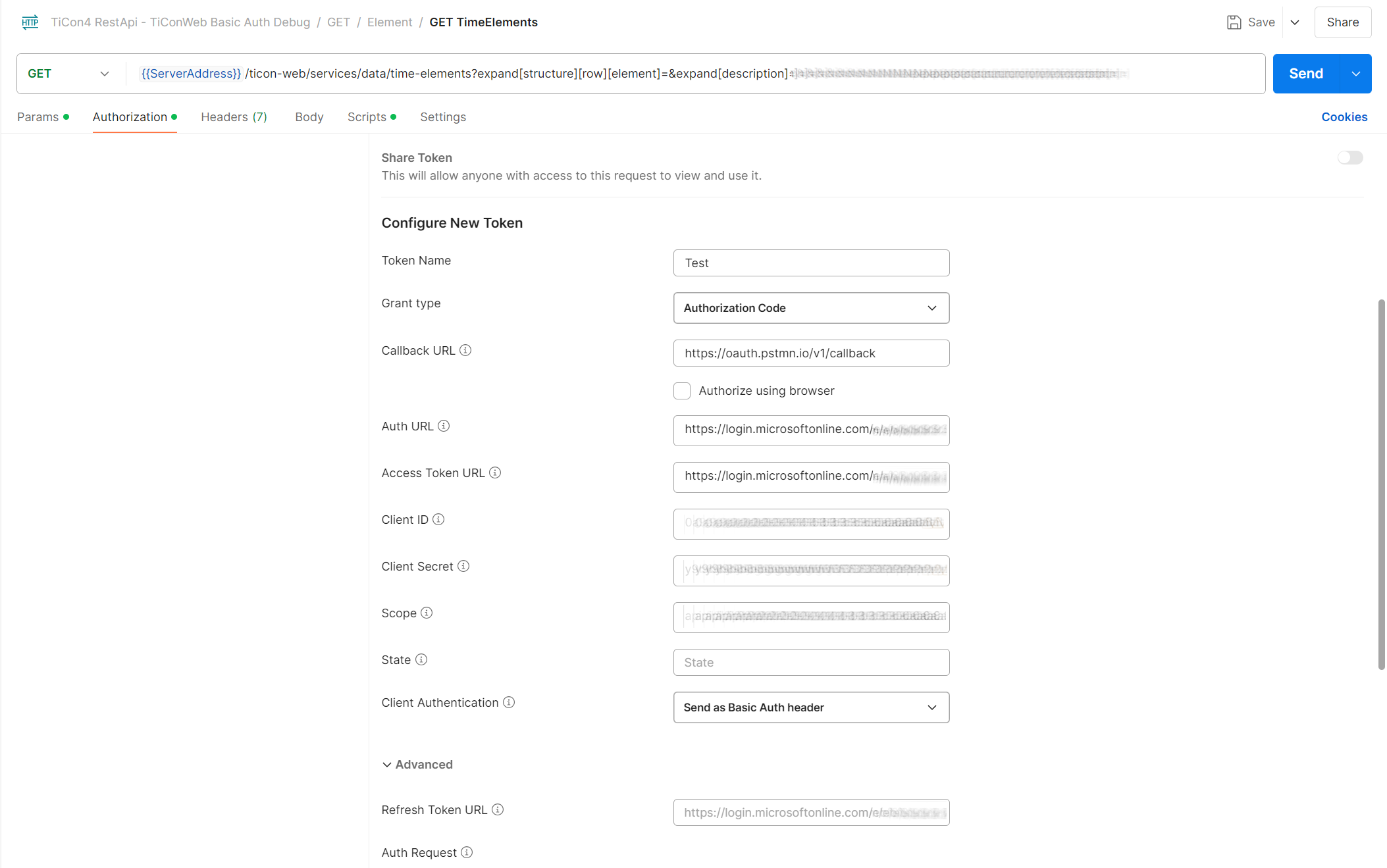
After configuring the client, start the OAuth authorization flow. The user is redirected to the Microsoft sign-in page; once authorization succeeds, the client receives an access token for authenticated requests. In the Postman example, this is initiated with Get New Access Token and the resulting token can be selected as shown below.
Use the access token for protected endpoints until it expires or becomes invalid; then obtain a new token using the client application's OAuth flow. Where supported, client configuration or environment variables can store values such as the API base URL, client ID and scopes for different environments. The screenshot below shows this feature in Postman.
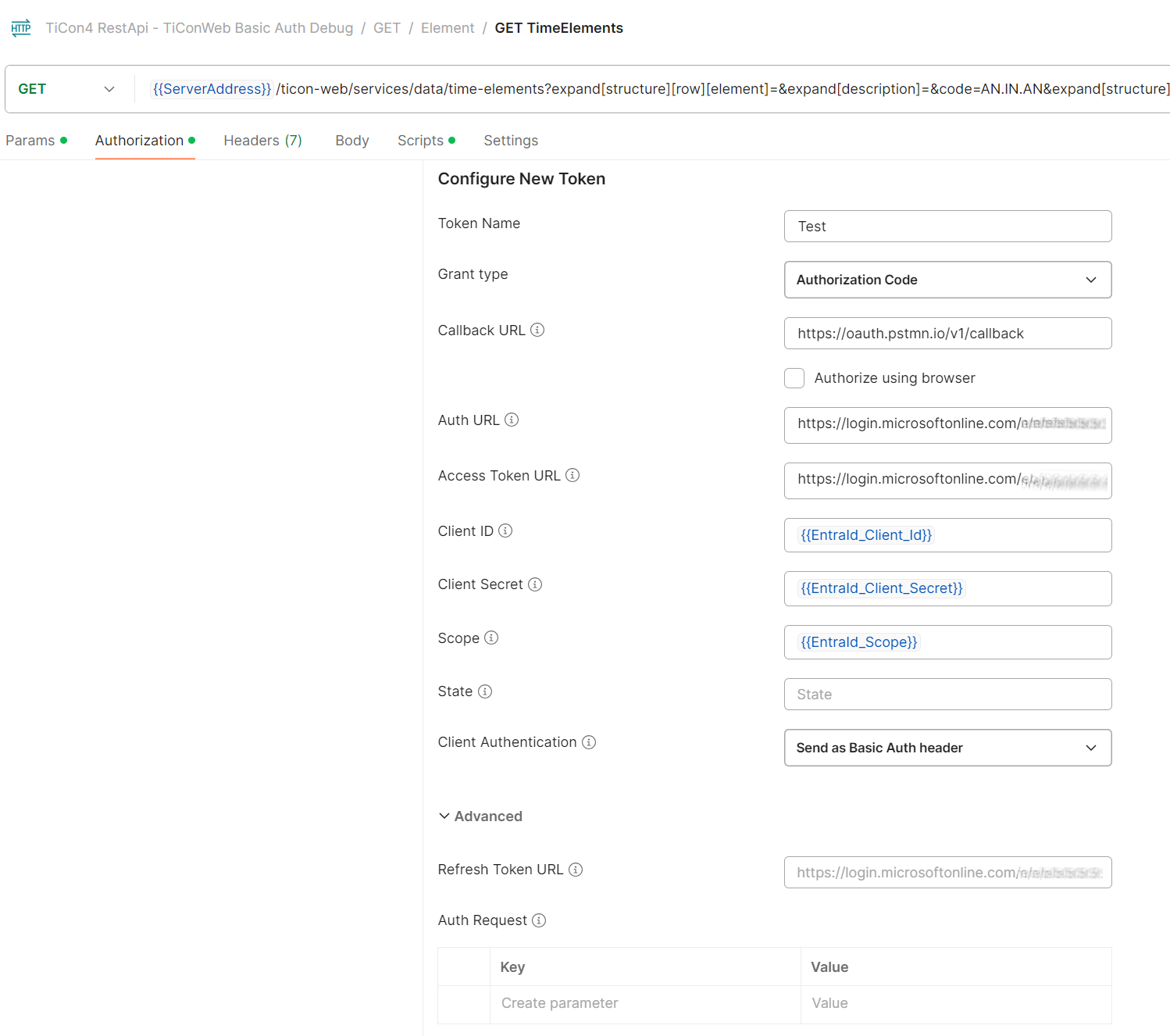
5.2.2 Google Cloud Platform
With the Google Cloud Platform, it is possible to use Google as an OAuth provider. The user has to log in with his Google credentials. The user will be redirected to the Google login page. After successful login, the user will get an Access token, that can use for all protected endpoints.
To configure the API to use the Google Cloud Platform, set AuthenticationType to oauth2 and configure the Google section in the app settings, after your administrator created an App project in the Google Cloud if it doesn't exists.
5.2.2.1 Configuration in Google
In Google Cloud Platform your system administrator have to create a new project in APIs and services if no project already exists. After the project is successfully created, under Credentials add the API as new OAuth client ID. The application type is Web application, configure the Authorised redirect URIs and at the end click Create. In the overview of OAuth 2.0 Client IDs appears the API as new entry. When you click on the new created Client ID for Web application, you can see the Google Client ID and Client secret, this two values are important for your development tool and API configuration.
Now your API Google Cloud configuration is in Testing mode, see OAuth consent screen, here you can add test users, to test your current Google Cloud configuration. When all works fine, publish your configuration into Production mode, by pressing the button Publish App.
Remarks:
Google recommend that you don't need this step, when you use the API only for internal purposes, or for testing, or when only a small group of users uses the API.
The API supports swagger Open API, if you want support authentication in swagger, you have to add the redirect URI of your Open API in Google Clout Platform: https://xxx/doc-rest-api/oauth2-redirect.html. xxx is your base address of the API.
5.2.2.2 Configuration in API development tool
Configure an OAuth 2.0 client with the Google authorization and token endpoints, the registered client credentials, scopes and a redirect URI that matches the client configuration in Google Cloud. The authorization credentials are sent in request headers; the correct token type is described below. Exact client settings and interface labels may vary.
Use the following values:
- Callback URL: the redirect URI registered in Google Cloud for the OAuth client in use. For the Postman example below, this is
https://oauth.pstmn.io/v1/callback; other clients use their own registered redirect URIs. - The Google Cloud Platform Auth URL is
https://accounts.google.com/o/oauth2/v2/auth - The Google Cloud Platform Access Token URL is
https://oauth2.googleapis.com/token - The Client ID and Client Secret you can find in the Google Cloud Platform API configuration section
- As Scope you can use
email
The following screenshot shows an example configuration in Postman; equivalent settings can be used in other clients:
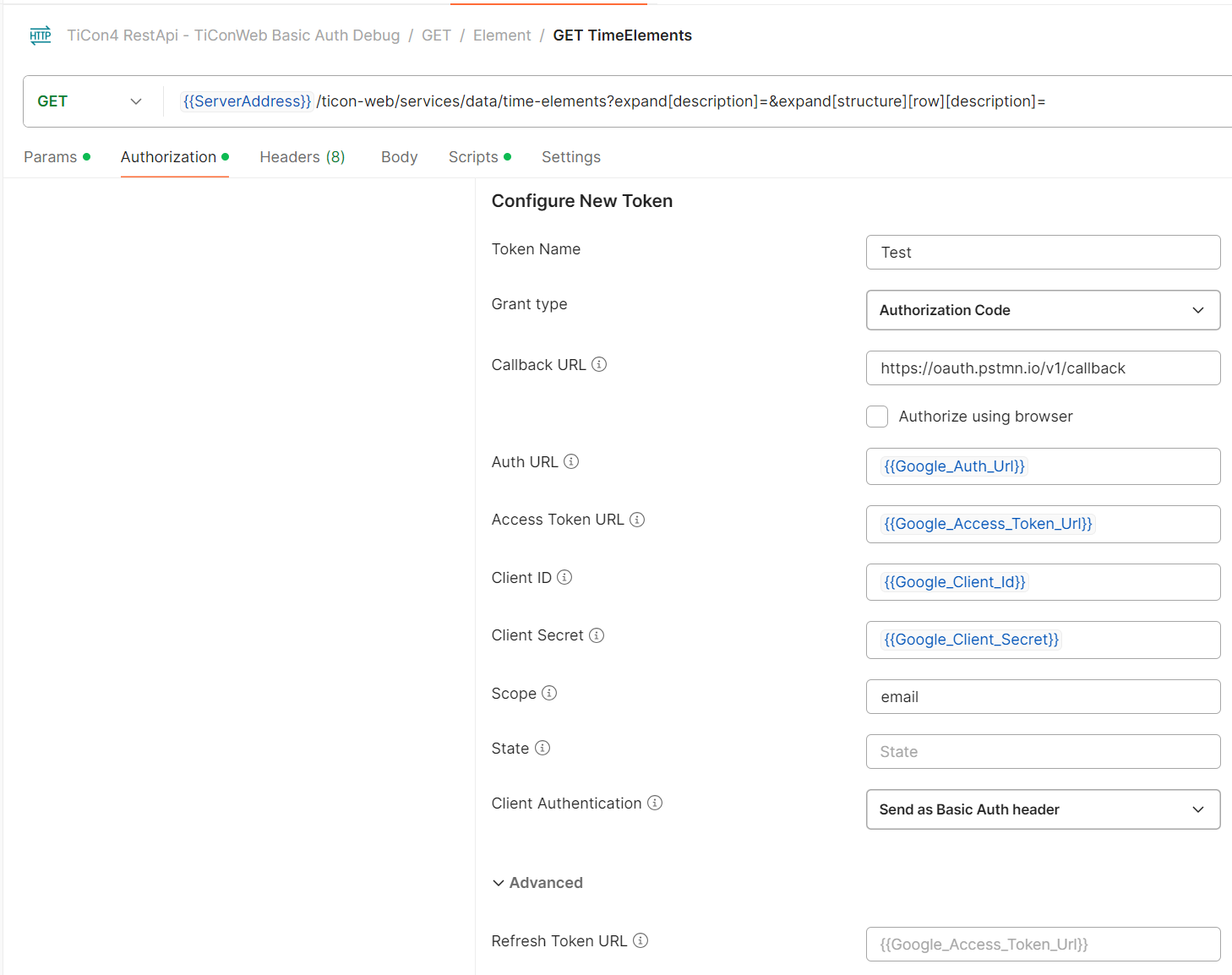
Remarks: When you request a Access Token from the Google Cloud Platform, after your login was successful, in the response from Google you get two tokens, a Access token and a ID token.
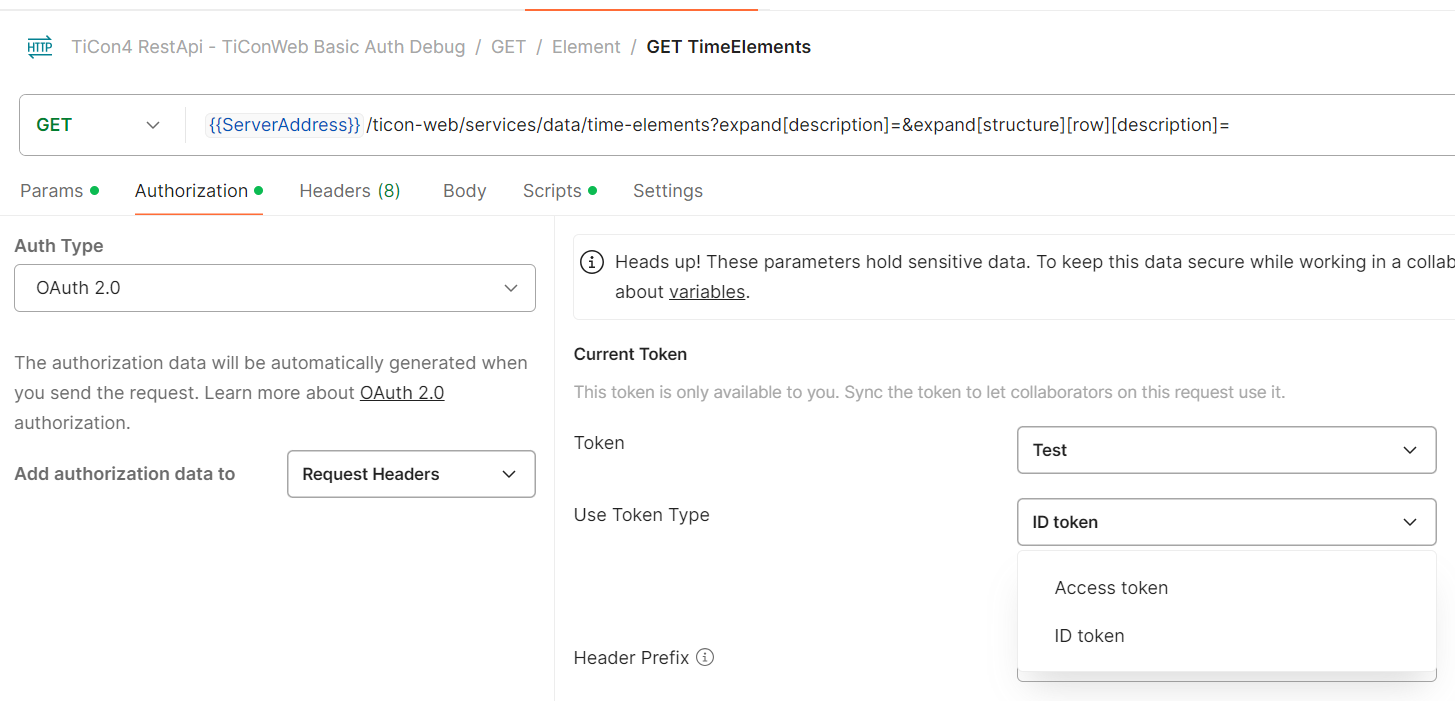
It is a mistake to assume that the Access token would be a authentication token, but this is not the case with the Goolge Cloud Platform, the ID token must be used for authentication, otherwise you will get a authentication exception.
Google does not return a refresh token by default. In order to receive a refresh token on authorization from a Google API, you need to add an extra query parameter to your auth URL. Modify your auth URL to https://accounts.google.com/o/oauth2/v2/auth?access_type=offline, which includes a query parameter of access_type set to offline. The default state is online, and you need to explicitly set it to offline.
Optional: You can send a POST to https://oauth2.googleapis.com/token with the following body:
{
  "client_id": "Your Client ID",
  "client_secret": "Your Client Secret",
  "refresh_token": "Your Refresh Token",
  "grant_type": "refresh_token"
}
to refresh the access token.
5.2.3 OAuth users to TiCon4 users mapping
We discussed the OAuth 2.0 configuration in the Azure portal and Google Cloud Platform, and described the configuration in your favorite API development tool. But how can you map the OAuth user to a TiCon4 user, to get access to the database?
In the case of Entra ID, you have to configure TiCon4 to use Microsoft as authentication provider, please take a look into the TiCon4 documentation or ask the TiCon4 support, to reach this goal. In the TiCon4 Admin you can add new users by click the new button User account and select ActiveDirectory user.
TiCon4 shows only users from your Entra ID and now you can add new users to TiCon4, it saves automatically all necessary data, to get a valid user mapping.
In the case of Google Cloud Platform, your TiCon administrator has to modify the TiCon4 database, he needs a valid Open ID of a Google user and has to change the Provider ID, please contact the TiCon4 support to reach this goal. Another possibility to create a user with a valid Open ID, is to create it by TiCon REST-API, here is a JSON body example:
[
  {
    "comment": "A user with Google Cloud Platform ID",
    "code": "Domainname\\VALIDCODE",
    "isActive": true,
    "mailAddress": "max.mustermann@example.com",
    "openIdProvider": "Google",
    "openId": "Google Open ID"
  }
]
Send this body by POST to endpoint {{ServerAddress}}/ticon-web/services/data/account.
The identity type of an existing account cannot be converted by PATCH. In particular, sid, openId and openIdProvider are create-only properties for Open ID accounts. To create a Google/Open ID mapping, create a new Open ID account by POST as shown above.
After all changes are done, it exists an OAuth to TiCon4 users mapping, and you can use all protected endpoints in the TiCon REST-API.
5.2.4 Account save contract
POST /ticon-web/services/data/account can create either a local TiCon user account or an Open ID account. The account type is derived from the identity properties and is not selected through userType.
For a local user account, code and password are mandatory. The optional writable properties are firstName, lastName, comment, isActive, mailAddress, department, subDepartment, position, defaultFolderUid and customRootFolderUid. Local account codes are trimmed and stored in uppercase. password is never returned by GET or save responses.
For an Open ID account, code is mandatory and must use the form DOMAIN\user. sid, openId and openIdProvider are create-only identity properties. A Google account without SID requires openIdProvider to be Google. Passwords are not accepted for Open ID accounts. Folder references can be set through defaultFolderUid and customRootFolderUid; only system folders are valid.
PATCH /ticon-web/services/data/account keeps the existing domain account type. Local users can update code, password, profile properties, isActive, defaultFolderUid and customRootFolderUid. Open ID accounts can update code, isActive, comment, mailAddress, defaultFolderUid and customRootFolderUid; sid, openId, openIdProvider and password are not patchable.
The following properties are read-only through this endpoint and are not part of the account save contract: userType, roles, functions, adminFunctions, moduleSecurity, folderSecurity, elementClassSecurity, elementClassConfigurationSecurity, dataCardSecurity, printingFormSecurity and lastLogin.
When both defaultFolderUid and customRootFolderUid are set, TiCon4 validates that the default folder is the custom root folder itself or a descendant of it. Sending null, an empty string or whitespace for a writable profile string or folder UID clears the corresponding value.
GET examples
{{ServerAddress}}/ticon-web/services/data/account?code=REST_USER
{{ServerAddress}}/ticon-web/services/data/account/{{ACCOUNT_UID}}
{{ServerAddress}}/ticon-web/services/data/account?code=REST_USER&$expand=defaultFolder($expand=description),customRootFolder($expand=description),roles($expand=role($expand=description))
The password is never returned by GET. Role and security collections are read-only through the account save contract and are expanded only when explicitly requested.
Local account POST example
[
  {
    "code": "REST_USER",
    "password": "{{INITIAL_PASSWORD}}",
    "firstName": "Rest",
    "lastName": "User",
    "isActive": true,
    "mailAddress": "rest.user@example.com",
    "defaultFolderUid": "{{FOLDER_UID}}"
  }
]
Local account PATCH example
[
  {
    "uid": "{{ACCOUNT_UID}}",
    "firstName": "REST",
    "comment": "Updated through REST",
    "mailAddress": "rest.user.changed@example.com"
  }
]
The Google/Open ID POST example in chapter 5.2.3 uses the same endpoint. Identity properties such as sid, openId and openIdProvider are create-only and therefore must not be echoed into PATCH requests.
6 Entity GET
6.1 structure and behavior
The generic endpoint for reading entities of type Foo has two flavors:
GET /foo/{uid}<L><E>- returns exactly one entity with UIduid, and throws a 4xx error, if the entity could not be loaded. Possible error reasons are:- no entity with the specified UId was found (404)
- UId is present but the entity is not of type
Foo(404) - User does not have access authorization (403)
- Other (400)
GET /foo<F><P><L><E>- returns a list of entities that match the specified filter<F>and are within the specified paging range.- No 4xx errors are returned if one of the specified UIds does not exist or the user does not have access on an element, but the resource is simply not found by the filter.
This behavior is consistent because when called in the first variant, e.g. /time-elements/Element-259, the parameter has the logic of a path to a resource and the path does not exist or is inaccessible.
In the second variant, e.g. /time-elements?uids=Element-259, the path is accessible (/time-elements), and uids=42 has the logic of a search filter. Therefore, no 4xx error should be returned here.
In both variants, the endpoint returns an error if the client-side call was correct, but an error occurred on the server (5xx).
6.2 Filter parameters <F>
Specification of the filter is optional. If no filter is specified, all entities of the respective type will be returned limited only by paging.
The following filter parameter can be used for each entity type:
uids- filter by one or more uids.
Other possible filters depend on the specific entity type.
For time elements, for example, there are the filters code (for the element's code) and user (owner of the element).
If you want to know, how much elements counts the total result, you can add a total counter at the end of JSON result by set counttotalresults=true in your query.
Examples
uids=Element-259,Element-258- Search for items with UIdsElement-259andElement-258code=*AA1*- Search for elements whose code containsAA1code=TEST*&user=mtm- Search for items whose code starts withTESTand is owned by usermtm.description=*time*- Search for elements whose description containtime
6.3 Paging parameter <P>
The page size can be given as a query parameter for each endpoint able to return more than one entity.
top- maximum number of results to return, even if the filter matches more items. Used in combination withskipas the page size for paging.skip- number of elements to be skipped.
When paging is used the items have to be sorted by sortBy parameter.
sortBy accepts one or more comma-separated properties. Each property can optionally use asc or desc; omitted direction means ascending. The property names are REST properties and are resolved by the selected endpoint. The supported direction tokens are asc and desc.
For element-based endpoints, the established sort mappings also include navigation and journal properties such as description, owner.code, elementType.code, elementStatus.code, elementConfiguration.code, createuser.code, modifyuser.code, createtime, and modifytime. Work-organization endpoints additionally support times.tg. Navigation-based sorting keeps the normal expansion requirements; in particular, sorting by times.tg requires an explicit times expansion.
Examples
top=50- search limited to 50 results, no defined ordertop=50&skip=150&sortBy=uid- skip the first 150 elements, page size is 50 elements and ordered by UIDsortBy=code desc- sort by code descendingsortBy=code asc,index desc- sort by code ascending and use index descending as the secondary key$expand=description&sortBy=description desc,code- load the description, sort by it descending, and use code ascending as the secondary key
Remarks
You can configure top in the app settings, you have to set the property MaxTop. When no configuration is found, the default value is 100, the max value is 10000!
6.4 Language parameter <L>
Optional specification of the data language for language texts from the database. If the parameter is not specified or a property is not available in one of the requested languages, the property is returned in its source language.
Examples
lang=de-DE,en-US- Returns texts in German if they are in German, otherwise in English, otherwise in their original data language.lang=fr- Returns texts in French if they are in French, otherwise in their original data language.
6.5 OData-inspired $expand syntax
The TiCon REST-API uses an OData-inspired $expand query syntax for requesting complex, multilingual, and referenced data.
This is intentionally a focused subset of OData. The TiCon REST-API is not a fully OData-compliant service. The $expand syntax is used to describe which related or complex properties should be returned, while TiCon-specific query parameters such as code, uids, lang, top, skip, and sortBy remain unchanged.
The public syntax supports:
$expand- nested
$expand $levelson expansions that explicitly support recursive loading
The existing expand[...] syntax remains supported for backward compatibility. New integrations should prefer the OData-inspired $expand syntax shown below. For readability and consistency, use one syntax style per request.
6.5.1 Basic $expand
To load one property:
$expand=description
Example:
{{ServerAddress}}/ticon-web/services/data/time-elements?code={{CODE}}&$expand=description
To load several properties, list them in a single $expand query option separated by commas:
$expand=description,times,elementType,elementStatus
Example:
{{ServerAddress}}/ticon-web/services/data/time-elements?code={{CODE}}&$expand=description,times,elementType,elementStatus
Do not write multiple $expand query options when one combined expression can be used. A single expression is easier to read and is the preferred form throughout this documentation.
6.5.2 Nested expansions
Nested data is requested by adding a nested $expand expression in parentheses.
For example, to load the description of the referenced folder:
$expand=folder($expand=description)
To load both the folder description and the folder's administration object description:
$expand=folder($expand=description,adminObject($expand=description))
Multiple nesting levels can be combined:
$expand=structure($expand=element($expand=description,times))
This loads the structure and, for each structure entry, the referenced element including its description and times.
6.5.3 Public collection syntax
The new syntax describes the public REST-API model, not internal implementation details.
For example, the historic expansion:
expand[structure][row][description]
becomes:
$expand=structure($expand=description)
The internal row wrapper is deliberately omitted from the public semantic syntax.
The same principle applies to other collections:
Legacy:
expand[documents][row][description]

New:
$expand=documents($expand=description)
Legacy:
expand[sections][row][cycleInformations][row][description]

New:
$expand=sections($expand=cycleInformations($expand=description))
6.5.3.1 Foreign-key collection names
The historic expand[...] syntax uses the internal MapperLoader expansion name. For foreign-key properties the legacy MapperLoader usually removes the Uid or Uids suffix. The new $expand syntax uses the public semantic relationship name and deliberately omits Uid / Uids suffixes. The REST response properties keep their existing names.
For example:
| REST response property | New $expand name |
Historic expand[...] name |
|---|---|---|
defaultCriterionUids |
defaultCriterion |
defaultCriterion |
criterionUids |
criterion |
criterion |
formulaCriterionUids |
formulaCriterion |
formulaCriterion |
categoryUids |
category |
category |
Therefore both of the following requests address the same TimeElement criterion expansion:
Legacy:
expand[structure][row][criterion][description]

New:
$expand=structure($expand=criterion($expand=description))
The same applies to the root default criterion:
Legacy:
expand[defaultCriterion][description]

New:
$expand=defaultCriterion($expand=description)
The legacy syntax remains supported. Do not mix expand[...] and $expand in the same request.
6.5.4 Combining top-level and nested expansions
A request can combine any supported top-level and nested expansions in one expression:
$expand=description,times,elementType($expand=description),elementStatus($expand=description),structure($expand=description,element($expand=times))
Example:
{{ServerAddress}}/ticon-web/services/data/time-elements?code={{CODE}}&lang=en-US&$expand=description,times,elementType($expand=description),elementStatus($expand=description),structure($expand=description,element($expand=times))
6.5.5 $levels
Some recursive expansions support $levels.
$levels must be a positive integer:
$expand=children($levels=3)
Options can be combined with nested $expand. The preferred separator between options is a semicolon:
$expand=structure($levels=2;$expand=description)
$levels is only valid on properties for which recursive expansion is supported. Using it on a non-recursive property results in an unsupported-expansion error.
6.5.6 Expansion behavior
Primitive properties such as strings, numbers, booleans, and enums are normally returned without an expansion.
Other properties require an explicit expansion:
- Language text properties, such as
description,begin,content,end, andlimit - Model objects and collections, such as
times,structure,sections,documents, andworkOrganization - Referenced entities, such as
folder,elementType,elementStatus, or an element referenced by a structure entry
Referenced entities are represented by their UID on the owning object. When expanded, the referenced entity is additionally returned in the response's expanded collection.
Example:
$expand=folder($expand=description)
A response can contain:
{
  "entities": [
    {
      "folderUid": "Folder-20"
    }
  ],
  "expanded": [
    {
      "code": "MTM-UAS-BASE",
      "uid": "Folder-20",
      "description": {
        "language": "en-US",
        "text": "MTM-UAS Base",
        "isSource": true
      }
    }
  ]
}
Language text and model properties are generally inlined directly into the owning JSON object.
Example:
$expand=description,times
{
  "description": {
    "language": "en-US",
    "text": "Walk / m",
    "isSource": true
  },
  "times": {
    "tg": 27.777777777777775
  }
}
6.5.7 Common examples
Load an element description:
$expand=description
Load folder and folder description:
$expand=folder($expand=description)
Load work organization:
$expand=workOrganization
Load extra points:
$expand=extraPoints
Load structure descriptions and calculated times:
$expand=structure($expand=description,times,totalTimes)
Load tags and their descriptions on structure entries:
$expand=structure($expand=tags($expand=description))
Load formula values inside Time element structure:
$expand=structure($expand=description,formulaValues)
Load Time study sections and their nested cycles:
$expand=sections($expand=description,checkPoint,cycleInformations($expand=description))
Load Formula element parameters and nested variable values:
$expand=structure($expand=description,variableValues($expand=description))
6.5.8 Legacy syntax
The previous TiCon REST-API expansion syntax remains fully valid and can continue to be used by existing clients. There is no requirement to migrate existing requests immediately. The OData-inspired syntax is the preferred form for new integrations and new examples because it is more compact and easier to read for deeply nested expansions.
Older TiCon REST-API versions used expressions such as:
expand[structure][row][description]
The equivalent public syntax is now:
$expand=structure($expand=description)
The existing expand[...] syntax continues to work and remains valid for existing integrations. New integrations should use the $expand syntax shown in this documentation. For readability and consistency, use one syntax style per request.
6.5.9 NULL value handling
The default NULL value handling is, that properties, without a valid number, enum or string, are not available in JSON result. The reason is for this behavior is, to make the HTTP stream smaller, especially with very complex classes, such as the time vector or a very complex structure.
Is zero printed or not?
In all TiCon classes, zero values are displayed in JSON structure, because in the most cases, they are relavant information. An exception is the time vector class. They is very complex and has a large number of properties, that can become confusing very quickly. For this reason, all times that are zero are not displayed in JSON result, only times that are not zero.
At the moment there is a special exception regarding the NULL value handling. This is the query of folders, if there is no parent directory, an empty string is displayed in the JSON result. This should be changed in the future and adapted to the standard NULL value handling.
6.5.10 Expand presets
In some cases it is useful to shorten the called URL. In the TiCon REST-API you have the possibility to store expand presets. The default path for this is the www root directory 'Content/Presets'. There you will find a predefined folder structure in which you can save your presets for the respective element.
Existing presets that use technical flattened paths remain supported:
{
  "expands": [
    "Description",
    "ElementType.Description",
    "ElementStatus.Description",
    "ElementConfiguration.Description",
    "ElementConfiguration.AdminObject.Description",
    "Times",
    "Folder.Description",
    "Folder.AdminObject.Description"
  ],
  "description": "Expand a TimeElement with description, element type, element status, element class configuration, time vector and folder"
}
Presets can also use the same OData-inspired expansion syntax as the $expand query parameter. This includes semantic expansions such as details, nested $expand, and supported $levels expressions:
{
  "expands": [
    "$expand=details",
    "structure($expand=description,times)"
  ],
  "description": "Expand the standard details and structure times"
}
Old technical paths and the newer expansion syntax can be combined in the same preset. New presets should prefer the OData-inspired syntax described in this chapter.
To get all available presets in the TiCon REST-API, please call {{ServerAddress}}/ticon-web/services/management/presets. Valid credentials are necessary.
6.6 Examples
6.6.0 Generic elements
{{ServerAddress}}/ticon-web/services/data/elements
The generic elements endpoint is intended for type-independent Element/BaseElement metadata lookups. It returns the common element contract with objectType set to Element, regardless of the concrete element subtype. Type-specific data should be read through the corresponding specialized endpoint.
$expand=defaultDetails loads the common BaseElement detail profile. This includes the element texts, owner/creator/modify-user references, element status, element type, element configuration, folder, variables, and tags together with their configured nested descriptions. Larger collections such as journal, usages, images, documents, additional objects, and criteria remain explicit expansions.
Typical requests using the newer expansion syntax:
{{ServerAddress}}/ticon-web/services/data/elements?code={{ELEMENT_CODE}}
{{ServerAddress}}/ticon-web/services/data/elements?uids={{ELEMENT_UID}}
{{ServerAddress}}/ticon-web/services/data/elements?uids={{ELEMENT_UID}}&$expand=defaultDetails
{{ServerAddress}}/ticon-web/services/data/elements?uids={{ELEMENT_UID}}&$expand=elementConfiguration($expand=description)
{{ServerAddress}}/ticon-web/services/data/elements?uids={{ELEMENT_UID}}&$expand=description,elementType($expand=description),elementStatus($expand=description),elementConfiguration($expand=description),folder($expand=description)
elementClass is available through the element configuration, for example:
{{ServerAddress}}/ticon-web/services/data/elements?uids={{ELEMENT_UID}}&$expand=elementConfiguration($expand=description,elementClass($expand=description))
The existing legacy expand[...] syntax remains valid. For example, the following request continues to expand the element configuration description:
{{ServerAddress}}/ticon-web/services/data/elements?uids={{ELEMENT_UID}}&expand[elementConfiguration][description]&lang=de-DE
The generic endpoint is deliberately focused on common metadata. Type-specific structures and calculations belong to the corresponding specialized element endpoints.
6.6.1 Time Elements
Here you will find some examples for getting time elements by using the endpoint
{{ServerAddress}}/ticon-web/services/data/time-elements
Basic parameters
- code filters elements by a certain CODE parameter.
- uids filters elements by UIDs, separated by comma.
- codewildcards true to use wildcards in element search
- top the maximum number of shown elements. The default value is 20 and the max number of elements is limited to 100!
- $expand selects public navigation/detail properties explicitly. Use
$expand=defaultDetailsfor the curated native detail profile, or request individual properties such as$expand=description,times,structure(...). Referenced entities may be returned in the top-levelexpandedcollection; inline text and structure properties are written directly on the entity.
Returns
The endpoint returns Time Elements from folders for which the current user has at least read permission, excluding the DataCard folder. A bare native GET returns the root Time Element fields only; it does not calculate times / timeTgByCriterionUid and it does not load defaultCriterion, structure or eawsStructure unless an expansion requests them. Journal timestamps and the root reference UIDs are still populated by the normal reader pipeline.
A simplified bare response can look like this:
{
  "entities": [
    {
      "shortCode": "AHG02",
      "analyzeMethodUid": "AnalyzeMethod-3",
      "createTime": "1983-08-28T00:00:00Z",
      "modifyTime": "1997-10-28T00:00:00Z",
      "ownerUid": "Account-2",
      "modifyUserUid": "Account-2",
      "elementStatusUid": "ElementStatus-7",
      "elementTypeUid": "ElementType-1",
      "elementConfigurationUid": "ElementClassConfiguration-4104",
      "folderUid": "Folder-19",
      "code": "2000AHG02..4",
      "objectType": "TimeElement",
      "uid": "Element-10"
    }
  ]
}
$expand=defaultDetails loads the shared BaseElement and Work Organization detail profile plus Time Element-specific details. In particular, it includes begin, content, end, limit, analyzeMethod, timeDeterminationMethod, workOrganization, workOrganizationBreakStructure, defaultCriterion, extraPoints, structure and eawsStructure, together with their child nodes marked as details. Calculated times, timeTgByCriterionUid, root ergo, structure times / totalTimes and rtwResult remain explicit.
Examples
The following examples demonstrate how to find time elements by code or UIDs, how to use wild card search and expand structure and description.
{{ServerAddress}}/ticon-web/services/data/time-elements?code=3000AA1....5
{{ServerAddress}}/ticon-web/services/data/time-elements?code=3000AA1....5&$expand=defaultDetails
{{ServerAddress}}/ticon-web/services/data/time-elements?uids={{uid}},{{uid}}
{{ServerAddress}}/ticon-web/services/data/time-elements?code=AN*&codewildcards=true
{{ServerAddress}}/ticon-web/services/data/time-elements?code=AN*&codewildcards=true&top=5
{{ServerAddress}}/ticon-web/services/data/time-elements/Element-13?$expand=defaultCriterion&counttotalresults=true
{{ServerAddress}}/ticon-web/services/data/time-elements?code=AN*&codewildcards=true&$expand=description,times,structure($expand=element($expand=description,elementConfiguration))
{{ServerAddress}}/ticon-web/services/data/time-elements?code=B.13744&$expand=description,structure($expand=element($expand=description),criterion($expand=description)),defaultCriterion($expand=description)
{{ServerAddress}}/ticon-web/services/data/time-elements?$expand=structure($expand=criterion($expand=description),element($expand=times),singletime,totalTimes),timeTgByCriterionUid,times,workOrganization&code=An.1...4
{{ServerAddress}}/ticon-web/services/data/time-elements?$expand=description,criteria($expand=fixedCriterionValue($expand=description),description)
A more complete example converted from the historic expand[...] syntax is:
{{ServerAddress}}/ticon-web/services/data/time-elements?uids=Element-28291&lang=en-US&$expand=times,limit,content,begin,end,description,modifyUser,timeDeterminationMethod($expand=description),defaultCriterion($expand=description),elementConfiguration($expand=description),structure($expand=element($expand=times,description,analyzeMethod,elementConfiguration($expand=description),timeDeterminationMethod($expand=description)),criterion($expand=description),description,comment),documents($expand=documentElement($expand=description,modifyUser,elementConfiguration($expand=description)))
Here is another example, how to get formula values in a time element.
{{ServerAddress}}/ticon-web/services/data/time-elements?$expand=structure($expand=description,element,formulaValues)&code=xxxx
As you can see, it's always the same principle, when you want to get extended properties, expand it! Please take a look here.
Remarks
All text properties, as description, begin, end and can also be expanded, but the properties are displayed directly on the property in the JSON string and not in the expanded node, as described above. Other exceptions are: structure, element, row depending on which element type is queried.
6.6.1.1 Time Elements with Ergonomics
For time elements with ergonomics the following expands and properties are for interest:
$expand=workOrganization$expand=extraPoints- performance property
- eawsgenerated property
structure and eawsStructure are already part of $expand=defaultDetails, but their association data can also be requested directly. To get connections between structure rows and ergonomic rows, use for example:
$expand=structure($expand=eawsReferenceAssociations)$expand=eawsStructure($expand=timeReferenceAssociations)
eawsReferenceAssociations and timeReferenceAssociations row are having the following properties:
| No. | Content | Property Name and Remarks |
|---|---|---|
| 1 | Ergonomics reference | entity.eawsReferenceUid |
| 2 | Time reference | entity.timeReferenceUid |
| 3 | Percentage | entity.percentage |
| 4 | Source ergonomics reference | entity.sourceEawsReferenceUid |
| 5 | Source child element | entity.sourceChildElementUid |
| 6 | Source child key | entity.sourceChildCodeIndexVariant |
| 7 | Multilevel associated time reference | entity.multiLevelAssociatedTimeReferenceUId |
| 8 | Source total duration | entity.sourceTotalDuration |
| 9 | Source original factor | entity.sourceOriginalFactorValue |
Examples
{{ServerAddress}}/ticon-web/services/data/time-elements?code=DTGMGEH....1&lang=en-US&$expand=description,times,structure($expand=eawsReferenceAssociations),eawsStructure($expand=timeReferenceAssociations),workOrganization,extraPoints
The result might look like this: (result is shortened for clarity)
{
  "entities": [
    {
      "structure": [
        {
          "row": {
            "eawsReferenceAssociations": [
              {
                "row": {
                  "eawsReferenceUid": "Reference-159942",
                  "timeReferenceUid": "Reference-134084",
                  "percentage": 1,
                  "sourceChildElementUid": "Element-13360",
                  "sourceTotalDuration": 121.9,
                  "sourceOriginalFactorValue": 1
                },
                "identifier": "84"
              }
            ],
            "elementUid": "Element-13360",
            "factor": "1 * 1,0",
            "factorValue": 1,
            "customFactor": "1",
            "orderNumber": 1,
            "typeEnum": "Element",
            "isStandardDescription": true,
            "rowType": "REFERENCE"
          },
          "identifier": "134084"
        }
      ],
      "eawsStructure": [
        {
          "row": {
            "frequencyValue": 1,
            "frequency": "1.0",
            "numberValue": 1,
            "number": "1",
            "percentage": "100.0%",
            "duration": 121.9,
            "totalDuration": 0,
            "isRelevant": true,
            "handType": "BothHands",
            "bodyPosture": "Walking",
            "isAwkwardWrist": false,
            "isAwkwardElbow": false,
            "isAwkwardShoulder": false,
            "isAwkwardShoulderFlexion": false,
            "bodyForceCorrection": 0.6,
            "bodyForceDirection": "APlus",
            "bodyActionCount": 1,
            "bodyClassification": "Automatic",
            "fingerGrip": "ThumbTo4Fingers",
            "fingerActionCount": 1,
            "fingerClassification": "Automatic",
            "armActionCount": 1,
            "armClassification": "Automatic",
            "loadCount": 1,
            "loadType": "Repositioning",
            "loadActionType": "AutoDetect",
            "loadMeansOfTransportation": "None",
            "loadFloorCondition": "Undefined",
            "loadDistance": 20,
            "loadDurationScope": "PerOperation",
            "loadPosturePoints": -1,
            "loadPosition": "AtBody",
            "loadInstability": "NormalPosition",
            "loadAmount": 3,
            "timeReferenceAssociations": [
              {
                "row": {
                  "eawsReferenceUid": "Reference-159942",
                  "timeReferenceUid": "Reference-134084",
                  "percentage": 1,
                  "sourceChildElementUid": "Element-13360",
                  "sourceTotalDuration": 121.9,
                  "sourceOriginalFactorValue": 1
                },
                "identifier": "84"
              }
            ],
            "factor": "(1) * (1,0)",
            "factorValue": 1,
            "orderNumber": 1,
            "typeEnum": "EawsTask",
            "rowType": "EAWSREFERENCE"
          },
          "identifier": "159942"
        }
      ],
      "times": {
        "timeDeterminationMethodTime1": 8,
        "quantity": 1,
        "ttb": 1354.1,
        "ttu": 8,
        "tg": 1362.1,
        "te": 1362.1,
        "t": 1362.1
      },
      "defaultCriterionUids": [],
      "workOrganizationType": "BreaksEveryTime",
      "workOrganization": {
        "grossShiftDuration": 800000,
        "netShiftDuration": 666666.66667,
        "taktDuration": 2222.22222,
        "piecesPerShift": 300,
        "availableTgPerShift": 666666.66667,
        "nonRepetitiveDifferenceDuration": 0,
        "nonRepetitiveDuration": 16666.66667,
        "inputModeType": "GrossWorkingTimeAndTaktTime",
        "workplaceSizeType": "LargeWorkplace",
        "forcePercentileUid": "ForcePercentile-1"
      },
      "extraPoints": [
        {
          "row": {
            "extraPointValue": 3,
            "extraPointDefinitionUid": "ExtraPointDefinition-2",
            "orderNumber": 1
          },
          "identifier": "8"
        }
      ],
      "EawsGenerated": "Structure",
      "createTime": "2017-07-13T02:00:44Z",
      "modifyTime": "2025-08-25T03:27:22Z",
      "ownerUid": "Account-2",
      "modifyUserUid": "Account-5",
      "creatorUid": "Account-2",
      "elementStatusUid": "ElementStatus-3",
      "elementTypeUid": "ElementType-1",
      "elementConfigurationUid": "ElementClassConfiguration-100004",
      "folderUid": "Folder-89",
      "code": "DTGMGEH....1",
      "objectType": "TimeElement",
      "uid": "Element-13372",
      "description": {
        "language": "en-US",
        "text": "Housing assembly",
        "isSource": true
      }
    }
  ]
}
6.6.2 Stream Elements
{{ServerAddress}}/ticon-web/services/data/stream-elements?$expand=structure
Stream elements (TiCon model Stream2Element) can be read through the REST-API. The GET endpoint exposes both the normal element data and the stream-specific structure. Stream-specific calculated values are loaded only when they are explicitly expanded.
The most important property is the structure property. It contains the visible stream tree and can contain entries such as:
- variants (
typeEnum = Stream2Variant) - stations (
typeEnum = Stream2Station) - workers or machines (
typeEnum = Stream2Resource) - allocations (
typeEnum = Stream2Allocation) - features and options
- backlog rows
The structure is tree-like. Parent-child relationships can be derived from the row order and level. Standard and Mix streams return the normal stream tree. For Max streams, the structure represents the All variant; the available variants can be requested separately through the root variants expansion.
6.6.2.1 Stream Element defaultDetails
defaultDetails is the curated preset for commonly required non-calculated Stream Element data:
{{ServerAddress}}/ticon-web/services/data/stream-elements?code={{STREAM_CODE}}&$expand=defaultDetails
In addition to the shared BaseElement detail nodes, the Stream reader marks timeDeterminationMethod, workOrganization, workOrganizationBreakStructure, extraPoints, root structure and root variants as part of defaultDetails. Their inexpensive nested descriptions and criteria are included where those child nodes are also marked as details. The Stream reader does not expose a top-level expansion named details.
Calculated data is deliberately not part of defaultDetails. The following properties must be requested explicitly:
- root
times timeTgByCriterionUid- root
ergo structure.timesstructure.ergostructure.variantsand calculated values below those variants
This keeps normal Stream Element reads lightweight. For example, $expand=defaultDetails alone does not request Stream calculations.
Examples
{{ServerAddress}}/ticon-web/services/data/stream-elements
{{ServerAddress}}/ticon-web/services/data/stream-elements?code=T861600&$expand=defaultDetails
{{ServerAddress}}/ticon-web/services/data/stream-elements?code=T861600&$expand=owner,elementConfiguration($expand=description),folder($expand=description,parentFolder($expand=description))
{{ServerAddress}}/ticon-web/services/data/stream-elements?code=T861600&$expand=description,elementType($expand=description),elementStatus($expand=description),structure($expand=description)
{{ServerAddress}}/ticon-web/services/data/stream-elements?code=T861600&$expand=description,elementType($expand=description),workOrganizationBreakStructure($expand=description)
{{ServerAddress}}/ticon-web/services/data/stream-elements?$expand=description,workOrganizationBreakStructure($expand=description),workOrganization
6.6.2.2 Stream Element times and ergonomics
Times and ergonomics are calculated values and therefore have to be expanded explicitly when they are required. They are not included by $expand=defaultDetails.
The following properties are relevant:
entity.times- root Work Organization time vectorentity.timeTgByCriterionUid- Stream-specific indicator valuesentity.structure[].row.times- calculated times for a structure rowentity.structure[].row.ergo- calculated ergonomics for a structure row
Examples
{{ServerAddress}}/ticon-web/services/data/stream-elements?code=TZ733MH...Ü5&$expand=structure($expand=description,ergo,criterion),description
{{ServerAddress}}/ticon-web/services/data/stream-elements?code=TZ733MH...Ü5&$expand=structure($expand=description,times),description
{{ServerAddress}}/ticon-web/services/data/stream-elements?folderuids=Folder-56&$expand=workOrganization,structure($expand=description,times),description
{{ServerAddress}}/ticon-web/services/data/stream-elements?code={{STREAM_CODE}}&$expand=timeTgByCriterionUid
The times expansion on structure loads the calculated times of the used element or user-specific times [T01 ... T12] for the requested rows. Ergonomics are calculated and are only returned where an ergonomic result exists.
6.6.2.3 Max Stream Element variants
The root variants property can be expanded to get the list of variants for Max Stream Elements. For Max streams, the root structure property returns the rows of the All variant.
{{ServerAddress}}/ticon-web/services/data/stream-elements?code=MAX&$expand=variants($expand=description)

| No. | Content | Property Name and Remarks |
|---|---|---|
| 1 | Code | entity.code |
| 2 | Description | entity.description |
| 3 | Quantity | entity.quantity |
| 4 | Weighting | entity.variantWeighting |
| 5 | TA | entity.isVariantCycleTimeWorkOrganization |
| 6 | Cycle time | entity.variantCycleTime |
| 7 | Variant key | entity.variantKey |
6.6.2.4 Max Stream Element structure variants
The variants property below a structure row can be expanded to list the Max variants to which that row is assigned. This is a different projection from the root variants property.
The nested times and ergo properties can be expanded to get calculated values for the structure row in the respective variant. These values are not included in defaultDetails.
{{ServerAddress}}/ticon-web/services/data/stream-elements?code=MAX&$expand=structure($expand=variants($expand=times,ergo))
Remarks: Ergonomics are only supplied where an ergonomic result exists. For the definition of ergonomics data see chapter 8.
6.6.2.5 Update Stream Elements
The modification of Stream Elements is currently limited to HTTP PATCH and to basic/header data and criteria. Stream-specific data such as structure, variants, calculated times, ergonomics, and other takt-specific properties cannot currently be modified through this endpoint.
The following example changes the status and criteria of a Stream Element:
[
  {
    "criteria": [
      {
        "identifier": "27986"
      },
      {
        "row": {
          "elementCriterionUid": "ElementCriterion-1027",
          "textValue": "2026-06-06",
          "language": "en-US"
        },
        "identifier": "27988"
      },
      {
        "row": {
          "elementCriterionUid": "ElementCriterion-1051",
          "numberValue": 0.0,
          "language": "en-US"
        },
        "identifier": "27987"
      }
    ],
    "elementStatusUid": "ElementStatus-7",
    "uid": "Element-14084"
  }
]
6.6.3 Folders
Endpoint:
{{ServerAddress}}/ticon-web/services/data/folders
The folder endpoint can be used to read the TiCon folder hierarchy, inspect folder metadata and permissions, create folders, update supported folder properties, and delete empty folders.
A user only receives folders that are accessible with the current TiCon permissions.
6.6.3.1 Folder properties
A folder response can contain, among others, the following properties:
| Property | Description |
|---|---|
uid |
Unique REST-API UID of the folder, for example Folder-130 |
code |
Folder code / label |
path |
Complete TiCon REST-API folder path |
type |
Folder type |
isMtm |
true if the folder is an MTM standard folder |
isWriteable |
true if the current user has write permission for the folder |
parentFolderUid |
UID of the parent folder, if a parent exists |
synchronizationType |
Folder synchronization type |
The properties path and isWriteable are supplied as normal folder information and do not require an expansion.
6.6.3.2 Reading folders
Read folders by filter:
{{ServerAddress}}/ticon-web/services/data/folders
Read one folder by UID:
{{ServerAddress}}/ticon-web/services/data/folders/{{FOLDER_UID}}
Example:
{{ServerAddress}}/ticon-web/services/data/folders/Folder-130
Common folder filters are:
| Parameter | Description |
|---|---|
uids |
One or more folder UIDs |
code |
Folder code |
codeWildcards |
Enables wildcard matching for code |
desc |
Folder description |
descWildcards |
Enables wildcard matching for desc |
ownerCodes |
Restricts the result to folders associated with the specified owner codes |
types |
Restricts the result to one or more folder types |
top |
Maximum number of returned folders |
skip |
Number of folders to skip for paging |
sortBy |
Property used for sorting |
countTotalResults |
Adds the total number of matching folders to the response |
lang |
Preferred language or languages for multilingual text data |
preset |
Applies a configured expansion preset |
Examples:
{{ServerAddress}}/ticon-web/services/data/folders?code=MTM&$expand=description,parentFolder
{{ServerAddress}}/ticon-web/services/data/folders?uids=Folder-1,Folder-10
{{ServerAddress}}/ticon-web/services/data/folders?code=MT*&codeWildcards=true
{{ServerAddress}}/ticon-web/services/data/folders?desc=*process*&descWildcards=true&$expand=description,parentFolder($expand=description)
For paging, use sortBy together with top and skip to get deterministic result pages:
{{ServerAddress}}/ticon-web/services/data/folders?top=50&skip=100&sortBy=uid
6.6.3.3 Folder expansions
The folder endpoint supports the following important expansions:
descriptionparentFolderadminObjectassignedElementClassConfigurationsassociationschildren
For example:
$expand=description,parentFolder($expand=description)
loads the folder description and the parent folder including its description.
The corresponding complete request is:
{{ServerAddress}}/ticon-web/services/data/folders?uids={{FOLDER_UID}}&$expand=description,parentFolder($expand=description)
The previous expand[...] syntax remains valid as described in chapter 6.5.
6.6.3.4 Reading child folders
The children expansion can be used to retrieve the folder hierarchy below a returned folder.
Load the direct children:
$expand=children
Example:
{{ServerAddress}}/ticon-web/services/data/folders?uids={{FOLDER_UID}}&$expand=children
Load direct children and their descriptions:
{{ServerAddress}}/ticon-web/services/data/folders?uids={{FOLDER_UID}}&$expand=children($expand=description)
The returned child folders are embedded in the children property of the parent folder.
Example:
{
  "entities": [
    {
      "code": "PRODUCTION",
      "uid": "Folder-100",
      "children": [
        {
          "code": "ASSEMBLY",
          "parentFolderUid": "Folder-100",
          "uid": "Folder-101",
          "description": {
            "language": "en-US",
            "text": "Assembly"
          }
        },
        {
          "code": "LOGISTICS",
          "parentFolderUid": "Folder-100",
          "uid": "Folder-102",
          "description": {
            "language": "en-US",
            "text": "Logistics"
          }
        }
      ]
    }
  ]
}
6.6.3.5 Recursive child folders with $levels
children supports recursive loading with $levels.
Load two hierarchy levels below the selected folder:
$expand=children($levels=2)
Load two levels and descriptions on the requested hierarchy levels:
$expand=children($levels=2;$expand=description)
Complete example:
{{ServerAddress}}/ticon-web/services/data/folders?uids={{FOLDER_UID}}&$expand=children($levels=2;$expand=description)
Conceptually:
Selected folder
|
+-- Child level 1
|   |
|   +-- Child level 2
|
+-- Child level 1
    |
    +-- Child level 2
The TiCon folder model supports a maximum hierarchy depth of nine levels. Clients should nevertheless request only the depth they actually need, especially for folders with many descendants.
The legacy recursive expansion syntax remains valid as well. Existing integrations do not need to be migrated immediately.
6.6.3.6 Expanding additional data on children
Child folders can use the same folder expansions as normal folder results.
For example, load two child levels with descriptions and parent-folder information:
$expand=children($levels=2;$expand=description,parentFolder($expand=description))
Complete request:
{{ServerAddress}}/ticon-web/services/data/folders?uids={{FOLDER_UID}}&$expand=children($levels=2;$expand=description,parentFolder($expand=description))
Other supported child-folder expansions include adminObject, assignedElementClassConfigurations, and associations.
6.6.3.7 Assigned element class configurations
The assignedElementClassConfigurations expansion returns the element class configurations assigned to a folder.
{{ServerAddress}}/ticon-web/services/data/folders?uids={{FOLDER_UID}}&$expand=assignedElementClassConfigurations
To additionally load the descriptions of the assigned configurations:
{{ServerAddress}}/ticon-web/services/data/folders?uids={{FOLDER_UID}}&$expand=assignedElementClassConfigurations($expand=elementConfiguration($expand=description))
Each assignment contains its own persistent identifier and the UID of the assigned element configuration.
6.6.3.8 Folder associations
The associations expansion returns folder associations.
{{ServerAddress}}/ticon-web/services/data/folders?uids={{FOLDER_UID}}&$expand=associations
Associations can refer to elements or accounts. These referenced entities can be expanded further:
{{ServerAddress}}/ticon-web/services/data/folders?uids={{FOLDER_UID}}&$expand=associations($expand=element,account)
Nested properties supported by the referenced entity reader can be expanded in the usual way.
6.6.3.9 Administration object
The folder administration object can be requested with:
{{ServerAddress}}/ticon-web/services/data/folders?uids={{FOLDER_UID}}&$expand=adminObject
Load its description:
{{ServerAddress}}/ticon-web/services/data/folders?uids={{FOLDER_UID}}&$expand=adminObject($expand=description)
6.6.3.10 Creating folders
Create folders with POST:
{{ServerAddress}}/ticon-web/services/data/folders
At minimum, provide a folder code. If no folder type is supplied, the REST-API uses the standard system-folder type. The folder type is a creation-time property: System and Datacard can be created through this endpoint, while User folders are not supported here.
A typical child-folder request is:
[
  {
    "code": "{{FOLDER_CODE}}",
    "description": {
      "language": "en-US",
      "text": "{{FOLDER_DESCRIPTION}}"
    },
    "type": "System",
    "parentFolderUid": "{{PARENT_FOLDER_UID}}"
  }
]
Example:
[
  {
    "code": "ASSEMBLY",
    "description": {
      "language": "en-US",
      "text": "Assembly"
    },
    "type": "System",
    "parentFolderUid": "Folder-164"
  }
]
The parentFolderUid is optional. If supplied, it must reference an existing valid parent folder. A root-level Datacard folder can be created without a parent; if a parent is supplied for a Datacard folder, that parent must belong to the TiCon datacard hierarchy.
The assignedElementClassConfigurations, children, and associations properties are read-only in the folder save contract. They can be requested through the corresponding GET expansions, but they cannot be assigned through folder POST/PATCH requests.
6.6.3.11 Updating folders
Update folders with PATCH:
{{ServerAddress}}/ticon-web/services/data/folders
The folder uid is required.
The writable PATCH properties are code and description. The folder type and parentFolderUid are creation-time properties and cannot be changed through PATCH. Omitting a writable property leaves its current value unchanged. Setting the description text to null, an empty string, or whitespace removes the writable description text.
Example:
[
  {
    "uid": "{{FOLDER_UID}}",
    "code": "{{NEW_FOLDER_CODE}}",
    "description": {
      "language": "en-US",
      "text": "{{NEW_FOLDER_DESCRIPTION}}"
    }
  }
]
Changing the parent folder or folder type through PATCH is not supported. Any explicit parentFolderUid or type property in a PATCH request is rejected, including an explicit null parent. To create a folder at a specific location or with a specific type, set these properties when creating it.
Folder metadata such as assignedElementClassConfigurations, children, associations, adminObjectUid, synchronizationType, isMtm, isWriteable, and path is read-only for POST/PATCH.
6.6.3.12 Deleting folders
Folders can be deleted with DELETE when the current user has sufficient permissions and the folder is empty.
{{ServerAddress}}/ticon-web/services/data/folders?uids={{FOLDER_UID}}
Example:
{{ServerAddress}}/ticon-web/services/data/folders?uids=Folder-175
Multiple folder UIDs can be supplied where supported by the request:
{{ServerAddress}}/ticon-web/services/data/folders?uids=Folder-175,Folder-176
A folder containing elements or child content cannot be deleted until that content has been removed or moved.
6.6.4 Element configurations
{{ServerAddress}}/ticon-web/services/data/element-configurations
To get all Element configurations from REST, where the current user has the minimum permission read.
Examples
{{ServerAddress}}/ticon-web/services/data/element-configurations?$expand=description
{{ServerAddress}}/ticon-web/services/data/element-configurations?uids={{uid}},{{uid}}
{{ServerAddress}}/ticon-web/services/data/element-configurations?$expand=description&description=*time*&descriptionWildcards=true
6.6.5 Element types
{{ServerAddress}}/ticon-web/services/data/element-types
Get all Element types from REST. The normal root data contains uid, code, objectType and modifyTime. The defaultDetails preset adds the localized description.
Examples
{{ServerAddress}}/ticon-web/services/data/element-types?$expand=defaultDetails
{{ServerAddress}}/ticon-web/services/data/element-types?$expand=description
{{ServerAddress}}/ticon-web/services/data/element-types?uids={{uid}}
The historic expansion syntax remains valid, for example expand[description].
6.6.6 Element statuses
{{ServerAddress}}/ticon-web/services/data/element-statuses
Get all Element statuses from REST. The defaultDetails preset adds the localized description.
Examples
{{ServerAddress}}/ticon-web/services/data/element-statuses?$expand=defaultDetails
{{ServerAddress}}/ticon-web/services/data/element-statuses?$expand=description
{{ServerAddress}}/ticon-web/services/data/element-statuses?uids={{uid}},{{uid}}
The historic expansion syntax remains valid, for example expand[description].
6.6.7 Process indicators
The endpoint {{ServerAddress}}/ticon-web/services/data/process-indicators returns ProcessIndicator entities, not indicator criteria. The complete native contract and examples are documented in section 6.6.31. Process indicator criteria use the separate process-indicator-criteria endpoint described in section 6.6.33.
6.6.8 Formula elements
{{ServerAddress}}/ticon-web/services/data/formula-elements
Get all Formula elements from REST. defaultDetails includes the shared BaseElement details and content, but not the Formula parameter structure; expand structure explicitly when it is required.
Examples
{{ServerAddress}}/ticon-web/services/data/formula-elements?code=A..ZBAHS.TE5&$expand=defaultDetails
{{ServerAddress}}/ticon-web/services/data/formula-elements?$expand=description&code=A..ZBAHS.TE5
{{ServerAddress}}/ticon-web/services/data/formula-elements?$expand=description&uids={{uid}},{{uid}}
{{ServerAddress}}/ticon-web/services/data/formula-elements?$expand=description,structure($expand=description)
{{ServerAddress}}/ticon-web/services/data/formula-elements?$expand=formulaCriterion($expand=description),description,structure($expand=description,variableValues)
{{ServerAddress}}/ticon-web/services/data/formula-elements?$expand=content,description,longText1,images($expand=element($expand=binary))&index=idx
{{ServerAddress}}/ticon-web/services/data/formula-elements?$expand=content,description,journal($expand=journalDetails)&index=idx
{{ServerAddress}}/ticon-web/services/data/formula-elements?$expand=content,formulaCriterion,structure($expand=element,description,variableValues($expand=description)),description&index=idx
6.6.9 Station elements
{{ServerAddress}}/ticon-web/services/data/resource-station-elements
Get, create, and update Station elements through REST.
| No. | Content | Property Name and Remarks |
|---|---|---|
| 1 | Color | entity.color (read-only) |
Station elements expose the assignment collections machinesOrOperators, carriers, and tools. Assignment rows support the common row expansions description, comment, criterion, tags, and element. Empty assignment collections are omitted from the response.
$expand=defaultDetails includes the common Resource/BaseElement detail profile and the Station assignment collections. For these assignment collections the default row details include description, comment, criterion, and tags; the referenced element remains an explicit expansion.
The common writable Resource properties are code, description, longText1, longText2, longText3, customerData, elementConfigurationUid, folderUid, elementStatusUid, elementTypeUid, ownerUid, journalInformation, criteria, documents, and additionalObjects. Properties that are not part of this write contract are rejected by the native save path instead of being silently written.
When an assignment collection is present in a PATCH request, it represents the complete desired target state of that collection. Omitted collections remain unchanged and an empty collection removes all assignments of that collection type. Existing rows use their persistent identifier; a new row can use a temporary identifier. Request order defines the resulting assignment order.
Writable assignment-row properties are customerData, factor, isStandardDescription, elementUid, typeEnum, code, index, variant, unit, criterionUids, description, and comment. A non-null factorValue is rejected by the Resource assignment contract. Unsupported row properties such as formulaValues, nested additionalObjects, tags, or expanded/read-only data are rejected by the native save path instead of being silently ignored.
For Station elements, machinesOrOperators accepts ResourceMachine and ResourceOperator, carriers accepts ResourceCarrier, and tools accepts ResourceTool.
GET examples
{{ServerAddress}}/ticon-web/services/data/resource-station-elements?$expand=defaultDetails&code=STATION
{{ServerAddress}}/ticon-web/services/data/resource-station-elements?$expand=description&code=STATION
{{ServerAddress}}/ticon-web/services/data/resource-station-elements?$expand=description&uids={{uid}},{{uid}}
{{ServerAddress}}/ticon-web/services/data/resource-station-elements?$expand=description,machinesOrOperators($expand=description,comment)
{{ServerAddress}}/ticon-web/services/data/resource-station-elements?$expand=description,machinesOrOperators($expand=description,element($expand=description)),carriers($expand=description,element($expand=description)),tools($expand=description,element($expand=description))
{{ServerAddress}}/ticon-web/services/data/resource-station-elements?counttotalresults=true&$expand=machinesOrOperators($expand=criterion($expand=description),tags($expand=description))
POST example
[
  {
    "code": "STATION_01",
    "folderUid": "{{folderUid}}",
    "elementConfigurationUid": "{{elementConfigurationUid}}",
    "ownerUid": "{{ownerUid}}",
    "description": {
      "text": "Assembly station"
    }
  }
]
PATCH example with assignments
[
  {
    "uid": "{{stationUid}}",
    "description": {
      "text": "Assembly station 1"
    },
    "machinesOrOperators": [
      {
        "identifier": "new-machine",
        "row": {
          "typeEnum": "ResourceMachine",
          "elementUid": "{{machineUid}}"
        }
      }
    ],
    "tools": [
      {
        "identifier": "new-tool",
        "row": {
          "typeEnum": "ResourceTool",
          "elementUid": "{{toolUid}}"
        }
      }
    ]
  }
]
6.6.10 Operator elements
{{ServerAddress}}/ticon-web/services/data/resource-operator-elements
Get, create, and update Operator elements through REST.
| No. | Content | Property Name and Remarks |
|---|---|---|
| 1 | Color | entity.color (read/write, hexadecimal color string) |
Operator elements expose qualifications. The collection follows the common assignment-row contract and can expand row texts, criteria, tags, and the referenced resource element. The writable qualifications collection accepts ResourceQualification assignments.
$expand=defaultDetails includes the common Resource/BaseElement detail profile and qualifications with its default row details (description, comment, criterion, and tags). The referenced element remains an explicit expansion.
The common writable Resource properties and PATCH collection semantics are the same as described for Station elements. color is additionally writable for Operator elements.
GET examples
{{ServerAddress}}/ticon-web/services/data/resource-operator-elements?$expand=defaultDetails&code=OPERATOR
{{ServerAddress}}/ticon-web/services/data/resource-operator-elements?$expand=description&code=OPERATOR
{{ServerAddress}}/ticon-web/services/data/resource-operator-elements?$expand=description&uids={{uid}},{{uid}}
{{ServerAddress}}/ticon-web/services/data/resource-operator-elements?$expand=description,qualifications($expand=description,comment)
{{ServerAddress}}/ticon-web/services/data/resource-operator-elements?$expand=description,qualifications($expand=description,element($expand=description))
{{ServerAddress}}/ticon-web/services/data/resource-operator-elements?counttotalresults=true&$expand=qualifications($expand=criterion($expand=description),tags($expand=description))
POST example
[
  {
    "code": "OPERATOR_01",
    "folderUid": "{{folderUid}}",
    "elementConfigurationUid": "{{elementConfigurationUid}}",
    "ownerUid": "{{ownerUid}}",
    "color": "#4A90E2",
    "description": {
      "text": "Operator 1"
    }
  }
]
PATCH example with qualifications
[
  {
    "uid": "{{operatorUid}}",
    "color": "#5AA35A",
    "qualifications": [
      {
        "identifier": "new-qualification",
        "row": {
          "typeEnum": "ResourceQualification",
          "elementUid": "{{qualificationUid}}",
          "comment": {
            "text": "Required qualification"
          }
        }
      }
    ]
  }
]
6.6.11 Machine elements
{{ServerAddress}}/ticon-web/services/data/resource-machine-elements
Get, create, and update Machine elements through REST.
| No. | Content | Property Name and Remarks |
|---|---|---|
| 1 | Color | entity.color (read-only) |
Machine elements expose qualifications and tools. The writable qualifications collection accepts ResourceQualification assignments; tools accepts ResourceTool assignments. The common Resource write properties and PATCH replacement semantics apply.
$expand=defaultDetails includes the common Resource/BaseElement detail profile plus qualifications and tools with their default row details (description, comment, criterion, and tags). Referenced element data remains an explicit expansion.
GET examples
{{ServerAddress}}/ticon-web/services/data/resource-machine-elements?$expand=defaultDetails&code=MACHINE
{{ServerAddress}}/ticon-web/services/data/resource-machine-elements?$expand=description&code=MACHINE
{{ServerAddress}}/ticon-web/services/data/resource-machine-elements?$expand=description&uids={{uid}},{{uid}}
{{ServerAddress}}/ticon-web/services/data/resource-machine-elements?$expand=description,qualifications($expand=description)
{{ServerAddress}}/ticon-web/services/data/resource-machine-elements?$expand=description,qualifications($expand=description),tools($expand=description)
POST example
[
  {
    "code": "MACHINE_01",
    "folderUid": "{{folderUid}}",
    "elementConfigurationUid": "{{elementConfigurationUid}}",
    "ownerUid": "{{ownerUid}}",
    "description": {
      "text": "Machine 1"
    }
  }
]
PATCH example
[
  {
    "uid": "{{machineUid}}",
    "qualifications": [
      {
        "identifier": "new-qualification",
        "row": {
          "typeEnum": "ResourceQualification",
          "elementUid": "{{qualificationUid}}"
        }
      }
    ],
    "tools": [
      {
        "identifier": "new-tool",
        "row": {
          "typeEnum": "ResourceTool",
          "elementUid": "{{toolUid}}"
        }
      }
    ]
  }
]
6.6.12 Carrier elements
{{ServerAddress}}/ticon-web/services/data/resource-carrier-elements
Get, create, and update Carrier elements through REST. Carrier elements do not add a dedicated assignment collection; they use the common Resource/BaseElement expansions such as texts, status, type, element configuration, folder, owner, documents, criteria, tags, and usages.
| No. | Content | Property Name and Remarks |
|---|---|---|
| 1 | Color | entity.color (read-only) |
Carrier elements use the common writable Resource properties described for Station elements. $expand=defaultDetails is available and expands the common Resource/BaseElement detail profile.
GET examples
{{ServerAddress}}/ticon-web/services/data/resource-carrier-elements?$expand=defaultDetails&code=CARRIER
{{ServerAddress}}/ticon-web/services/data/resource-carrier-elements?$expand=description&code=CARRIER
{{ServerAddress}}/ticon-web/services/data/resource-carrier-elements?$expand=description&uids={{uid}},{{uid}}
{{ServerAddress}}/ticon-web/services/data/resource-carrier-elements?$expand=description,elementStatus($expand=description),elementType($expand=description),folder($expand=description)
{{ServerAddress}}/ticon-web/services/data/resource-carrier-elements?counttotalresults=true&$expand=description,tags($expand=description),owner
POST example
[
  {
    "code": "CARRIER_01",
    "folderUid": "{{folderUid}}",
    "elementConfigurationUid": "{{elementConfigurationUid}}",
    "ownerUid": "{{ownerUid}}",
    "description": {
      "text": "Carrier 1"
    }
  }
]
PATCH example
[
  {
    "uid": "{{carrierUid}}",
    "description": {
      "text": "Updated carrier"
    },
    "customerData": "{\"source\":\"rest\"}"
  }
]
6.6.13 Qualification elements
{{ServerAddress}}/ticon-web/services/data/resource-qualification-elements
Get, create, and update Qualification elements through REST.
| No. | Content | Property Name and Remarks |
|---|---|---|
| 1 | Color | entity.color (read-only) |
Qualification elements use the common writable Resource properties described for Station elements and do not add a dedicated writable assignment collection. $expand=defaultDetails is available and expands the common Resource/BaseElement detail profile.
GET examples
{{ServerAddress}}/ticon-web/services/data/resource-qualification-elements?$expand=defaultDetails&code=QUALIFICATION
{{ServerAddress}}/ticon-web/services/data/resource-qualification-elements?$expand=description&code=QUALIFICATION
{{ServerAddress}}/ticon-web/services/data/resource-qualification-elements?$expand=description&uids={{uid}},{{uid}}
POST example
[
  {
    "code": "QUALIFICATION_01",
    "folderUid": "{{folderUid}}",
    "elementConfigurationUid": "{{elementConfigurationUid}}",
    "ownerUid": "{{ownerUid}}",
    "description": {
      "text": "Electrical qualification"
    }
  }
]
PATCH example
[
  {
    "uid": "{{qualificationUid}}",
    "description": {
      "text": "Updated qualification"
    }
  }
]
6.6.14 Tool elements
{{ServerAddress}}/ticon-web/services/data/resource-tool-elements
Get, create, and update Tool elements through REST.
| No. | Content | Property Name and Remarks |
|---|---|---|
| 1 | Color | entity.color (read-only) |
Tool elements use the common writable Resource properties described for Station elements and do not add a dedicated writable assignment collection. $expand=defaultDetails is available and expands the common Resource/BaseElement detail profile.
GET examples
{{ServerAddress}}/ticon-web/services/data/resource-tool-elements?$expand=defaultDetails&code=TOOL
{{ServerAddress}}/ticon-web/services/data/resource-tool-elements?$expand=description&code=TOOL
{{ServerAddress}}/ticon-web/services/data/resource-tool-elements?$expand=description&uids={{uid}},{{uid}}
POST example
[
  {
    "code": "TOOL_01",
    "folderUid": "{{folderUid}}",
    "elementConfigurationUid": "{{elementConfigurationUid}}",
    "ownerUid": "{{ownerUid}}",
    "description": {
      "text": "Torque wrench"
    }
  }
]
PATCH example
[
  {
    "uid": "{{toolUid}}",
    "description": {
      "text": "Calibrated torque wrench"
    }
  }
]
6.6.15 Material elements
{{ServerAddress}}/ticon-web/services/data/product-material-elements
Get, create, and update Material elements. Root data includes the common BaseElement metadata plus unit, color and quantity.
defaultDetails adds the usual localized element texts and inexpensive BaseElement details, including owner/creator/modify-user metadata, element status/type/configuration/folder, variables and tags. Deeper collections such as documents, images, additional objects, criteria, journal and usages remain explicit expansions.
Material uses the common ProductItem write contract. In addition to unit, quantity and color, the normal writable BaseElement properties such as code/index/variant, localized texts, customer data, folder/configuration/status/type/owner, criteria, documents, additional objects and variables are supported. PATCH changes only properties that are present in the request.
GET examples
{{ServerAddress}}/ticon-web/services/data/product-material-elements?$expand=defaultDetails&code=MATERIAL
{{ServerAddress}}/ticon-web/services/data/product-material-elements?$expand=description&uids={{uid}},{{uid}}
{{ServerAddress}}/ticon-web/services/data/product-material-elements?$expand=tags($expand=description)
POST example
[
  {
    "code": "MATERIAL_01",
    "folderUid": "{{folderUid}}",
    "elementConfigurationUid": "{{elementConfigurationUid}}",
    "ownerUid": "{{ownerUid}}",
    "description": {
      "language": "en-US",
      "text": "Bearing sleeve"
    },
    "unit": "ST",
    "quantity": 4,
    "color": "#808080"
  }
]
PATCH example
[
  {
    "uid": "{{materialUid}}",
    "description": {
      "language": "en-US",
      "text": "Bearing sleeve, revised"
    },
    "quantity": 6
  }
]
The historic expansion syntax remains valid, for example expand[description] and expand[tags][description].
6.6.16 ConsumableSupplies elements
{{ServerAddress}}/ticon-web/services/data/product-consumable-supplies-elements
Get, create, and update ConsumableSupplies elements. Root data includes the common BaseElement metadata plus unit, color and quantity.
defaultDetails uses the same BaseElement detail profile as Material elements. Deeper collections remain explicit expansions. The writable properties follow the same common ProductItem contract as Material elements.
GET examples
{{ServerAddress}}/ticon-web/services/data/product-consumable-supplies-elements?$expand=defaultDetails&code=CONSUMABLESUPPLIES
{{ServerAddress}}/ticon-web/services/data/product-consumable-supplies-elements?$expand=description&uids={{uid}},{{uid}}
{{ServerAddress}}/ticon-web/services/data/product-consumable-supplies-elements?$expand=tags($expand=description)
POST example
[
  {
    "code": "CONSUMABLE_01",
    "folderUid": "{{folderUid}}",
    "elementConfigurationUid": "{{elementConfigurationUid}}",
    "ownerUid": "{{ownerUid}}",
    "description": {
      "language": "en-US",
      "text": "Assembly grease"
    },
    "unit": "ST",
    "quantity": 1
  }
]
PATCH example
[
  {
    "uid": "{{consumableUid}}",
    "quantity": 2,
    "color": "#A0A0A0"
  }
]
The historic expansion syntax remains valid, for example expand[description] and expand[tags][description].
6.6.17 ProductVariant elements
{{ServerAddress}}/ticon-web/services/data/product-variant-elements
Get ProductVariant elements.
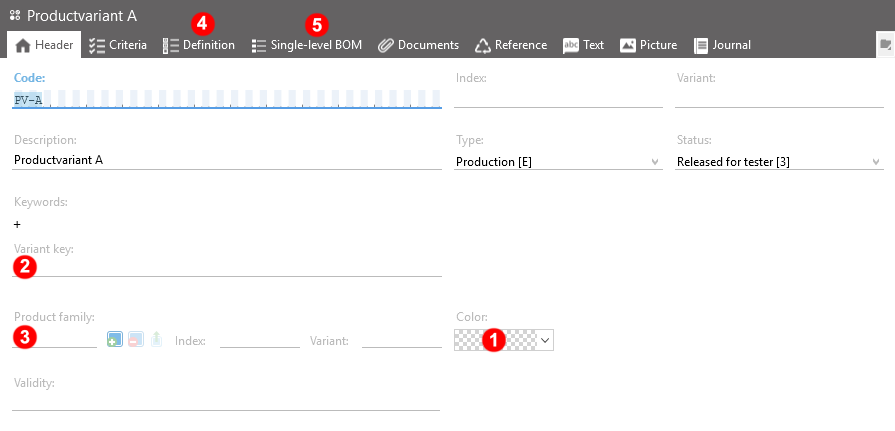
| No. | Content | Property Name and Remarks |
|---|---|---|
| 1 | Unit | entity.unit |
| 2 | Color | entity.color |
| 3 | Quantity | entity.quantity |
| 4 | Validity key | entity.validitykey |
| 5 | Product family | entity.productFamilyUid |
| 6 | Definition | entity.definition |
| 7 | BOM unit list | entity.bomUnitList |
defaultDetails adds the common BaseElement details and the referenced productFamily. definition and bomUnitList remain explicit because they are structure collections.
Examples
{{ServerAddress}}/ticon-web/services/data/product-variant-elements?$expand=defaultDetails&code=PRODUCTVARIANT
{{ServerAddress}}/ticon-web/services/data/product-variant-elements?$expand=description&uids={{uid}},{{uid}}
{{ServerAddress}}/ticon-web/services/data/product-variant-elements?$expand=productFamily($expand=description)
{{ServerAddress}}/ticon-web/services/data/product-variant-elements?$expand=definition($expand=description,criterion($expand=description),element)
{{ServerAddress}}/ticon-web/services/data/product-variant-elements?$expand=bomUnitList($expand=description,tags($expand=description),element)
definition rows expose the definition-specific values together with the referenced element/document UIDs. bomUnitList uses the standard assignment-row contract.
validitykey is omitted when TiCon4 has no validity key. productFamilyUid is omitted when no product family is assigned. Empty strings are not emitted for either property. definition is omitted when the variant has no generated definition rows.
ProductVariant elements can also be created and updated through POST/PATCH. In addition to the common writable ProductItem/BaseElement properties, productFamilyUid, definition and bomUnitList are writable. validitykey is calculated by TiCon4 from the current definition and is read-only.
Changing productFamilyUid uses the native TiCon4 product-family business logic. TiCon4 validates the family assignment, rebuilds the generated definition when the family changes, and recalculates the validity key. An empty product-family UID removes the family and its generated definition.
definition does not replace the generated definition collection. It updates existing definition rows only. A row is resolved first by its persistent identifier; when no matching identifier exists, elementUid can identify the generated definition row. Writable definition-row properties are selectionType and share; elementUid is accepted as row identity only. Factor fields (factor, factorValue, customFactor) are not part of the writable ProductVariant definition contract. Generated/read-only properties such as descriptions, criteria, document links, order numbers and isFactorChangeable are not writable. After definition changes TiCon4 recalculates the variant validity key.
bomUnitList uses the same native TiCon4 Assignment rules as WorkPiece BOM rows. When present in PATCH it is the complete desired Assignment target state; omitted rows are removed, an empty array removes all BOM rows, persistent identifiers update existing rows and temporary/missing identifiers create rows. additionalObjects and bomUnitList address the same Assignment collection and therefore use the same save pipeline. A request must not contain both properties.
POST example
[
  {
    "code": "PRODUCTVARIANT_01",
    "folderUid": "{{folderUid}}",
    "elementConfigurationUid": "{{elementConfigurationUid}}",
    "ownerUid": "{{ownerUid}}",
    "productFamilyUid": "{{productFamilyUid}}",
    "unit": "pcs",
    "quantity": 1,
    "bomUnitList": [
      {
        "identifier": "new-row",
        "row": {
          "typeEnum": "Assignment",
          "elementUid": "{{elementUid}}",
          "factor": "2"
        }
      }
    ]
  }
]
PATCH definition example
[
  {
    "uid": "{{productVariantUid}}",
    "definition": [
      {
        "identifier": "{{definitionRowIdentifier}}",
        "row": {
          "selectionType": "AlwaysSelected",
          "share": 100
        }
      }
    ]
  }
]
The historic expansion syntax remains valid, for example expand[productFamily][description], expand[definition][row][description] and expand[bomUnitList][row][description].
6.6.18 WorkPiece elements
{{ServerAddress}}/ticon-web/services/data/product-work-piece-elements
Get WorkPiece elements. Root data includes the common BaseElement metadata plus unit, color and quantity. The bomUnitList structure is an explicit expansion and uses the standard assignment-row contract.
defaultDetails uses the common BaseElement detail profile; bomUnitList remains explicit.
Examples
{{ServerAddress}}/ticon-web/services/data/product-work-piece-elements?$expand=defaultDetails&code=WORKPIECE
{{ServerAddress}}/ticon-web/services/data/product-work-piece-elements?$expand=description&uids={{uid}},{{uid}}
{{ServerAddress}}/ticon-web/services/data/product-work-piece-elements?$expand=bomUnitList($expand=description,tags($expand=description),element)
The historic expansion syntax remains valid, for example expand[description] and expand[bomUnitList][row][description].
WorkPiece elements can also be created and updated through POST/PATCH. In addition to the common writable ProductItem/BaseElement properties, bomUnitList is writable. When bomUnitList is present in PATCH, it represents the complete desired target state; when omitted, the existing BOM remains unchanged. An empty array removes all BOM rows. Existing rows use their persistent identifier; rows without a persistent identifier (including temporary identifiers) create new rows, and request order defines the resulting BOM order.
bomUnitList is stored as the standard Assignment reference collection. Writable row properties are customerData, factor, isStandardDescription, elementUid, typeEnum, code, index, variant, unit, criterionUids, description, and comment. If typeEnum is supplied, it must be Assignment. A non-null factorValue is rejected. Expanded/read-only row properties are not accepted as writable values.
bomUnitList follows the native TiCon4 assignment model. A row with elementUid is resolved as a global assignment through the TiCon4 assignment business rules (usage permission, recursion check, global child key and assignment defaults). Rows without a referenced element remain local assignment rows and use code / index / variant as their local key. factorValue is calculated by TiCon4 from factor; clients therefore write factor, not factorValue.
additionalObjects and bomUnitList address the same TiCon4 Assignment reference collection for WorkPiece elements. Both write paths therefore use the same native TiCon4 assignment business rules. Applications should normally use bomUnitList for the WorkPiece BOM. A request must not contain both additionalObjects and bomUnitList; the native saver rejects that combination because both properties describe the complete target state of the same Assignment collection.
POST example
[
  {
    "code": "WORKPIECE_01",
    "folderUid": "{{folderUid}}",
    "elementConfigurationUid": "{{elementConfigurationUid}}",
    "ownerUid": "{{ownerUid}}",
    "unit": "pcs",
    "quantity": 1,
    "bomUnitList": [
      {
        "identifier": "new-row",
        "row": {
          "typeEnum": "Assignment",
          "code": "PART_01",
          "unit": "pcs",
          "factor": "2"
        }
      }
    ]
  }
]
PATCH example
[
  {
    "uid": "{{workPieceUid}}",
    "bomUnitList": [
      {
        "identifier": "{{existingBomRowIdentifier}}",
        "row": {
          "unit": "pcs",
          "factor": "3"
        }
      },
      {
        "identifier": "new-row",
        "row": {
          "typeEnum": "Assignment",
          "elementUid": "{{elementUid}}"
        }
      }
    ]
  }
]
6.6.19 Document elements
{{ServerAddress}}/ticon-web/services/data/document-elements
Document Elements can be read, created, and updated through the REST-API. A Document Element describes where its document data is stored.
| No. | Content | Property Name and Remarks |
|---|---|---|
| 1 | Source of document data | entity.sourceType (Database, Filesystem or Url) |
| 2 | Path / URL / uploaded file name | entity.path |
| 3 | Time of creation of document data | entity.creationTimestamp |
| 4 | Size of document data | entity.size |
| 5 | Language of document | entity.language (see 6.4.) |
GET examples
{{ServerAddress}}/ticon-web/services/data/document-elements?code=DOCUMENT&$expand=defaultDetails
{{ServerAddress}}/ticon-web/services/data/document-elements?$expand=description&code=DOCUMENT
{{ServerAddress}}/ticon-web/services/data/document-elements?$expand=description&uids={{uid}},{{uid}}
defaultDetails uses the shared BaseElement detail profile (localized texts and the common reference/collection details registered for Document Elements). Document binary content is not part of the preset and must always be requested explicitly with $expand=binary.
6.6.19.1 Create and update Document Elements
Documents stored as Url or Filesystem can be created and updated through the normal JSON POST/PATCH endpoints.
Example: create a URL document:
[
  {
    "code": "DOC-URL-001",
    "folderUid": "{{FOLDER_UID}}",
    "elementConfigurationUid": "{{DOCUMENT_ELEMENT_CONFIGURATION_UID}}",
    "sourceType": "Url",
    "path": "https://example.com/work-instruction",
    "language": "en-US",
    "description": {
      "text": "Work instruction"
    }
  }
]
Example: update document metadata:
[
  {
    "uid": "{{DOCUMENT_ELEMENT_UID}}",
    "path": "https://example.com/work-instruction-v2",
    "description": {
      "text": "Updated work instruction"
    }
  }
]
As with the other PATCH endpoints, properties that are not present remain unchanged.
6.6.19.2 Upload document data to the database
Actual file content stored with sourceType = Database must be transferred through multipart/form-data. Binary document data is not accepted in the JSON request body.
Use the upload endpoints:
POST  {{ServerAddress}}/ticon-web/services/data/document-elements/upload
PATCH {{ServerAddress}}/ticon-web/services/data/document-elements/upload
The multipart request contains:
- form field
entities: the normal JSON entity array as a string - form field
files: one or more uploaded files
The uploaded file is matched to the Document Element by its multipart filename and the Document Element path. For example, if path is work-instruction.pdf, upload the corresponding file with filename work-instruction.pdf.
Example value of the entities form field for creating a database document:
[
  {
    "code": "DOC-DB-001",
    "folderUid": "{{FOLDER_UID}}",
    "elementConfigurationUid": "{{DOCUMENT_ELEMENT_CONFIGURATION_UID}}",
    "sourceType": "Database",
    "path": "work-instruction.pdf",
    "language": "en-US",
    "description": {
      "text": "Work instruction"
    }
  }
]
Creating a database-backed document, switching an existing document to Database, or changing the path of a database-backed document requires the corresponding uploaded file. If the required file is missing, the request fails with DocumentBinaryNotFound.
A metadata-only PATCH of an existing database-backed document does not require the file again as long as no new binary content is required. To replace the binary content while keeping the same path, use the multipart PATCH endpoint and upload a file with the matching filename.
Save responses contain document metadata only. Binary data is never returned automatically by POST/PATCH responses.
6.6.19.3 Document element binary data
If the document is stored inside the database (entity.sourceType = Database), binary data can be retrieved explicitly by expanding the binary section.
Example
{{ServerAddress}}/ticon-web/services/data/document-elements?$expand=description,binary
6.6.20 HWD elements
{{ServerAddress}}/ticon-web/services/data/hwd-elements
Get all HWD elements from REST.
$expand=defaultDetails includes the inherited WorkOrganization/BaseElement detail profile and the HWD-specific localized texts organizationUnit, begin, content, end, limit, comment and environment. Expensive calculated data such as times and ergo remains explicit. The historic expand[...] syntax remains supported.
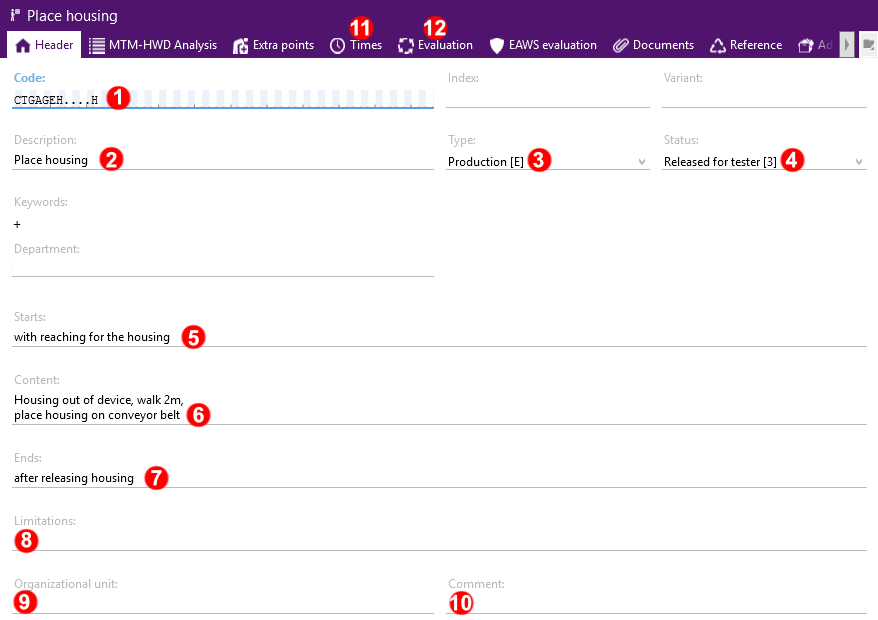
| No. | Content | Property Name and Remarks |
|---|---|---|
| 1 | Code | entity.code |
| 2 | Description | entity.description |
| 3 | Type | entity.elementtypeuid you need the Uid of element type, see chapter 6.6.5 |
| 4 | Status | entity.elemntstatusuid you need the Uid of element status, see chapter 6.6.6 |
| 5 | Starts | entity.begin |
| 6 | Content | entity.content |
| 7 | Ends | entity.end |
| 8 | Limitations | entity.limit |
| 9 | Organizational unit | entity.organizationunit |
| 10 | Comment | entity.comment |
| 11 | Times | entity.times |
| 12 | Ergonomics | entity.ergo see chapter 8 |
Examples
{{ServerAddress}}/ticon-web/services/data/hwd-elements?$expand=defaultDetails&code=CTGAGEH....H
{{ServerAddress}}/ticon-web/services/data/hwd-elements?code=CTGAGEH....H&$expand=description,organizationUnit,begin,content,end,limit,comment,environment
{{ServerAddress}}/ticon-web/services/data/hwd-elements?code=CTGAGEH....H&$expand=description,times,ergo
{{ServerAddress}}/ticon-web/services/data/hwd-elements?code=CTGAGEH....H&expand[description]&expand[organizationUnit]&expand[begin]&expand[content]&expand[end]&expand[limit]&expand[comment]&expand[environment]
The complete result of a GET request might look like this:
{
  "entities": [
    {
      "defaultCriterionUids": [],
      "workOrganizationType": "BreaksEveryTime",
      "EawsGenerated": "None",
      "createTime": "2017-07-19T03:03:06Z",
      "modifyTime": "2025-08-02T08:33:10Z",
      "ownerUid": "Account-2",
      "modifyUserUid": "Account-5",
      "creatorUid": "Account-2",
      "elementStatusUid": "ElementStatus-3",
      "elementTypeUid": "ElementType-1",
      "elementConfigurationUid": "ElementClassConfiguration-50001",
      "folderUid": "Folder-89",
      "code": "CTGAGEH....H",
      "objectType": "HwdElement",
      "uid": "Element-13391",
      "description": {
        "language": "en-US",
        "text": "Place housing",
        "isSource": true
      },
      "organizationUnit": {
        "language": "en-US"
      },
      "begin": {
        "language": "en-US",
        "text": "with reaching for the housing",
        "isSource": true
      },
      "content": {
        "language": "en-US",
        "text": "Housing out of device, walk 2m, \nplace housing on conveyor belt ",
        "isSource": true
      },
      "end": {
        "language": "en-US",
        "text": "after releasing housing",
        "isSource": true
      },
      "limit": {
        "language": "en-US"
      },
      "comment": {
        "language": "en-US"
      },
      "environment": {
        "language": "en-US"
      }
    }
  ]
}
6.6.21 AccountRoles
{{ServerAddress}}/ticon-web/services/data/accountRoles
Get the configured roles. Root data includes uid, code, objectType and type. The defaultDetails preset adds the localized description, category1, category2 and category3. Security collections remain explicit because they can be large and depend on the configured authorization catalog.
Available security collections are functions, adminFunctions, moduleSecurity, folderSecurity, elementClassSecurity, elementClassConfigurationSecurity, dataCardSecurity and printingFormSecurity. Their rows contain the role right and can expand the referenced administrationObject.
Examples
{{ServerAddress}}/ticon-web/services/data/accountRoles?$expand=defaultDetails
{{ServerAddress}}/ticon-web/services/data/accountRoles?code={{code}}&$expand=description,category1,category2,category3
{{ServerAddress}}/ticon-web/services/data/accountRoles?uids={{uid}},{{uid}}&$expand=functions($expand=administrationObject($expand=description))
{{ServerAddress}}/ticon-web/services/data/accountRoles?$expand=folderSecurity($expand=administrationObject($expand=description))
The historic expansion syntax remains valid, for example expand[description], expand[category1] and expand[functions][row][description].
6.6.22 ExtraPoints
{{ServerAddress}}/ticon-web/services/data/extraPoint-categories
{{ServerAddress}}/ticon-web/services/data/extraPoint-definitions
Get the configured extrapoint categories and definitions. Category root data includes uid, code, objectType, orderNumber and maxPoints. The defaultDetails preset adds the localized description. The structure remains explicit and returns the configured extrapoint definitions ordered by orderNumber. Structure rows use their numeric database identifier as identifier; the nested row is an ExtraPointDefinition entity with uid, code, objectType, points, isEditable and orderNumber. Its localized description can be expanded explicitly or through defaultDetails inside the structure.
ExtraPoint definitions can also be read directly through the extraPoint-definitions root. Root data includes uid, code, objectType, points, isEditable and orderNumber; defaultDetails adds the localized description.
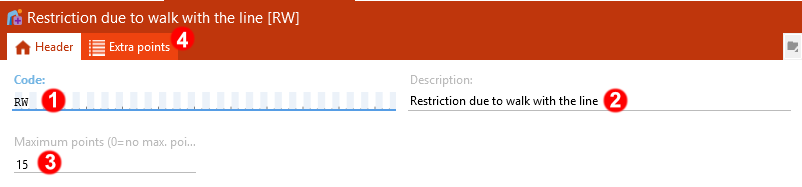
| No. | Content | Property Name and Remarks |
|---|---|---|
| 1 | Code | entity.code |
| 2 | Description | entity.description |
| 3 | Maximum points | entity.maxPoints |
| 4 | Extra points | entity.structure |
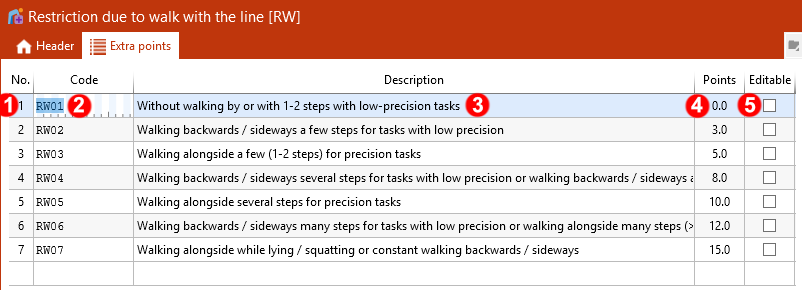
| No. | Content | Property Name and Remarks |
|---|---|---|
| 1 | No. | entity.ordernumber |
| 2 | Code | entity.code |
| 3 | Description | entity.description |
| 4 | Points | entity.points |
| 5 | Editable | entity.iseditable |
Extrapoint categories can be created (POST), edited (PATCH) and deleted (DELETE) through extraPoint-categories. Definitions are written through the category structure; the extraPoint-definitions root is read-only. Data for POST and PATCH uses the same public shape as returned GET data. code, description, orderNumber, maxPoints and structure are writable on categories. The uid is required only for PATCH; objectType is accepted as a compatibility field and ignored. adminObjectUid and other inherited fields are read-only.
If structure is omitted on PATCH, the existing definitions remain unchanged. If it is present, it represents the complete desired definition list; an empty list removes all definitions, subject to TiCon business validation. The array order is authoritative and determines the resulting definition orderNumber values (1..n). The orderNumber returned inside a structure row is accepted for GET-to-PATCH roundtrips but ignored as input.
Structure rows use identifier as their category-local persistent identity. A numeric identifier matching an existing definition of the same category updates that definition. An unknown, empty or temporary identifier together with a row creates a new definition; an unknown identifier without row is rejected. Identifiers are never resolved globally across categories. New rows should therefore normally omit identifier. Duplicate non-empty identifiers in one payload are rejected.
Within a definition row, code, description, points and isEditable are writable. uid, objectType and orderNumber are accepted only as compatibility fields for GET-to-PATCH roundtrips. Category and definition codes are trimmed, validated with the public REST code rules and normalized to uppercase. Description updates use description.language when supplied, otherwise the current language. A category description is optional on POST. On PATCH, omitting description leaves the existing category text unchanged; when description is supplied, its selected language row is written. A null description/text is stored as an empty string and whitespace text is stored as supplied. Category and definition description updates affect only the selected language row. Definition descriptions remain subject to the TiCon business validation.
maxPoints is nullable. A value of 0 means no positive cap; positive values limit definition points through the TiCon business validation. Values are persisted with model precision; GET formatting may round the returned representation. Extra point definition points are likewise saved without REST-side rounding.
Examples
{{ServerAddress}}/ticon-web/services/data/extraPoint-categories?$expand=defaultDetails
{{ServerAddress}}/ticon-web/services/data/extraPoint-categories?code=AC&$expand=description,structure($expand=description)
{{ServerAddress}}/ticon-web/services/data/extraPoint-categories?code=AC&$expand=structure($expand=defaultDetails)
{{ServerAddress}}/ticon-web/services/data/extraPoint-categories?uids=ExtraPointCategory-2
{{ServerAddress}}/ticon-web/services/data/extraPoint-definitions?$expand=defaultDetails
{{ServerAddress}}/ticon-web/services/data/extraPoint-definitions?code=AC01&$expand=description
{{ServerAddress}}/ticon-web/services/data/extraPoint-definitions?uids=ExtraPointDefinition-8
The historic expansion syntax remains valid on both roots, for example expand[description] and expand[structure][row][description].
POST example with definitions
[
  {
    "code": "REST",
    "description": {
      "language": "en-US",
      "text": "REST example category"
    },
    "maxPoints": 10,
    "structure": [
      {
        "row": {
          "code": "REST01",
          "description": {
            "language": "en-US",
            "text": "First definition"
          },
          "points": 2,
          "isEditable": true
        }
      },
      {
        "row": {
          "code": "REST02",
          "description": {
            "language": "en-US",
            "text": "Second definition"
          },
          "points": 3
        }
      }
    ]
  }
]
Simple PATCH example
[
  {
    "uid": "{{EXTRA_POINT_CATEGORY_UID}}",
    "maxPoints": 12
  }
]
Because structure is a synchronized collection, a PATCH containing it must include every definition that shall remain. The following slightly more complex example updates one existing definition and adds a new one:
[
  {
    "uid": "{{EXTRA_POINT_CATEGORY_UID}}",
    "structure": [
      {
        "identifier": "{{EXISTING_DEFINITION_IDENTIFIER}}",
        "row": {
          "description": {
            "language": "en-US",
            "text": "Updated definition"
          },
          "points": 4
        }
      },
      {
        "row": {
          "code": "REST03",
          "description": {
            "language": "en-US",
            "text": "New definition"
          },
          "points": 1
        }
      }
    ]
  }
]
A GET request for Code AC with $expand=description,structure($expand=description) might return the following shape. A bare GET and $expand=defaultDetails omit structure; request structure explicitly when definitions are required.
{
  "entities": [
    {
      "code": "AC",
      "description": {
        "language": "en-US",
        "text": "Accessibility",
        "isSource": true
      },
      "orderNumber": 2,
      "maxPoints": 10,
      "structure": [
        {
          "row": {
            "description": {
              "language": "en-US",
              "text": "From the outside",
              "isSource": true
            },
            "points": 1,
            "isEditable": true,
            "orderNumber": 1,
            "code": "AC01",
            "objectType": "ExtraPointDefinition",
            "uid": "ExtraPointDefinition-8"
          },
          "identifier": "8"
        },
        {
          "row": {
            "description": {
              "language": "en-US",
              "text": "Footwell operations",
              "isSource": true
            },
            "points": 3,
            "isEditable": false,
            "orderNumber": 2,
            "code": "AC02",
            "objectType": "ExtraPointDefinition",
            "uid": "ExtraPointDefinition-9"
          },
          "identifier": "9"
        }
      ],
      "objectType": "ExtraPointCategory",
      "uid": "ExtraPointCategory-2"
    }
  ]
}
6.6.23 Analyze methods
{{ServerAddress}}/ticon-web/services/data/analyze-methods
Get the available analyze methods. Root data includes uid, code, objectType and isMtm. The defaultDetails preset adds the localized description.
Examples
{{ServerAddress}}/ticon-web/services/data/analyze-methods?$expand=defaultDetails
{{ServerAddress}}/ticon-web/services/data/analyze-methods?$expand=description&code={{code}}
{{ServerAddress}}/ticon-web/services/data/analyze-methods?uids={{uid}},{{uid}}
The historic expansion syntax remains valid, for example expand[description].
6.6.24 Time determination methods
{{ServerAddress}}/ticon-web/services/data/time-determination-methods
Get the available time determination methods. Root data includes uid, code, objectType and timeNumber. The defaultDetails preset adds the localized description.
Examples
{{ServerAddress}}/ticon-web/services/data/time-determination-methods?$expand=defaultDetails
{{ServerAddress}}/ticon-web/services/data/time-determination-methods?$expand=description&code={{code}}
{{ServerAddress}}/ticon-web/services/data/time-determination-methods?uids={{uid}},{{uid}}
The historic expansion syntax remains valid, for example expand[description].
6.6.25 Time types
{{ServerAddress}}/ticon-web/services/data/time-types
Get the available time types. Root data includes uid, code, objectType, assignment and orderNumber. The defaultDetails preset adds the localized description.
Examples
{{ServerAddress}}/ticon-web/services/data/time-types?$expand=defaultDetails
{{ServerAddress}}/ticon-web/services/data/time-types?$expand=description&code={{code}}
{{ServerAddress}}/ticon-web/services/data/time-types?uids={{uid}},{{uid}}
The historic expansion syntax remains valid, for example expand[description].
6.6.26 Addition classes
{{ServerAddress}}/ticon-web/services/data/addition-classes
Get the available addition classes. Root data includes uid, code, objectType and schema. The defaultDetails preset adds the localized description. Addition parameters are available explicitly through parameters; their localized descriptions can be expanded as a child.
Examples
{{ServerAddress}}/ticon-web/services/data/addition-classes?$expand=defaultDetails
{{ServerAddress}}/ticon-web/services/data/addition-classes?$expand=parameters($expand=description)&code={{code}}
{{ServerAddress}}/ticon-web/services/data/addition-classes?uids={{uid}},{{uid}}&$expand=description,parameters($expand=description)
The historic expansion syntax remains valid, for example expand[description] and expand[parameters][description].
6.6.27 Additional sections standard texts
{{ServerAddress}}/ticon-web/services/data/additional-sections-standardtext
Get the standard texts used for additional time-study sections. Root data includes uid, code, objectType and orderNumber. The defaultDetails preset adds the localized description.
Examples
{{ServerAddress}}/ticon-web/services/data/additional-sections-standardtext?$expand=defaultDetails
{{ServerAddress}}/ticon-web/services/data/additional-sections-standardtext?$expand=description&code={{code}}
{{ServerAddress}}/ticon-web/services/data/additional-sections-standardtext?uids={{uid}},{{uid}}
The historic expansion syntax remains valid, for example expand[description].
6.6.28 Force percentiles
{{ServerAddress}}/ticon-web/services/data/forcePercentile
Get the configured force percentiles. Root data includes uid, code, objectType, percentile, isMtm and genderType. The defaultDetails preset adds the localized description. The percentile value table is available explicitly through structure; row descriptions are localized TiCon standard texts.
Examples
{{ServerAddress}}/ticon-web/services/data/forcePercentile?$expand=defaultDetails
{{ServerAddress}}/ticon-web/services/data/forcePercentile?$expand=structure($expand=description)&code={{code}}
{{ServerAddress}}/ticon-web/services/data/forcePercentile?uids={{uid}},{{uid}}&$expand=description,structure($expand=description)
The historic expansion syntax remains valid. Use expand[description] for the force-percentile description and expand[structure][row][description] for descriptions inside the value table.
6.6.29 Element criterions
{{ServerAddress}}/ticon-web/services/data/criterions
Get the configured element criterions. Root data includes uid, code, objectType, typeEnum, minValue, maxValue, defaultText, defaultNumber, isMandatory, isEditable, alignmentTypeEnum, defaultFixedCriterionValueUid, precisionEnum, isSearchable, isMultiline and definition. The defaultDetails preset adds the localized description and message.
The referenced default fixed criterion value can be expanded through defaultFixedCriterionValue. For list criterions, the configured fixed values are available explicitly through structure; row descriptions and the referenced element criterion can be expanded as children.
Examples
{{ServerAddress}}/ticon-web/services/data/criterions?$expand=defaultDetails
{{ServerAddress}}/ticon-web/services/data/criterions?code={{code}}&$expand=description,message,defaultFixedCriterionValue($expand=description)
{{ServerAddress}}/ticon-web/services/data/criterions?uids={{uid}},{{uid}}&$expand=structure($expand=description)
{{ServerAddress}}/ticon-web/services/data/criterions?code={{code}}&$expand=structure($expand=description,elementCriterion($expand=description))
The historic expansion syntax remains valid. Use expand[description], expand[message], expand[defaultFixedCriterionValue][description], expand[structure][row][description] and expand[structure][row][elementCriterion][description] for the corresponding expansions.
6.6.30 Fixed criterion values
{{ServerAddress}}/ticon-web/services/data/fixedCriterions
Get fixed values configured for element criterions. Root data includes uid, code, objectType, elementCriterionUid, orderNumber and color. The defaultDetails preset adds the localized description. The referenced element criterion is available explicitly through elementCriterion.
Examples
{{ServerAddress}}/ticon-web/services/data/fixedCriterions?$expand=defaultDetails
{{ServerAddress}}/ticon-web/services/data/fixedCriterions?code={{code}}&$expand=description,elementCriterion($expand=description)
{{ServerAddress}}/ticon-web/services/data/fixedCriterions?uids={{uid}},{{uid}}
The historic expansion syntax remains valid, for example expand[description] and expand[elementCriterion][description].
6.6.31 Process indicators
{{ServerAddress}}/ticon-web/services/data/process-indicators
Get the configured process indicators. Root data includes uid, code, objectType and isEnabled. The defaultDetails preset adds the localized description. The response property is categoryUids; use the semantic $expand=category relationship to expand categories through the native ProcessIndicatorCategory reader.
Examples
{{ServerAddress}}/ticon-web/services/data/process-indicators?$expand=defaultDetails
{{ServerAddress}}/ticon-web/services/data/process-indicators?code={{code}}&$expand=category($expand=description)
{{ServerAddress}}/ticon-web/services/data/process-indicators?uids={{uid}},{{uid}}&$expand=description,category($expand=description,criterion($expand=description))
The historic expansion syntax remains valid. expand[category][description] corresponds to $expand=category($expand=description).
6.6.32 Process indicator categories
{{ServerAddress}}/ticon-web/services/data/process-indicator-categories
Get the categories configured for process indicators. Root data includes uid, code, objectType and orderNumber. The defaultDetails preset adds the localized description. The response property is criterionUids; use the semantic $expand=criterion relationship to expand criteria through the native ProcessIndicatorCriterion reader.
Examples
{{ServerAddress}}/ticon-web/services/data/process-indicator-categories?$expand=defaultDetails
{{ServerAddress}}/ticon-web/services/data/process-indicator-categories?code={{code}}&$expand=criterion($expand=description)
{{ServerAddress}}/ticon-web/services/data/process-indicator-categories?uids={{uid}},{{uid}}&$expand=description,criterion($expand=description,category($expand=description))
The historic expansion syntax remains valid. expand[criterion][description] corresponds to $expand=criterion($expand=description).
6.6.33 Process indicator criteria
{{ServerAddress}}/ticon-web/services/data/process-indicator-criteria
Get the configured process indicator criteria. Root data includes uid, code, objectType, categoryUid, color and timeNumber. The defaultDetails preset adds the localized description and the referenced category with its local default details. The category can also be expanded explicitly through category.
Examples
{{ServerAddress}}/ticon-web/services/data/process-indicator-criteria?$expand=defaultDetails
{{ServerAddress}}/ticon-web/services/data/process-indicator-criteria?code={{code}}&$expand=description,category($expand=description)
{{ServerAddress}}/ticon-web/services/data/process-indicator-criteria?uids={{uid}},{{uid}}&$expand=category($expand=description,criterion($expand=description))
The historic expansion syntax remains valid, for example expand[description] and expand[category][description].
6.6.34 Administration objects
{{ServerAddress}}/ticon-web/services/data/adminobjects
Get administration objects used by the TiCon authorization model. Root data includes uid, code, objectType and type. The defaultDetails preset adds the localized description. Administration-object descriptions are translated from the existing TiConCore administration-object translation keys; they are not stored as normal entity texts.
Examples
{{ServerAddress}}/ticon-web/services/data/adminobjects?$expand=defaultDetails
{{ServerAddress}}/ticon-web/services/data/adminobjects?code={{code}}&$expand=description
{{ServerAddress}}/ticon-web/services/data/adminobjects?uids={{uid}},{{uid}}
The historic expansion syntax remains valid, for example expand[description].
6.6.35 Print layouts
{{ServerAddress}}/ticon-web/services/management/printlayout
Get configured print layouts. This endpoint belongs to the Management service. Root data includes uid, code, objectType, printClassCode and adminObjectUid. The defaultDetails preset adds the localized description. The referenced administration object can be expanded explicitly.
Examples
{{ServerAddress}}/ticon-web/services/management/printlayout?$expand=defaultDetails
{{ServerAddress}}/ticon-web/services/management/printlayout?code={{code}}&$expand=description,adminObject($expand=description)
{{ServerAddress}}/ticon-web/services/management/printlayout?uids={{uid}},{{uid}}&$expand=adminObject($expand=description)
The historic expansion syntax remains valid, for example expand[description] and expand[adminObject][description].
6.6.36 Tags
{{ServerAddress}}/ticon-web/services/data/tags
Get the configured tags. Root data includes uid, code, objectType, color and isColorLine. The defaultDetails preset adds the localized description. Tag expansions used by elements and structure rows use the same authoritative tag mapping as this root.
Examples
{{ServerAddress}}/ticon-web/services/data/tags?$expand=defaultDetails
{{ServerAddress}}/ticon-web/services/data/tags?code={{code}}&$expand=description
{{ServerAddress}}/ticon-web/services/data/tags?uids={{uid}},{{uid}}
The historic expansion syntax remains valid, for example expand[description].
6.6.37 Product family elements
{{ServerAddress}}/ticon-web/services/data/product-family-elements
Get ProductFamily elements. Product families use the common BaseElement contract without additional product-specific root properties.
defaultDetails adds localized element texts and the usual inexpensive BaseElement details.
Examples
{{ServerAddress}}/ticon-web/services/data/product-family-elements?$expand=defaultDetails
{{ServerAddress}}/ticon-web/services/data/product-family-elements?code={{code}}&$expand=description
{{ServerAddress}}/ticon-web/services/data/product-family-elements?uids={{uid}},{{uid}}
The historic expansion syntax remains valid, for example expand[description].
6.6.38 Product feature elements
{{ServerAddress}}/ticon-web/services/data/product-feature-elements
Get ProductFeature elements. In addition to the common BaseElement metadata, a feature exposes operationMode.
defaultDetails adds localized element texts and the usual inexpensive BaseElement details.
Examples
{{ServerAddress}}/ticon-web/services/data/product-feature-elements?$expand=defaultDetails
{{ServerAddress}}/ticon-web/services/data/product-feature-elements?code={{code}}&$expand=description
{{ServerAddress}}/ticon-web/services/data/product-feature-elements?uids={{uid}},{{uid}}
The historic expansion syntax remains valid, for example expand[description].
6.6.39 Element classes
Element classes use the management endpoint:
{{ServerAddress}}/ticon-web/services/management/elementClass
The root data includes uid, code, nr, module, isInstalled and adminObjectUid. defaultDetails adds the localized description. The assigned elementClassConfigurations remain an explicit expansion and can themselves expand their descriptions.
Examples
{{ServerAddress}}/ticon-web/services/management/elementClass?$expand=defaultDetails
{{ServerAddress}}/ticon-web/services/management/elementClass?code={{code}}&$expand=description
{{ServerAddress}}/ticon-web/services/management/elementClass?elementClassModule={{module}}&$expand=description,elementClassConfigurations($expand=description)
{{ServerAddress}}/ticon-web/services/management/elementClass/{{ELEMENT_CLASS_UID}}?$expand=description
Element classes are read-only through this REST endpoint.
6.6.40 Data cards
{{ServerAddress}}/ticon-web/services/data/datacards
Get DataCard elements that are visible to the current user. Root data contains the common BaseElement metadata and the DataCard-specific properties orderNumber, isMtm and adminObjectUid.
defaultDetails includes the common BaseElement detail profile and the DataCard structure with its normal inexpensive row details such as description, comment, criteria, formula values, additional objects and tags. The referenced structure-row element, document references (documentElement1, documentElement2, documentElement3) and adminObject remain explicit expansions.
Examples
{{ServerAddress}}/ticon-web/services/data/datacards?code={{code}}
{{ServerAddress}}/ticon-web/services/data/datacards?code={{code}}&$expand=defaultDetails
{{ServerAddress}}/ticon-web/services/data/datacards?uids={{DATACARD_UID}}&$expand=description,adminObject($expand=description)
{{ServerAddress}}/ticon-web/services/data/datacards?code={{code}}&$expand=structure($expand=description,comment,tags($expand=description),element($expand=description))
The DataCard root is currently read-only in the public REST contract; there is no POST or PATCH operation for this endpoint.
The historic expansion syntax remains valid for existing clients.
7 Return To Work (RTW)
For time elements and EAWS elements the property rtwResult can be expanded to get Return To Work result.
This is an example of a Return To Work result from TiCon:
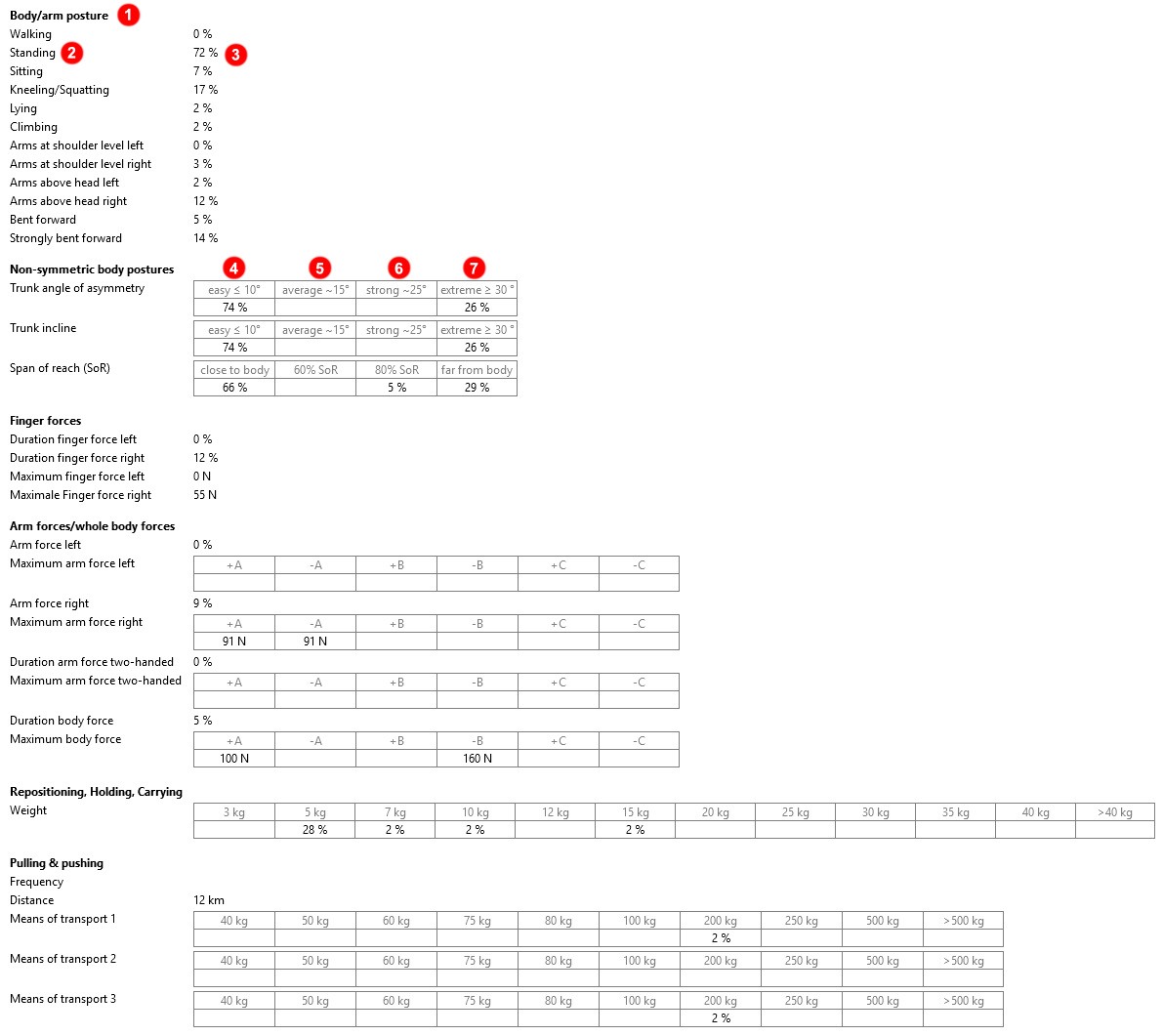
Examples
{{ServerAddress}}/ticon-web/services/data/time-elements?code=CODE&$expand=rtwResult
{{ServerAddress}}/ticon-web/services/data/eaws-detailed-elements?code=EAWS&$expand=rtwResult
A section of the returned result from API looks like this:
{
  "entities": [
    {
      "rtwResult": {
        "sections": [
          {
            "label": "Body/arm posture",
            "code": "bp",
            "items": [
              {
                "label": "Walking",
                "unitInfo": "Time share [%]",
                "code": "bp1",
                "values": [
                  {}
                ]
              },
              {
                "label": "Standing",
                "unitInfo": "Time share [%]",
                "code": "bp2",
                "values": [
                  {
                    "value": 72.41
                  }
                ]
              },
              ...
            ]
          },
          {
            "label": "Non-symmetric body postures",
            "code": "3d",
            "items": [
              {
                "label": "Trunk angle of asymmetry",
                "unitInfo": "Time share [%]",
                "code": "rot",
                "values": [
                  {
                    "value": 74.14,
                    "code": "rot1",
                    "header": "easy ≤ 10°"
                  },
                  {
                    "code": "rot2",
                    "header": "average ~15°"
                  },
                  {
                    "code": "rot3",
                    "header": "strong ~25°"
                  },
                  {
                    "value": 25.86,
                    "code": "rot4",
                    "header": "extreme ≥ 30 °"
                  }
                ]
              },
              ...
            ]
          }
        ]
      }
    }
  ]
}
Contents of rtwResult
| No. | Content | Property Name and Remarks |
|---|---|---|
| 1 | Sections | sections |
Contents of sections
| No. | Content | Property Name and Remarks | Screenshot | JSON |
|---|---|---|---|---|
| 1 | Label | label |
1 | Body/arm posture |
| 2 | Code | code |
bp | |
| 3 | Items | items |
Contents of items
| No. | Content | Property Name and Remarks | Screenshot | JSON |
|---|---|---|---|---|
| 1 | Label | label |
2 | Standing |
| 2 | Unit | unitInfo |
Time share [%] | |
| 3 | Code | code |
bp2 | |
| 4 | Values | values |
Contents of values
| No. | Content | Property Name and Remarks | Screenshot | JSON |
|---|---|---|---|---|
| 1 | Value | value |
3 | 72.41 |
| 2 | Code | code |
||
| 3 | Header | header |
Contents of multiple values for section Non-symmetric body postures
| No. | Content | Property Name and Remarks | Screenshot | JSON |
|---|---|---|---|---|
| 1 | Value | value |
4 | 74.14 |
| 2 | Code | code |
4 | rot1 |
| 3 | Header | header |
4 | easy ≤ 10° |
| No. | Content | Property Name and Remarks | Screenshot | JSON |
|---|---|---|---|---|
| 1 | Value | value |
5 | |
| 2 | Code | code |
5 | rot2 |
| 3 | Header | header |
5 | average ~15° |
| No. | Content | Property Name and Remarks | Screenshot | JSON |
|---|---|---|---|---|
| 1 | Value | value |
6 | 74.14 |
| 2 | Code | code |
6 | rot3 |
| 3 | Header | header |
6 | strong ~25° |
| No. | Content | Property Name and Remarks | Screenshot | JSON |
|---|---|---|---|---|
| 1 | Value | value |
7 | 25.86 |
| 2 | Code | code |
7 | rot4 |
| 3 | Header | header |
7 | extreme ≥ 30° |
8 Ergonomics
Ergonomics can be expanded through the Ergo property at EawsDetailedElement, TimeElement, HwdElement, structure of StreamElement and variants of structure of StreamElement.
Examples
{{ServerAddress}}/ticon-web/services/data/eaws-detailed-elements?code=AIM IST&$expand=ergo
{{ServerAddress}}/ticon-web/services/data/time-elements?code=ELEMENT&$expand=ergo
{{ServerAddress}}/ticon-web/services/data/hwd-elements?code=HWD&$expand=ergo
{{ServerAddress}}/ticon-web/services/data/stream-elements?code=STREAM2EAWS&$expand=structure($expand=ergo,variants($expand=ergo))
Remarks
All sub-properties are expanded by default except forcePercentile inside constraint. If you need it it can be expanded like this:
{{ServerAddress}}/ticon-web/services/data/eaws-detailed-elements?code=AIM IST&$expand=ergo[constraints][forcePercentile][values]
A section of the expanded ergo property with all data might look like this:
{
    "ergo": {
    "version": "1.3.6 2025-04-09",
    "isValid": true,
    "informationList": [],
    "isBasicDataOnly": true,
    "wholeBodyScoreReducedG8": true,
    "constraints": {
        "grossShiftDuration": 28800,
        "netShiftDuration": 24000,
        "allBreaksDuration": 4200,
        "allBreaksAtLeast8MinCount": 3,
        "lunchBreakDuration": 1800,
        "nonRepetitiveDuration": 600,
        "taktCountPerShift": 300,
        "taktDuration": 80,
        "taktCountPerAnalysis": 1,
        "cycleTimeFactor": 1,
        "isSingleWorkerWithSingleCycle": true,
        "totalTaskDurationSum": 61.85,
        "workplaceSize": "LargeWorkplace",
        "workOrganization": "BreaksEveryTime",
        "gender": "Undefined",
        "forcePercentile": {
            "code": "MTM.40.N",
            "percentile": 40,
            "genederTypeEnum": "Undefined",
            "values": [
                {
                "code": "FI-A1",
                "value": 205
                },
                ...
            ]
        },
        "bodyPercentile": "P50",
        "forcePercentileCode": "MTM.40.N",
        "aggregateLoadDistanceOnMerge": true,
        "externalNonStaticTime": 0,
        "isCurrentState": true,
        "safetyAllowanceForBodyPostures": 1,
        "safetyAllowanceForForces": 1,
        "safetyAllowanceForLoads": 1,
        "safetyAllowanceForUpperLimbs": 1,
        "performanceRate": 1,
        "exoskeleton": "None"
    },
    "wholeBodyScore": {
        "value": 20.5,
        "category": "Green"
    },
    "upperLimbsScore": {
        "value": 8.5,
        "category": "Green"
    },
    "posture": {
        "lines": [],
        "trunkRotation": {},
        "trunkLateral": {},
        "farArm": {},
        "totalScore": 2
    },
    "force": {
        "finger": {
        "dynamicStatistics": [],
        "staticStatistics": [],
        "type": "None"
        },
        "wholeBody": {
        "dynamicStatistics": [],
        "staticStatistics": [],
        "type": "None"
        }
    },
    "load": {
        "types": [],
        "totalScore": 22
    },
    "upperLimbs": {
        "staticForceLevels": [],
        "dynamicForceLevels": [],
        "staticTotal": {
        "forceLevelIndex": 0,
        "duration": 0,
        "isRealActionCountReducedCycle": false,
        "gripModeAPercentage": 0,
        "gripModeBPercentage": 0,
        "gripModeCPercentage": 0,
        "fl": 0,
        "ff": 0,
        "g": 0,
        "g_Mod": 0,
        "ffg": 0,
        "referencePercentage": 0,
        "totalPercentage": 0,
        "totalFFG": 0
        },
        "dynamicTotal": {
        "forceLevelIndex": 0,
        "duration": 0,
        "isRealActionCountReducedCycle": false,
        "gripModeAPercentage": 0,
        "gripModeBPercentage": 0,
        "gripModeCPercentage": 0,
        "fl": 0,
        "ff": 0,
        "g": 0,
        "g_Mod": 0,
        "ffg": 0,
        "referencePercentage": 0,
        "totalPercentage": 0,
        "totalFFG": 0
        },
        "totalFFG": 1.3,
        "awkwardPostureType": "Wrist",
        "workOrganizationType": "BreaksEveryTime",
        "totalDurationScore": 6.2
    },
    "totalScore": {
        "value": 20.5,
        "category": "Green"
    }
  }
}
9 Entity Delete
To delete elements, you have to send the request as DELETE method.
{{ServerAddress}}/ticon-web/services/data/time-elements?uids=
Deletes elements by UIDs, when the current user has the minimum permission write.
Examples
{{ServerAddress}}/ticon-web/services/data/time-elements?uids={{uid}}
{{ServerAddress}}/ticon-web/services/data/time-elements?uids={{udi}},{{uid}}
Remarks
The Microsoft IIS server don't allow the delete method by default. Don't forgive to enable this feature in your side settings, before use the delete possibility of the TiCon REST-API.
10 Entity Duplicate
To duplicate elements, you have to create duplicate information as JSON in the request body and send it as POST to the server.
{{ServerAddress}}/ticon-web/services/data/duplicate
Examples
{
  "isDuplicateChildren": true,
  "isRemoveDocumentElements": false,
  "isRemoveAssignmentElements": false,
  "isRemoveCycleInformation": false,
  "isResetTexts": false,
  "elements": [
    {
      "uid": "Element-14172",
      "newCode": "P1-X",
      "newIndex": "I1",
      "newVariant": "V1",
      "newFolderUid": "Folder-136"
    },
    {
      "uid": "Element-14173",
      "newCode": "P2-X",
      "isChild": true
    }
  ]
}